
Sony BRAVIA KDL-26S2000: Overview of the TV buttons and indicators
Overview of the TV buttons and indicators: Sony BRAVIA KDL-26S2000
Table of contents
- WARNING Introduction Notice for Digital TV function
- Table of Contents
- Start-up Guide 1: Checking the 2: Connecting an aerial/ accessories VCR
- 3: Bundling the cables 5: Selecting the language and country/ region 4: Preventing the TV from toppling over
- 6: Auto-tuning the TV
- Safety information
- GB
- GB
- Precautions
- Overview of the remote
- Overview of the TV buttons and indicators
- Watching TV
- To access Text Picture Freeze To change the screen mode manually to suit the broadcast Using the Tools menu
- Checking the Digital Electronic Programme Guide To Do this
- To Do this
- Using the Favourite list * To Do this
- Viewing pictures from connected equipment
- Navigating through menus Menu Description
- Picture menu
- Noise Reduction Advanced Settings
- Sound menu
- Dual Sound
- Screen menu
- Set-up menu
- All Reset
- PC Settings menu
- Analogue Set-up menu (Analogue mode only)
- Manual Programme Preset
- Digital Set-up menu Digital Tuning
- Digital Set-up
- Connecting optional equipment Connecting to the TV (side)
- Connecting to the TV (rear)
- Using the Tools menu in PC input mode
- Specifications
- PC Input Signal Reference Chart
- Troubleshooting Picture Problem Cause/Remedy
- Sound Channels General
- Index
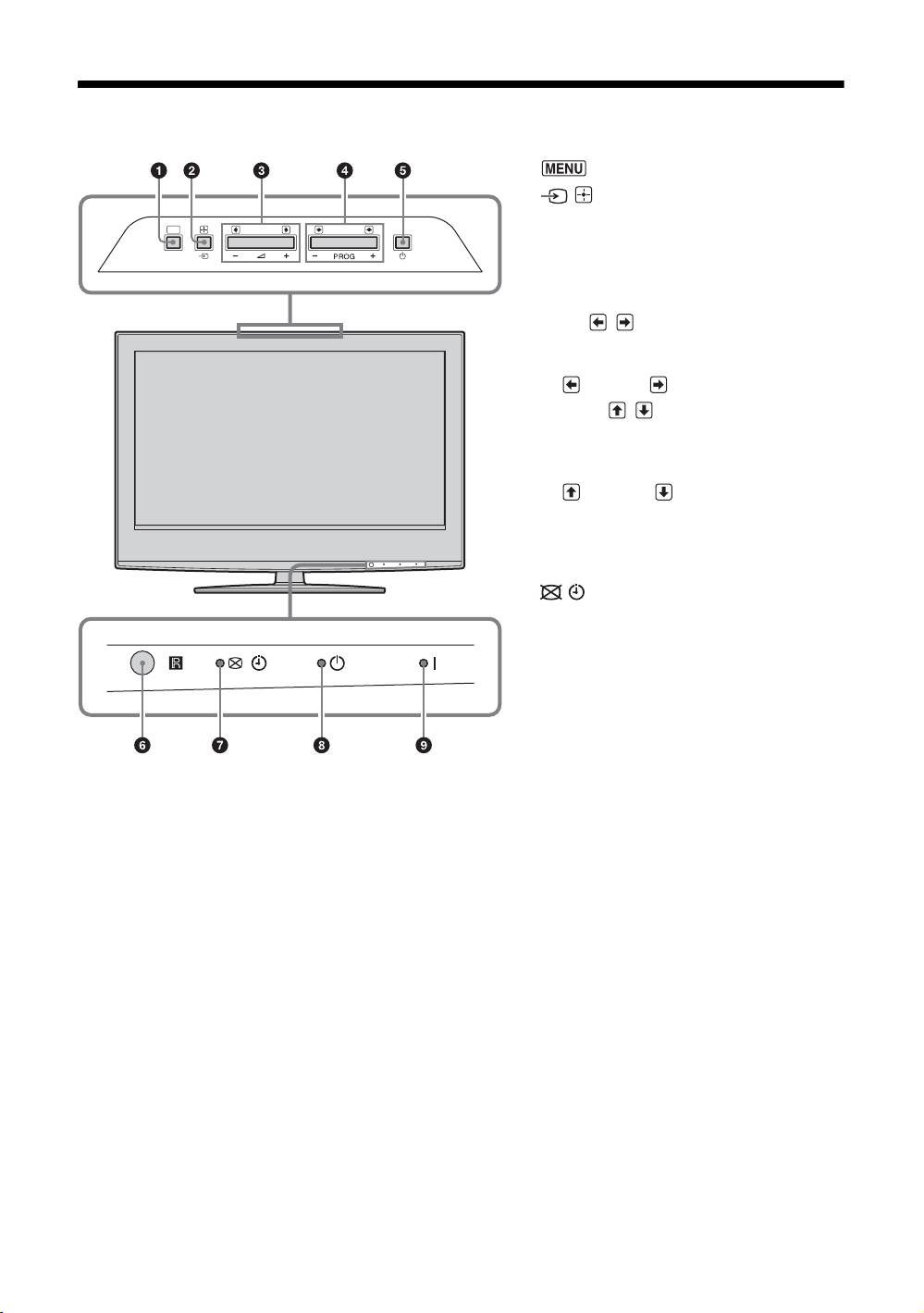
Overview of the TV buttons and indicators
1 (page 19)
2 / – Input select/OK
• In TV mode (page 18): Selects the input
MENU
source from equipment connected to the TV
sockets.
• In TV menu: Selects the menu or option, and
confirm the setting.
3 2 +/-/ /
• Increases (+) or decreases (-) the volume.
• In TV menu: Moves through the options left
( ) or right ( ).
4 PROG +/-/ /
• In TV mode: Selects the next (+) or previous
(-) channel.
• In TV menu: Moves through the options up
( ) or down ( ).
5 1 – Power
Switches the TV on or off.
6 Remote control sensor
7 – Picture Off/Timer indicator
• Lights up in green when the picture is
switched off (page 26).
• Lights up in orange when the timer is set
(page 25).
8 1 – Standby indicator
Lights up in red when the TV is in standby mode.
9 " – Power indicator
Lights up in green when the TV is switched on.
Note
Make sure that the TV is completely switched off before unplugging the mains lead. Unplugging the mains lead while the TV is
turned on may cause the indicator to remain lit or may cause the TV to malfunction.
GB
12
