
Sony BRAVIA KDL-26S2000: Safety information
Safety information: Sony BRAVIA KDL-26S2000
Table of contents
- WARNING Introduction Notice for Digital TV function
- Table of Contents
- Start-up Guide 1: Checking the 2: Connecting an aerial/ accessories VCR
- 3: Bundling the cables 5: Selecting the language and country/ region 4: Preventing the TV from toppling over
- 6: Auto-tuning the TV
- Safety information
- GB
- GB
- Precautions
- Overview of the remote
- Overview of the TV buttons and indicators
- Watching TV
- To access Text Picture Freeze To change the screen mode manually to suit the broadcast Using the Tools menu
- Checking the Digital Electronic Programme Guide To Do this
- To Do this
- Using the Favourite list * To Do this
- Viewing pictures from connected equipment
- Navigating through menus Menu Description
- Picture menu
- Noise Reduction Advanced Settings
- Sound menu
- Dual Sound
- Screen menu
- Set-up menu
- All Reset
- PC Settings menu
- Analogue Set-up menu (Analogue mode only)
- Manual Programme Preset
- Digital Set-up menu Digital Tuning
- Digital Set-up
- Connecting optional equipment Connecting to the TV (side)
- Connecting to the TV (rear)
- Using the Tools menu in PC input mode
- Specifications
- PC Input Signal Reference Chart
- Troubleshooting Picture Problem Cause/Remedy
- Sound Channels General
- Index
• It is strongly recommended that you use Sony accessories
for safety reasons:
Safety information
– KDL-46S2000/KDL-46S2010/KDL-40S2000/
KDL-40S2010:
Wall-mount bracket SU-WL51
Mains lead
– KDL-32S2000/KDL-32S2010/KDL-32S2020/
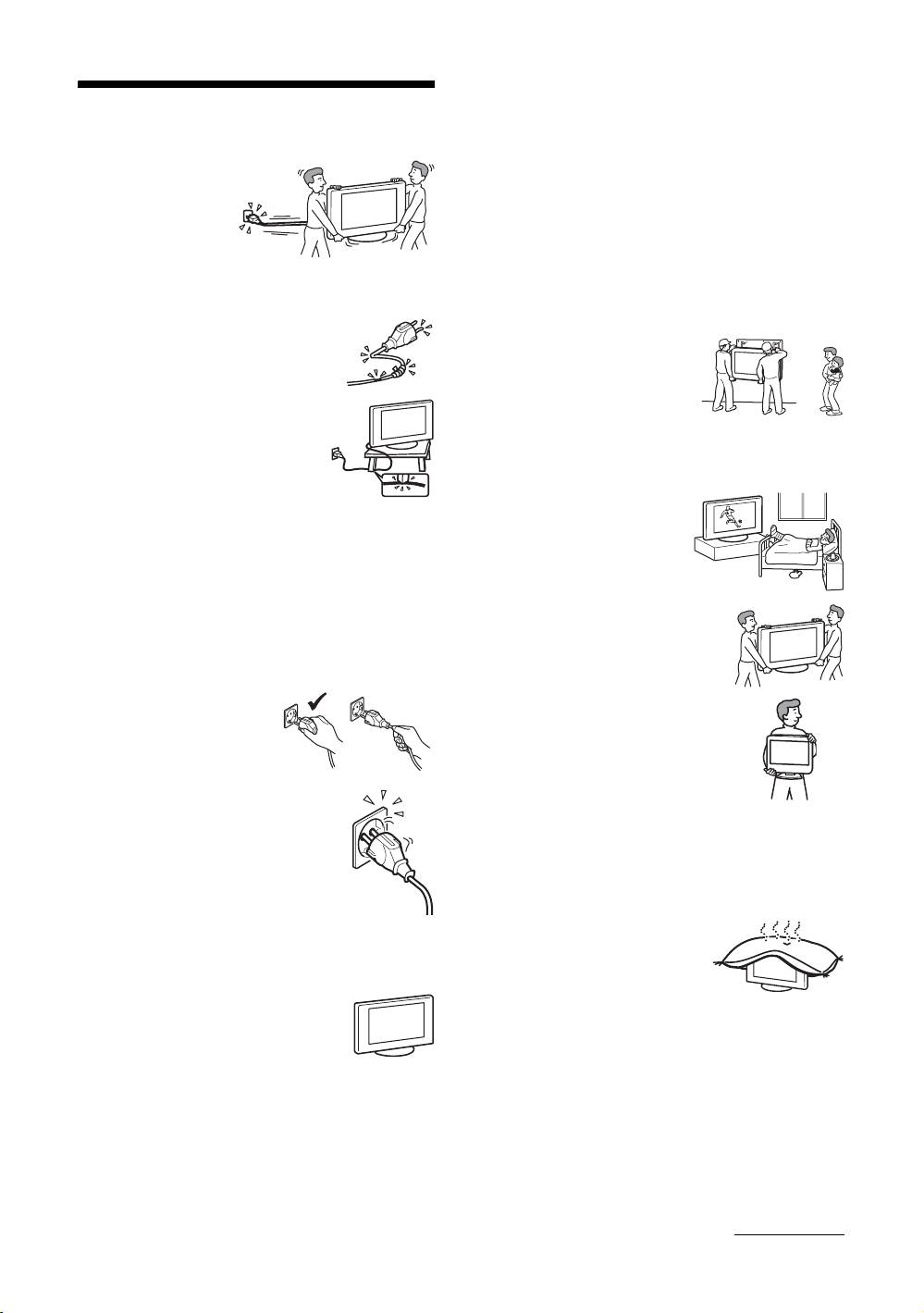
• Unplug the mains lead
KDL-26S2000/KDL-26S2010/KDL-26S2020:
when moving the TV
Wall-mount bracket SU-WL31
set. Do not move the
• It is strongly recommended that you use the official Sony
TV set with the mains
wall-mount bracket to allow adequate air circulation and
lead plugged in. It may
to avoid dust build up around the TV, wall and ceiling.
damage the mains lead
• Secure the TV set properly, following the instructions
and result in fire or electric shock.
supplied with your wall-mount bracket when installing the
• If you damage the mains lead, it may
TV set.
result in fire or electric shock.
– Do not pinch, bend, or twist the
Installation
mains lead excessively. The core
• If the TV set is to be installed on
conductors may be exposed or
a wall, have the installation
broken, causing a short-circuit,
carried out by qualified service
which may cause fire or electric
men. Improper installation may
shock.
render the TV set unsafe.
– Do not modify or damage the mains
• The TV should be installed near
lead.
an easily accessible mains socket.
– Do not put anything heavy on the
Medical institutions
mains lead. Do not pull the mains
lead.
Do not place this TV set in a place
– Keep the mains lead away from heat sources.
where medical equipment is in
– Be sure to grasp the plug when disconnecting the mains
use. It may cause malfunction of
lead.
medical instruments.
• If the mains lead is damaged, stop using it and ask your
dealer or Sony service centre to exchange it.
Carrying
• Do not use the supplied mains lead on any other
• Before carrying the TV set, disconnect
equipment.
all the cables from the TV set.
• Use only an original Sony mains lead, not other brands.
• When you carry the TV set by hand,
Mains lead/cable protection
hold the TV set as illustrated on the
Pull out the mains lead/cable by
right. If you do not do so, the TV set
the plug. Do not pull on the mains
may fall and be damaged or cause
lead/cable itself.
serious injury. If the TV set has been
dropped or damaged, have it checked
immediately by qualified service
Mains
personnel.
• When transporting it, do not subject the
Do not use a poor fitting mains socket. Insert
TV set to jolts or excessive vibration. The TV set may fall
the plug fully into the mains socket. A poor
and be damaged or cause serious injury.
fit may cause arcing and result in fire.
• When you carry the TV set in for repair or when you move
Contact your electrician to have the mains
it, pack it using the original carton and packing material.
socket changed.
• Carrying the TV set requires two or more people.
For the TV set with a three-wire
Ventilation
grounding type AC mains plug
• Never cover the ventilation
This TV set must be connected to an AC mains socket with a
holes in the cabinet. It may
protective earthing connection.
cause overheating and result in
Optional accessories
fire.
Observe the following when installing the
• Unless proper ventilation is provided, the TV set may
TV set using a wall-mount bracket. If you do
gather dust and get dirty. For proper ventilation, observe
not do so, the TV set may fall and cause
the following:
serious injury.
– Do not install the TV set turned backwards or sideways.
– Do not install the TV set turned over or upside down.
– Do not install the TV set on a shelf or in a closet.
– Do not place the TV set on a rug or bed.
– Do not cover the TV set with cloth, such as curtains, or
items such as newspapers, etc.
Continued
GB
7
