
JVC KD-G111: ~
~ : JVC KD-G111
Sound adjustments
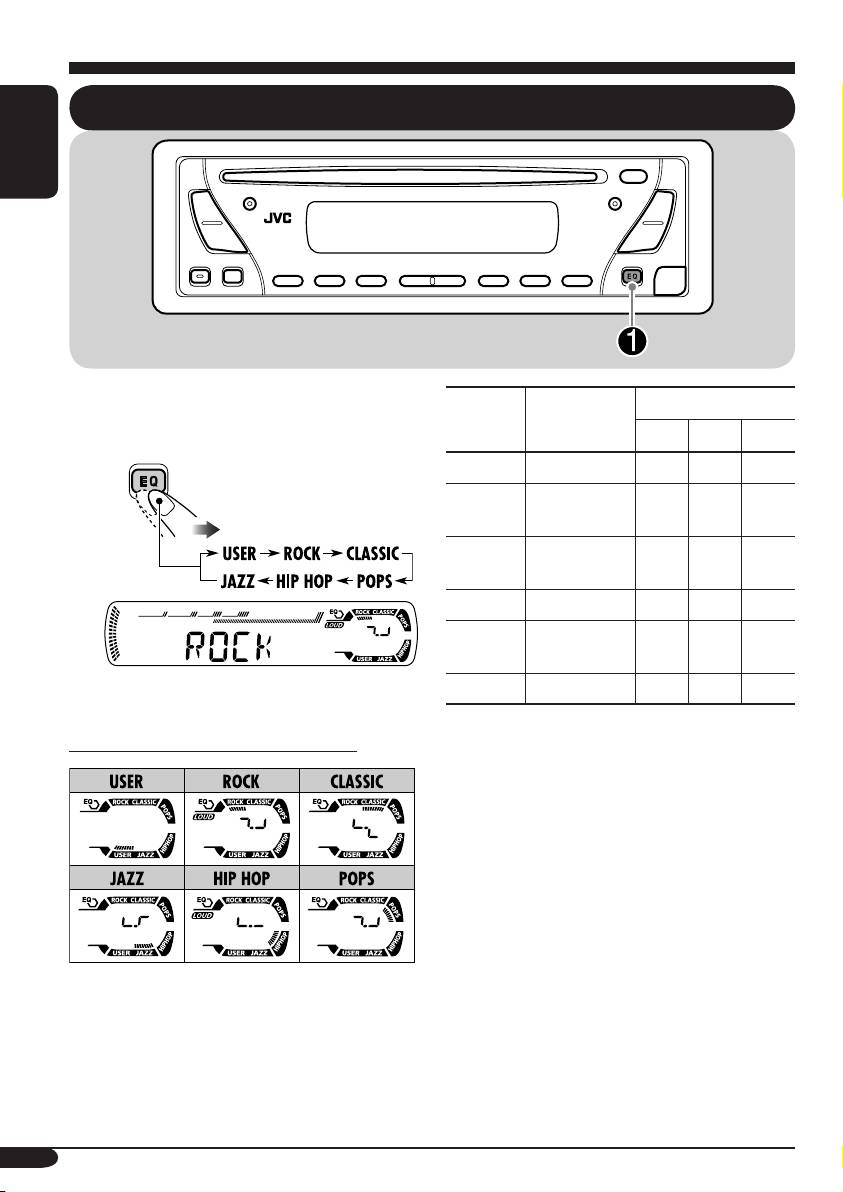
Selecting preset sound modes (C-EQ: custom equalizer)
ENGLISH
You can select a preset sound mode suitable to
Preset values
the music genre.
Indication For:
1
2
3
BAS
*
TRE
*
LOUD
*
USER (Flat sound) 00 00 OFF
~
ROCK Rock or disco
+03 +01 ON
music
CLASSIC Classical
+01 –02 OFF
music
POPS Light music +04 +01 OFF
HIP HOP Funk or rap
+02 00 ON
music
Ex.: When “ROCK” is selected
JAZZ Jazz music +02 +03 OFF
1
*
BAS: Bass
Indication pattern for each sound mode:
2
*
TRE: Treble
3
*
LOUD: Loudness
12
EN10-13_KD-G111[EX_EU]f.indd 12 10/8/04, 12:15:20 PM
Indication To do: Range
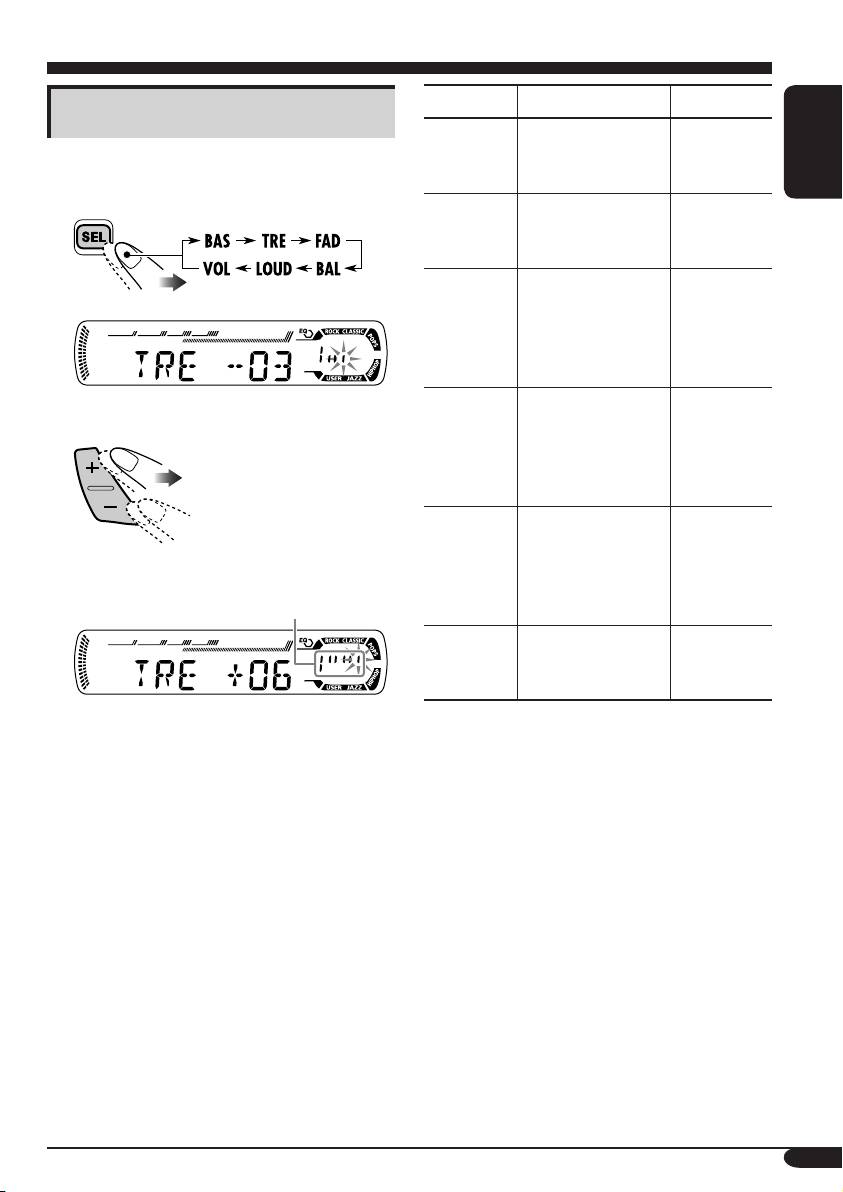
Adjusting the sound
1
BAS*
Adjust the bass. –06 (min.)
You can adjust the sound characteristics to your
(bass)
to
preference.
+06 (max.)
ENGLISH
1
TRE*
Adjust the treble. –06 (min.)
1
(treble)
to
+06 (max.)
2
FAD*
Adjust the front
R06 (Rear
(fader)
and rear speaker
only)
balance.
to
F06 (Front
only)
Ex.: When “TRE” is selected
BAL
Adjust the left
L06 (Left
(balance)
and right speaker
only)
2
balance.
to
R06 (Right
only)
1
LOUD*
Boost low and
LOUD ON
(loudness)
high frequencies
J
to produce a well-
LOUD OFF
Indication pattern changes as
balanced sound at
you adjust the level.
low volume level.
3
VOL*
Adjust the
00 (min.) to
(volume)
volume.
30 or 50
4
(max.)*
1
*
When you adjust the bass, treble, or
loudness, the adjustment you have made is
stored for the currently selected sound mode
(C-EQ) including “USER.”
2
*
If you are using a two-speaker system, set
the fader level to “00.”
3
*
Normally the +/– buttons work as the
volume control. So you do not have to select
“VOL” to adjust the volume level.
4
*
Depending on the amplifier gain control
setting. (See page 14 for details.)
13
EN10-13_KD-G111[EX_EU]f.indd 13 10/9/04, 1:20:11 PM
General settings — PSM
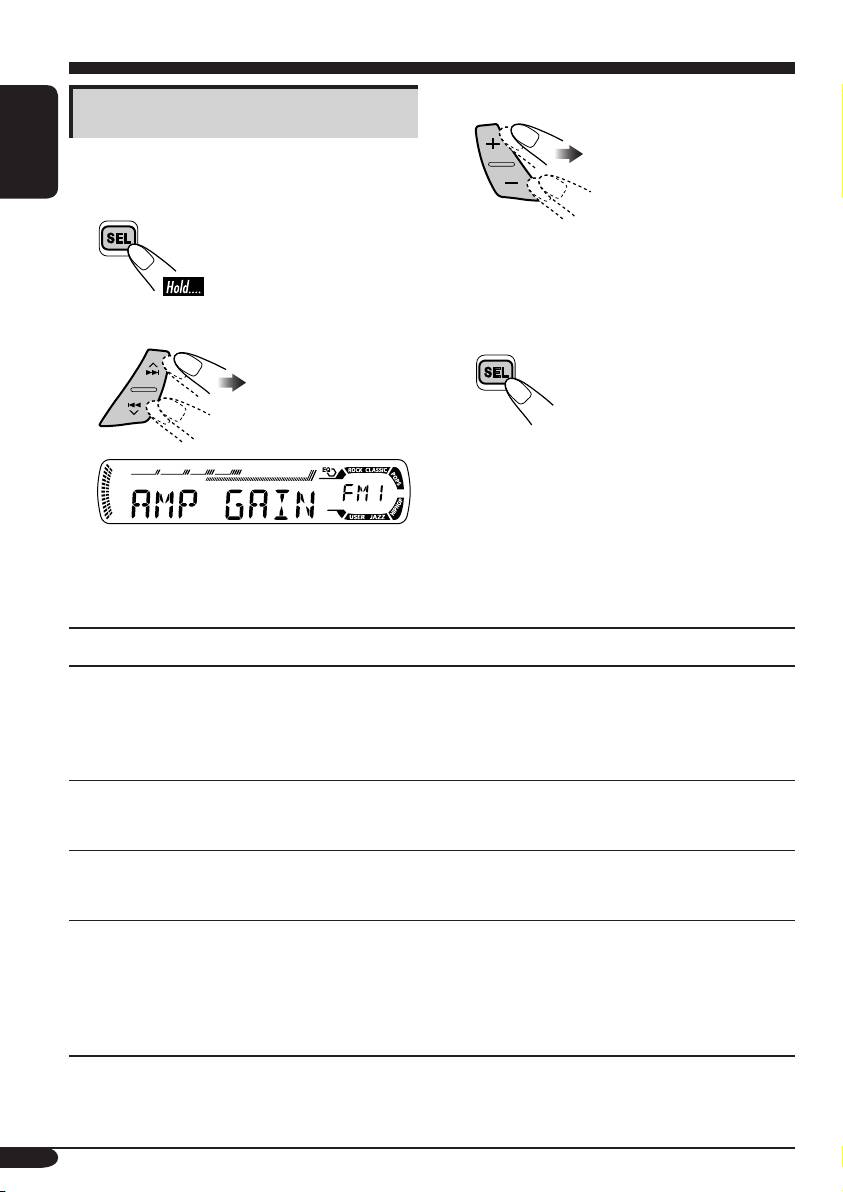
3 Adjust the PSM item selected.
Basic procedure
You can change PSM (Preferred Setting Mode)
items listed on the table that follows.
ENGLISH
1
4 Repeat steps 2 and 3 to adjust the
other PSM items if necessary.
2
Select a PSM item.
5 Finish the procedure.
Ex.: When you select “AMP GAIN”
Indications Selectable settings, [reference page]
DEMO
DEMO ON: [Initial]; Display demonstration will be activated
Display demonstration
automatically if no operation is done for about
20 seconds, [7].
DEMO OFF: Cancels.
CLOCK H
0 – 23, [7]
Hour adjustment
[Initial: 0 (0:00)]
CLOCK M
00 – 59, [7]
Minute adjustment
[Initial: 00 (0:00)]
AMP GAIN
You can change the maximum volume level of this receiver.
Amplifier gain control
LOW PWR: VOL 00 – VOL 30 (Select this if the maximum power
of the speaker is less than 45 W to prevent them from
damaging the speaker.)
HIGH PWR: [Initial]; VOL 00 – VOL 50
14
EN14-19_KD-G111[EX_EU]f.indd 14 10/8/04, 12:15:40 PM
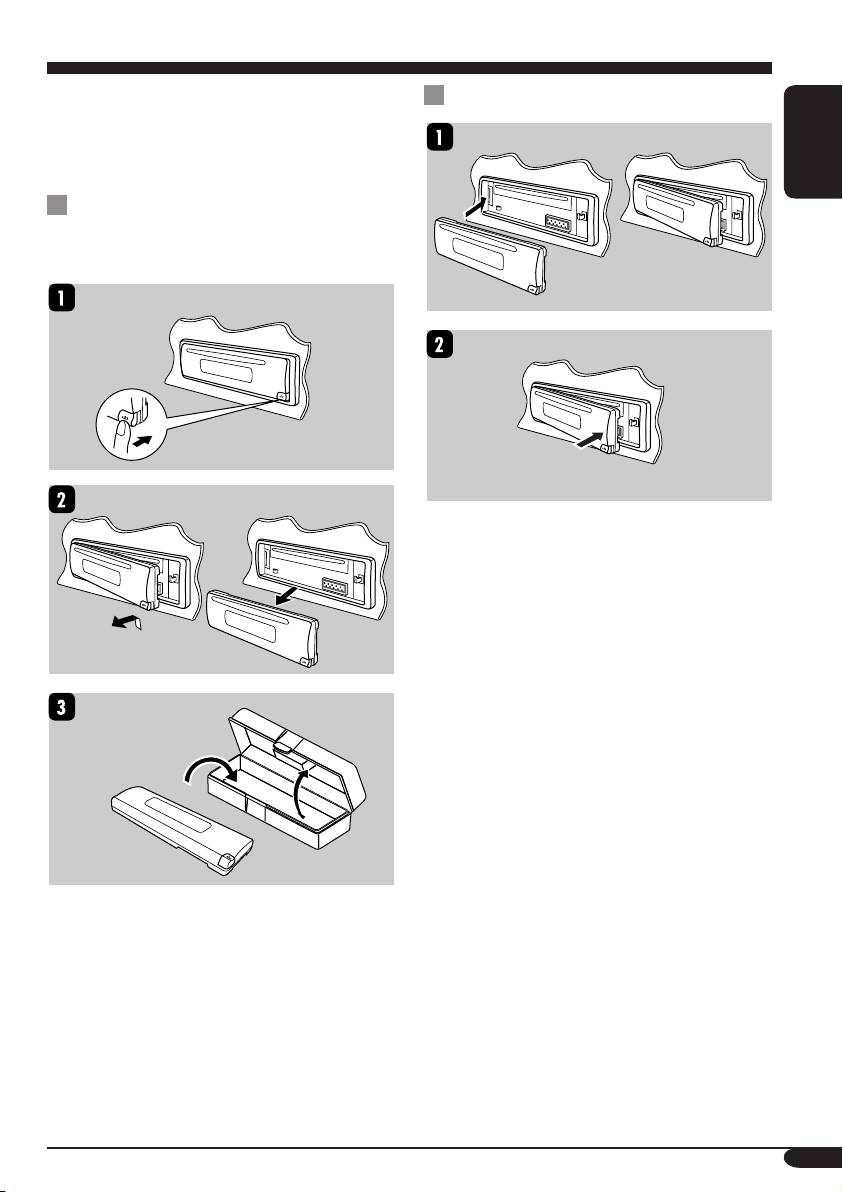
Detaching the control panel
When detaching or attaching the control panel,
Attaching the control panel
be careful not to damage the connectors on
the back of the control panel and on the panel
holder.
ENGLISH
Detaching the control panel
Before detaching the control panel, be sure to
turn off the power.
15
EN14-19_KD-G111[EX_EU]f.indd 15 10/8/04, 12:15:41 PM

Maintenance
How to clean the connectors
To keep discs clean
Frequent detachment will deteriorate the
A dirty disc may not play correctly.
connectors.
If a disc does become dirty, wipe
To minimize this possibility, periodically wipe
it with a soft cloth in a straight line
ENGLISH
the connectors with a cotton swab or cloth
from center to edge.
moistened with alcohol, being careful not to
• Do not use any solvent (for
damage the connectors.
example, conventional record cleaner, spray,
thinner, benzine, etc.) to clean discs.
To play new discs
New discs may have some rough
spots around the inner and outer
edges. If such a disc is used, this
Connector
receiver may reject the disc.
To remove these rough spots, rub the edges
Moisture condensation
with a pencil or ball-point pen, etc.
Moisture may condense on the lens inside the
CD player in the following cases:
• After starting the heater in the car.
• If it becomes very humid inside the car.
Should this occur, the CD player may
malfunction. In this case, eject the disc and
leave the receiver turned on for a few hours
until the moisture evaporates.
How to handle discs
When removing a disc from
Center holder
its case, press down the center
holder of the case and lift the
disc out, holding it by the
edges.
• Always hold the disc by the edges. Do not
touch its recording surface.
When storing a disc into its case, gently insert
the disc around the center holder (with the
printed surface facing up).
• Make sure to store discs into the cases after
use.
Do not use the following discs:
Sticker
Sticker
Stick-on
Wrap disc
residue
Disc
label
16
EN14-19_KD-G111[EX_EU]f.indd 16 10/8/04, 12:15:41 PM

More about this receiver
• Some CD-Rs or CD-RWs may not play
Basic operations
back on this receiver because of their disc
Turning off the power
characteristics, and for the following causes:
• If you turn off the power while listening to a
– Discs are dirty or scratched.
disc, disc play will start from where playback
– Moisture condensation occurs on the lens
ENGLISH
has been stopped previously, next time you
inside the receiver.
turn on the power.
– The pickup lens inside the receiver is dirty.
– CD-R or CD-RW on which the files are
written with “Packet Write” method.
Tuner operations
– There are improper recording conditions
Storing stations in memory
(missing data, etc.) or media conditions
• During SSM search...
(stain, scratch, warp, etc.).
– All previously stored stations are erased and
• CD-RWs may require a longer readout time
stations are stored newly.
since the reflectance of CD-RWs is lower
– Received stations are preset in No. 1 (lowest
than that of regular CDs.
frequency) to No. 6 (highest frequency).
• Do not use the following CD-Rs or
– When SSM is over, the station stored in
CD-RWs:
No. 1 will be automatically tuned in.
– Discs with stickers, labels, or protective seal
• When storing a station manually, a previously
stuck to the surface.
preset station is erased when a new station is
– Discs on which labels can be directly
stored in the same preset number.
printed by an ink jet printer.
Using these discs under high temperatures
or high humidity may cause malfunctions or
Disc operations
damage to discs.
General
• This receiver has been designed to reproduce
Changing the source
CDs, and CD-Rs (Recordable)/CD-RWs
• If you change the source, playback also stops
(Rewritable) in audio CD (CD-DA) format.
(without ejecting the disc).
• When a disc has been loaded, selecting “CD”
Next time you select “CD” for the playback
for the playback source starts disc play.
source, disc play starts from where it has been
stopped previously.
Inserting a disc
• When a disc is inserted upside down, the disc
Ejecting a disc
automatically ejects.
• If the ejected disc is not removed within
• Do not insert 8 cm discs (single CD) and
15 seconds, the disc is automatically inserted
unusual shape discs (heart, flower, etc) into
again into the loading slot to prevent it from
the loading slot.
dust. (Disc will not play this time.)
Playing a CD-R or CD-RW
General settings—PSM
• Use only “finalized” CD-Rs or CD-RWs.
• If you change the “AMP GAIN” setting from
• This receiver can play back multi-session
“HIGH PWR” to “LOW PWR” while the
discs; however, unclosed sessions will be
volume level is set higher than “VOL 30,” the
skipped while playing.
receiver automatically changes the volume
level to “VOL 30.”
17
EN14-19_KD-G111[EX_EU]f.indd 17 10/8/04, 12:15:41 PM
Troubleshooting
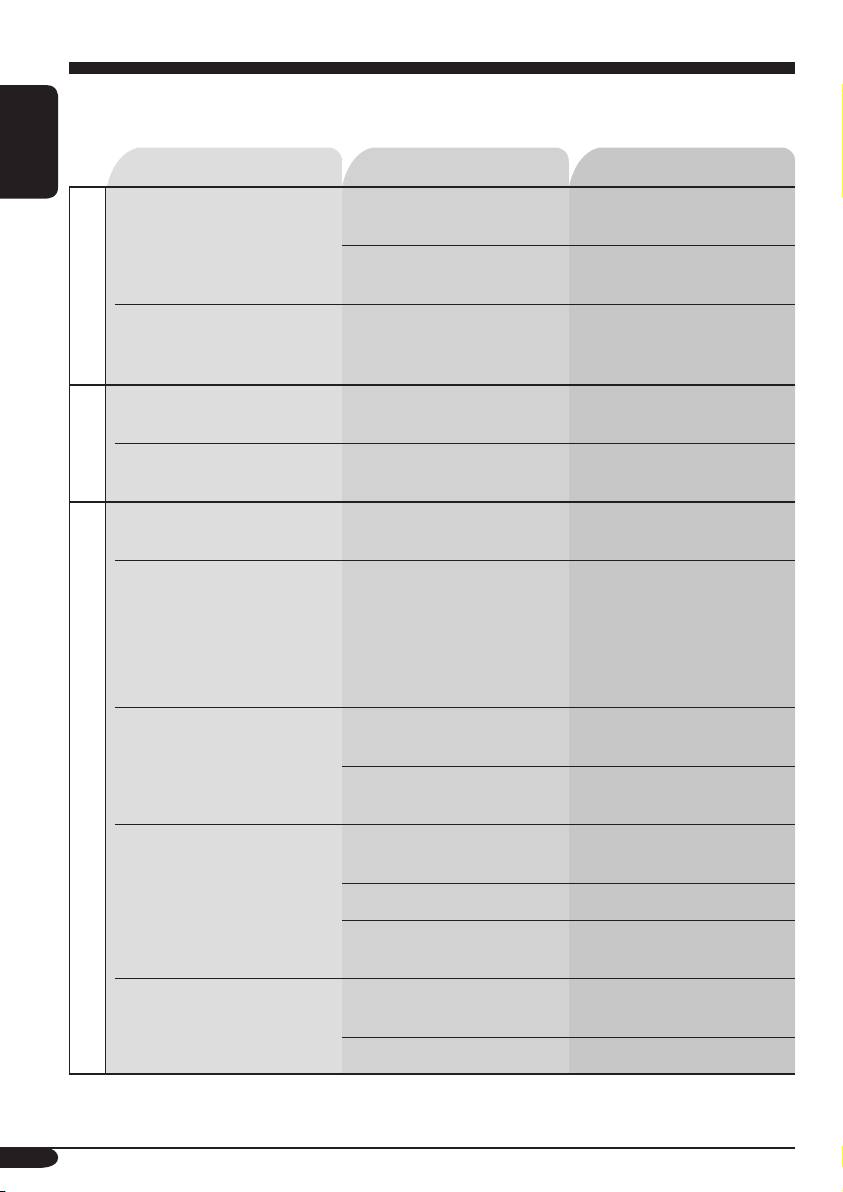
What appears to be trouble is not always serious. Check the following points before calling a service
center.
Symptoms Causes Remedies
ENGLISH
• Sound cannot be heard
The volume level is set to
Adjust it to the optimum
from the speakers.
the minimum level.
level.
Connections are incorrect. Check the cords and
connections.
General
• The receiver does not
The built-in microcomputer
Reset the receiver (see page
work at all.
may have functioned
2).
incorrectly due to noise, etc.
• SSM automatic presetting
Signals are too weak. Store stations manually.
does not work.
FM/AM
• Static noise while listening
The aerial is not connected
Connect the aerial firmly.
to the radio.
firmly.
• Disc automatically ejects. Disc is inserted upside
Insert the disc correctly.
down.
• CD-R/CD-RW cannot be
CD-R/CD-RW is not
• Insert a finalized CD-R/
played back.
finalized.
CD-RW.
• Tracks on the CD-R/
• Finalize the CD-R/
CD-RW cannot be
CD-RW with the
skipped.
component which you
used for recording.
• Disc can be neither played
Disc is locked. Unlock the disc (see page
back nor ejected.
11).
The CD player may have
Eject the disc forcibly (see
functioned incorrectly.
page 2).
Disc playback
• Disc sound is sometimes
You are driving on rough
Stop playback while driving
interrupted.
roads.
on rough roads.
Disc is scratched. Change the disc.
Connections are incorrect. Check the cords and
connections.
• “NO DISC” appears on
No disc in the loading slot. Insert a disc into the loading
the display.
slot.
Disc is inserted incorrectly. Insert the disc correctly.
18
EN14-19_KD-G111[EX_EU]f.indd 18 10/9/04, 1:20:41 PM

Specifications
AUDIO AMPLIFIER SECTION
CD PLAYER SECTION
Maximum Power Output:
Type: Compact disc player
Front: 45 W per channel
Signal Detection System: Non-contact optical
Rear: 45 W per channel
pickup (semiconductor laser)
ENGLISH
Continuous Power Output (RMS):
Number of channels: 2 channels (stereo)
Front: 17 W per channel into 4 Ω, 40 Hz
Frequency Response: 5 Hz to 20 000 Hz
to 20 000 Hz at no more than 0.8%
Dynamic Range: 96 dB
total harmonic distortion.
Signal-to-Noise Ratio: 98 dB
Rear: 17 W per channel into 4 Ω, 40 Hz
Wow and Flutter: Less than measurable limit
to 20 000 Hz at no more than 0.8%
total harmonic distortion.
Load Impedance: 4 Ω (4 Ω to 8 Ω allowance)
GENERAL
Tone Control Range:
Power Requirement:
Bass: ±10 dB at 100 Hz
Operating Voltage:
Treble: ±10 dB at 10 kHz
DC 14.4 V (11 V to 16 V allowance)
Frequency Response: 40 Hz to 20 000 Hz
Grounding System: Negative ground
Signal-to-Noise Ratio: 70 dB
Allowable Operating Temperature:
Line-Out Level/Impedance:
0°C to +40°C
2.0 V/20 kΩ load (full scale)
Dimensions (W × H × D):
Output Impedance: 1 kΩ
Installation Size (approx.):
182 mm × 52 mm × 150 mm
Panel Size (approx.):
TUNER SECTION
188 mm × 58 mm × 11 mm
Frequency Range:
Mass (approx.):
FM: 87.5 MHz to 108.0 MHz
1.3 kg (excluding accessories)
AM: (MW) 522 kHz to 1 620 kHz
(LW) 144 kHz to 279 kHz
[FM Tuner]
Design and specifications are subject to change
Usable Sensitivity: 11.3 dBf (1.0 µV/75 Ω)
without notice.
50 dB Quieting Sensitivity:
16.3 dBf (1.8 µV/75 Ω)
Alternate Channel Selectivity (400 kHz): 65 dB
Frequency Response: 40 Hz to 15 000 Hz
Stereo Separation: 30 dB
Capture Ratio: 1.5 dB
[MW Tuner]
Sensitivity: 20 µV
Selectivity: 35 dB
[LW Tuner]
Sensitivity: 50 µV
19
EN14-19_KD-G111[EX_EU]f.indd 19 10/14/04, 1:40:39 PM
Wir danken Ihnen für den Kauf eines JVC Produkts.
Bitte lesen Sie die Anleitung vollständig durch, bevor Sie das Gerät in Betrieb nehmen, um
sicherzustellen, daß Sie alles vollständig verstehen und die bestmögliche Leistung des Geräts
erhalten.
WICHTIG FÜR LASER-PRODUKTE
1. LASER-PRODUKT DER KLASSE 1
2. ACHTUNG: Die obere Abdeckung nicht öffnen. Das Gerät enthält keine Teile, die vom
Benutzer gewartet werden können. Wartungen nur von qualifiziertem Fachpersonal durchführen
lassen.
DEUTSCH
3. ACHTUNG: Sichtbare und unsichtbare Laserstrahlung bei offenem Gerät und Defekt oder
Umgehen der Verriegelung. Setzen Sie sich dem Strahl nicht direkt aus.
4. ANBRINGEN DES ETIKETTS: WARNHINWEIS-ETIKETT, AUSSEN AM GERÄT
ANGEBRACHT.
Warnung:
Wenn Sie den Receiver beim Fahren
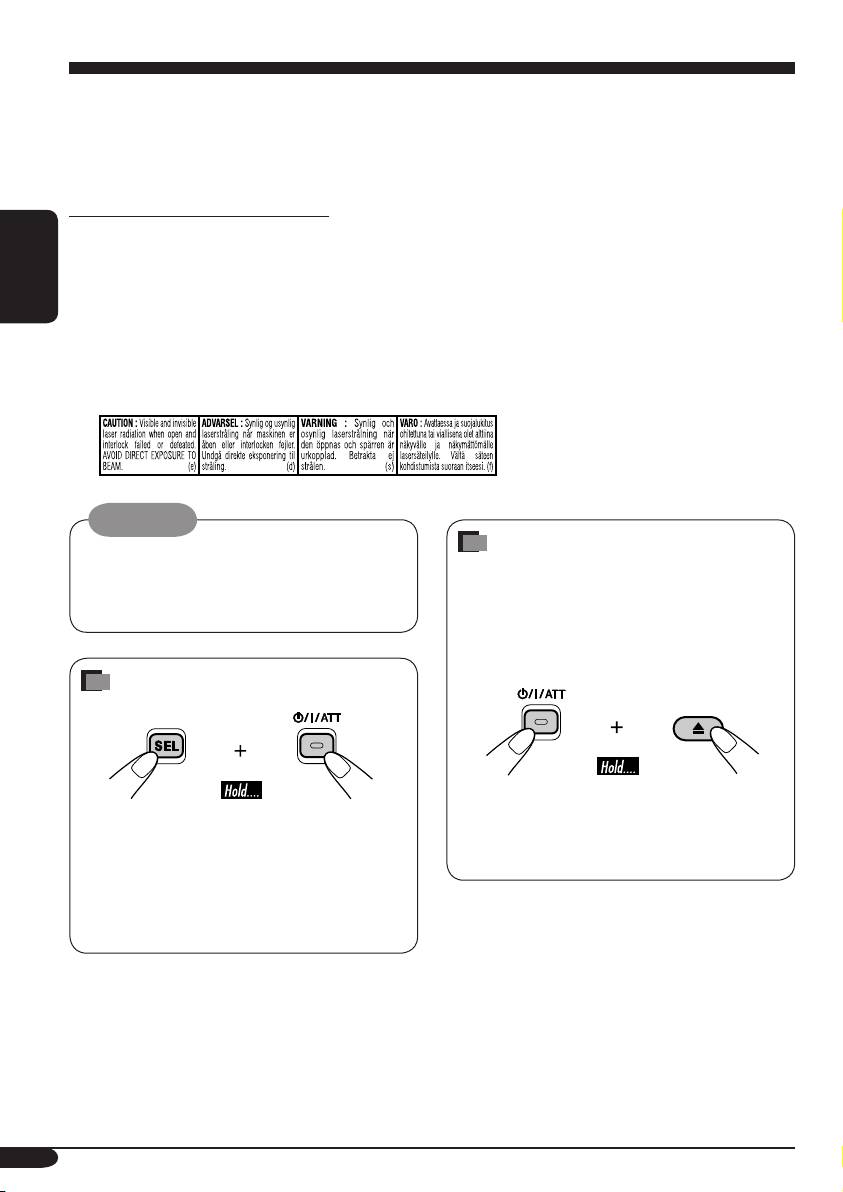
Zwangsweises Ausschieben
bedienen müssen, dürfen Sie nicht den Blick
einer Disk
von der Straße nehmen, da sonst die Gefahr
Wenn eine Disk vom Receiver nicht erkannt
von Verkehrsunfällen besteht.
wird oder nicht ausgeschoben kann, können
Sie zwangsweisen Ausschub wie folgt
ausführen.
Zurücksetzen des Geräts
• Wenn das nicht funktioniert, führen Sie
• Dadurch wird der Mikrocomputer
einen Reset am Receiver aus.
zurückgesetzt. Ihre vorgegebenen
• Achten Sie darauf, die ausgeschobene Disk
Einstellungen werden ebenfalls gelöscht.
nicht fallen zu lassen.
• Wenn eine Disk eingelegt ist, wird sie
ausgeschoben. Achten Sie darauf, die Disk
nicht fallenzulassen.
Aus Sicherheitsgründen wird eine nummerierte ID-Karte mit diesem Receiver mitgeliefert, und die
gleiche ID-Nummer ist auf dem Chassis des Receivers aufgedruckt. Die Karte muss an sicherer
Stelle aufbewahrt werden, da sie den Behörden bei der Identifikation des Receivers im Falle eines
Diebstahls helfen kann.
2
GE02-05_KD-G111[EY]f.indd 2 14/10/04, 11:30:26 PM

Inhalt
Zurücksetzen des Geräts........................ 2
Klangeinstellungen ................ 12
Zwangsweises Ausschieben einer Disk
... 2
Wählen der vorgegebenen Klangmodi
Wie Sie diese Anleitung lesen............... 4
(C-EQ: Spezieller Equalizer) .............. 12
Wie Sie die MODE-Taste verwenden ... 4
Einstellen des Klangs............................. 13
Bedienfeld — KD-G111 ............. 5
Allgemeine Einstellungen
Beschreibung der Teile.......................... 5
— PSM................................. 14
Grundlegendes Verfahren...................... 14
Erste Schritte .......................... 6
Grundlegende Bedienung...................... 6
Abnehmen des Bedienfelds .... 15
Abbrechen der Display
DEUTSCH
-Demonstrationen............................... 7
Wartung ................................ 16
Einstellung der Uhr................................ 7
Weitere Informationen zu
Bedienung des Tuners ............ 8
Ihrem Receiver .................... 17
Rundfunkempfang ............................... 8
Speichern von Sendern .......................... 9
Störungssuche........................ 18
Hören eines Festsenders ........................ 9
Technische Daten ................... 19
Bedienung der Disk................ 10
Wiedergabe einer Disk ........................ 10
Auswählen von Wiedergabemodi.......... 11
*Für die Sicherheit....
*Temperatur im Auto....
• Die Lautstärke nicht zu laut stellen, da
Wenn Sie das Auto für lange Zeit in heißem
dadurch Außengeräusche überdeckt und das
oder kaltem Wetter parken, bitte warten, bis
Autofahren gefährlich wird.
sich die Temperatur im Auto sich normalisiert
• Das Auto vor dem Durchführen von
hat, bevor Sie das Gerät einschalten.
komplizierten Bedienschritten anhalten.
3
GE02-05_KD-G111[EY]f.indd 3 14/10/04, 11:30:28 PM
Wie Sie diese Anleitung lesen
Wie Sie die MODE-Taste
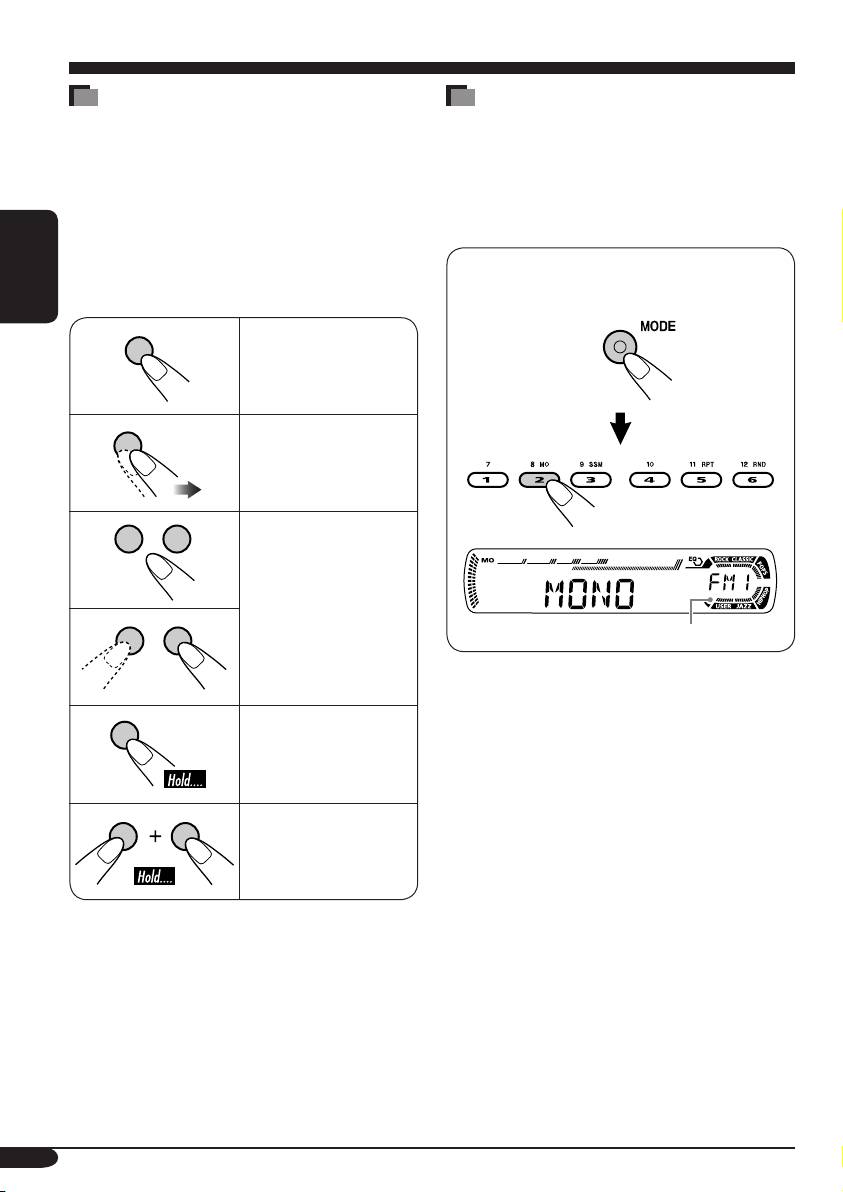
Die folgenden Methoden werden eingesetzt, um
verwenden
die Erklärungen einfach und leichtverständlich
Wenn Sie MODE drücken, schaltet
zu gestalten:
der Receiver auf Funktion-Modus, und
• Einige zugehörige Tipps und Hinweise
die Zifferntasten arbeiten als andere
werden unter „Weitere Informationen zu
Funktionstasten.
Ihrem Receiver“ gegeben (siehe Seite 17).
• Tastenfunktionen werden im Wesentlichen
Beisp.: Wenn die Zifferntaste 2 als
mit den folgenden Abbildungen erläutert:
MO (Mono)-Taste fungiert.
DEUTSCH
Kurz drücken.
Wiederholt drücken.
Eine davon drücken.
Zeit-Countdown-Anzeige
Um diese Tasten wieder für die
ursprünglichen Funktionen zu verwenden,
nachdem MODE gedrückt wurde, warten
Gedrückt halten,
Sie 5 Sekunden, ohne eine dieser Tasten zu
bis die gewünschte
drücken, bis der Funktion-Modus wieder
Reaktion beginnt.
aufgehoben ist.
• Durch erneutes Drücken von MODE wird der
Halten Sie die beide
Funktion-Modus ebenfalls aufgehoben.
Tasten gleichzeitig
gedrückt.
4
GE02-05_KD-G111[EY]f.indd 4 14/10/04, 11:30:28 PM
Bedienfeld — KD-G111
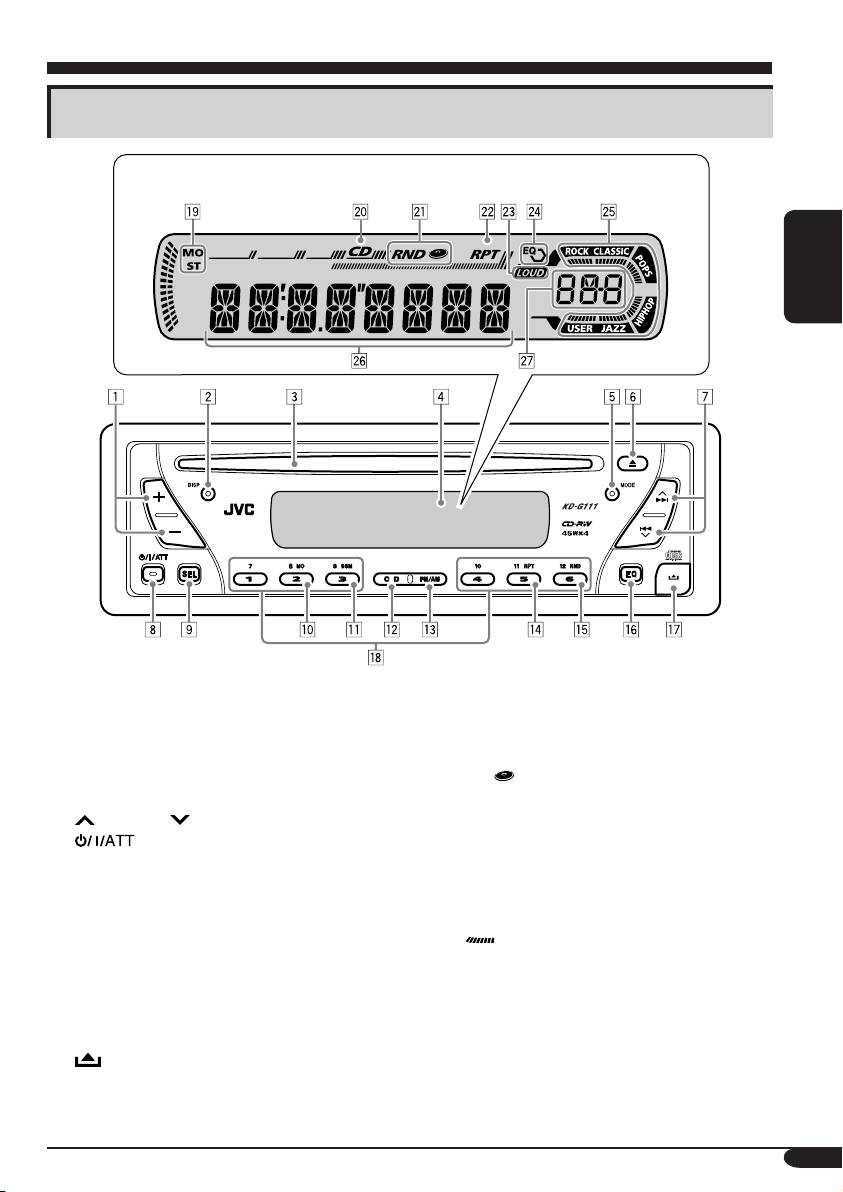
Beschreibung der Teile
Displayfenster
DEUTSCH
1 +/– -Tasten
Displayfenster
2 DISP (Display)-Taste
o Tuner-Empfangsanzeigen
3 Ladeschlitz
MO (Mono), ST (Stereo)
4 Displayfenster
; CD-Anzeige
5 MODE-Taste
a RND
(Disk-Zufall)-Anzeige
6 0 (Auswurf)-Taste
s RPT (Wiederholung)-Anzeige
7
¢/4 -Tasten
d LOUD (Loudness)-Anzeige
f EQ (Equalizer)-Anzeige
8
(Standby/Ein/Dämpfung)-Taste
g Sound-Modus (C-EQ: spezieller Equalizer)-
9 SEL (Wählen)-Taste
Anzeigen
p MO (Mono)-Taste
ROCK, CLASSIC, POPS, HIP HOP, JAZZ,
q SSM (Sequentieller Speicher für starke
USER
Sender)-Taste
•
fungiert auch als Zeit-Countdown-
w CD-Taste
Anzeige.
e FM/AM-Taste
h Hauptdisplay
r RPT (Wiederholung)-Taste
j Quellenanzeige
t RND (Zufall)-Taste
Lautstärkepegelanzeige
y EQ (Equalizer)-Taste
u
(Bedienfeld-Freigabe)-Taste
i Zifferntasten
5
GE02-05_KD-G111[EY]f.indd 5 14/10/04, 11:30:29 PM
