
Sony Bravia KDL-32D3010: Safety information
Safety information: Sony Bravia KDL-32D3010
Table of contents
- Introduction Notice for Digital TV function Disposal of the TV set
- Start-up Guide 1: Checking the 2: Connecting an aerial/ accessories cable/VCR
- 3: Preventing the TV 5: Performing the initial from toppling over setup 4: Bundling the cables Selecting the language and country/ region
- To tune the TV for digital cable connection Auto-tuning the TV Detaching the Table- Top Stand from the TV
- Safety information
- Prohibited Usage Precautions Broken pieces: When not in use For children If the following problems occur...
- Overview of the remote
- Overview of the TV buttons and indicators
- Watching TV Additional operations
- To change the screen format manually to suit the broadcast Using the Tools menu
- Checking the Digital Electronic Programme Guide (EPG) * To Do this
- To Do this
- Using the Digital Favourite list *
- Connecting optional equipment
- Sockets Input symbol on Description screen
- Viewing pictures from the connected equipment
- Using HDMI control
- Navigating through menus
- Picture menu
- Colour Temperature
- Sound menu
- Dual Sound
- Screen menu
- Set-up menu
- AV Set-up
- HDMI Set-up
- All Reset
- PC Settings menu
- Analogue Set-up menu
- Manual Programme Preset
- Skip
- Digital Set-up menu
- Digital Set-up
- Specifications
- PC Input Signal Reference Chart
- Troubleshooting
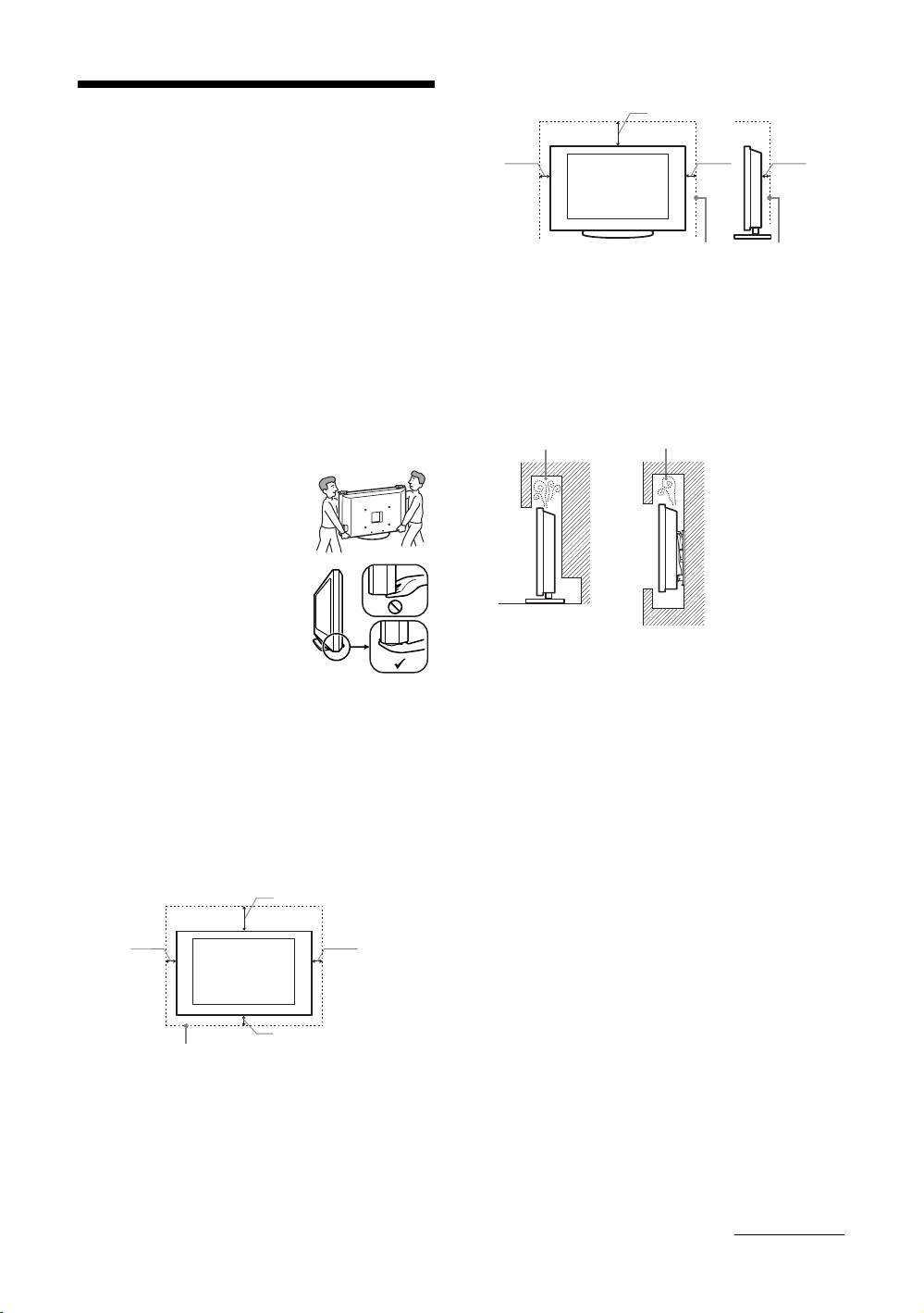
Installed with stand
30 cm
Safety information
10 cm 10 cm 6 cm
Installation/Set-up
Install and use the TV set in accordance with the
instructions below in order to avoid any risk of fire,
electrical shock or damage and/or injuries.
Leave at least this space around the set.
• To ensure proper ventilation and prevent the collection of
Installation
dirt or dust:
• The TV set should be installed near an easily accessible
– Do not lay the TV set flat, install upside down,
mains socket.
backwards, or sideways.
• Place the TV set on a stable, level surface.
– Do not place the TV set on a shelf, rug, bed or in a
• Only qualified service personnel should carry out wall
closet.
installations.
– Do not cover the TV set with a cloth, such as curtains,
• For safety reasons, it is strongly recommended that you
or items such as newspapers, etc.
use Sony accessories, including:
– Do not install the TV set as shown below.
– Wall-mount bracket SU-WL500
Air circulation is blocked.
Transporting
• Before transporting the TV set,
disconnect all cables.
• Two or three people are needed to
transport a large TV set.
• When transporting the TV set by
Wall Wall
hand, hold it as shown on the right.
• When lifting or moving the TV set,
hold it firmly from the bottom. Do
not put stress on the LCD panel.
• When transporting the TV set, do
not subject it to jolts or excessive
vibration.
• When transporting the TV set for
Mains lead
repairs or when moving, pack it using the original carton
Handle the mains lead and socket as follows in order
and packing material.
to avoid any risk of fire, electrical shock or damage
and/or injuries:
Ventilation
– Connect the TV set using a three-wire grounding type
• Never cover the ventilation holes or insert anything in the
mains plug to a mains socket with a protective earthing
cabinet.
connection.
• Leave space around the TV set as shown below.
– Use only Sony mains leads, not those of other brands.
• It is strongly recommended that you use a Sony wall-
– Insert the plug fully into the mains socket.
mount bracket in order to provide adequate air-circulation.
– Operate the TV set on a 220-240 V AC supply only.
– When wiring cables, be sure to unplug the mains lead
Installed on the wall
for your safety and care not to catch your feet on the
cables.
30 cm
– Disconnect the mains lead from the mains socket before
working on or moving the TV set.
10 cm 10 cm
– Keep the mains lead away from heat sources.
– Unplug the mains plug and clean it regularly. If the plug
is covered with dust and it picks up moisture, its
insulation may deteriorate, which could result in a fire.
Notes
10 cm
• Do not use the supplied mains lead on any other
Leave at least this space around the set.
equipment.
• Do not pinch, bend, or twist the mains lead excessively.
The core conductors may be exposed or broken.
• Do not modify the mains lead.
• Do not put anything heavy on the mains lead.
• Do not pull on the mains lead itself when disconnecting
the mains lead.
• Do not connect too many appliances to the same mains
socket.
• Do not use a poor fitting mains socket.
Continued
GB
7
