
Sony Bravia KDL-32D3010: Overview of the remote
Overview of the remote: Sony Bravia KDL-32D3010
Table of contents
- Introduction Notice for Digital TV function Disposal of the TV set
- Start-up Guide 1: Checking the 2: Connecting an aerial/ accessories cable/VCR
- 3: Preventing the TV 5: Performing the initial from toppling over setup 4: Bundling the cables Selecting the language and country/ region
- To tune the TV for digital cable connection Auto-tuning the TV Detaching the Table- Top Stand from the TV
- Safety information
- Prohibited Usage Precautions Broken pieces: When not in use For children If the following problems occur...
- Overview of the remote
- Overview of the TV buttons and indicators
- Watching TV Additional operations
- To change the screen format manually to suit the broadcast Using the Tools menu
- Checking the Digital Electronic Programme Guide (EPG) * To Do this
- To Do this
- Using the Digital Favourite list *
- Connecting optional equipment
- Sockets Input symbol on Description screen
- Viewing pictures from the connected equipment
- Using HDMI control
- Navigating through menus
- Picture menu
- Colour Temperature
- Sound menu
- Dual Sound
- Screen menu
- Set-up menu
- AV Set-up
- HDMI Set-up
- All Reset
- PC Settings menu
- Analogue Set-up menu
- Manual Programme Preset
- Skip
- Digital Set-up menu
- Digital Set-up
- Specifications
- PC Input Signal Reference Chart
- Troubleshooting
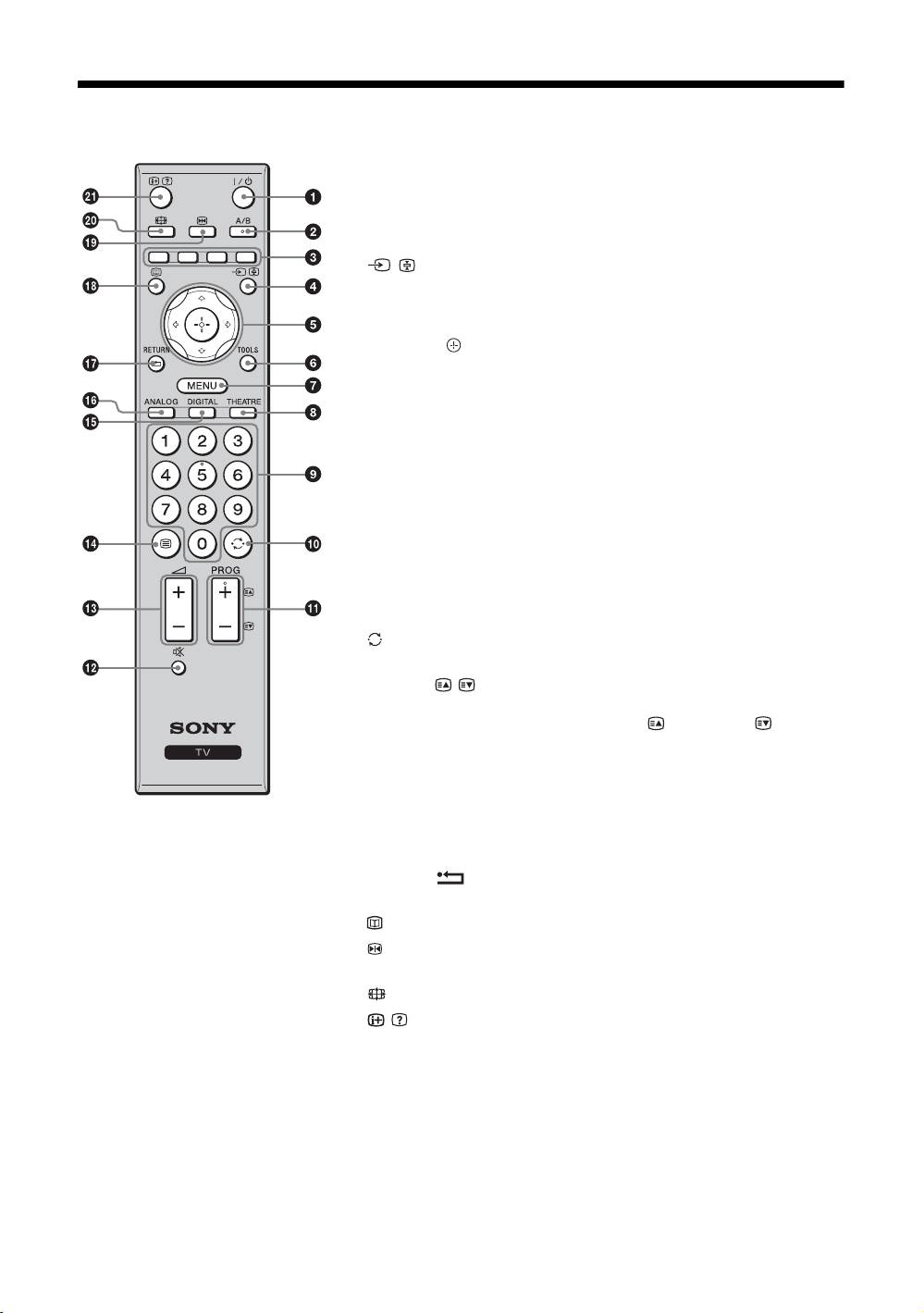
Overview of the remote
1 "/1 – TV standby
Turns the TV on and off from standby mode.
2 A/B – Dual Sound (page 24)
3 Coloured buttons (page 12, 13, 15)
4 / – Input select / Text hold
• In TV mode (page 18): Selects the input source from equipment connected
to the TV sockets.
• In Text mode (page 12): Holds the current page.
5 F/f/G/g/ (page 11, 20)
6 TOOLS (page 12, 18)
Enables you to access various viewing options and change/make adjustments
according to the source and screen format.
7 MENU (page 20)
8 THEATRE
You can set Theatre Mode on or off. When Theatre Mode is set to on, the
optimum audio output (if the TV is connected with an audio system using an
HDMI cable) and picture quality for film-based contents are automatically
set.
9 Number buttons
• In TV mode: Selects channels. For channel numbers 10 and above, enter
the second and third digit quickly.
• In Text mode: Enters the three digit page number to select the page.
0 – Previous channel
Returns to the previous channel watched (for more than five seconds).
qa PROG +/-/ /
• In TV mode (page 11): Selects the next (+) or previous (-) channel.
• In Text mode (page 12): Selects the next ( ) or previous ( ) page.
qs % – Mute (page 11, 18)
qd 2 +/- – Volume (page 18)
qf / – Text (page 12)
qg DIGITAL – Digital mode (page 11)
z
qh ANALOG – Analogue mode (page 11)
• The number 5, PROG + and A/B
qj RETURN /
buttons have tactile dots. Use the tactile
Returns to the previous screen of any displayed menu.
dots as references when operating the
TV.
qk – EPG (Digital Electronic Programme Guide) (page 13)
• If you turn the TV off, Theatre Mode is
ql – Picture freeze (page 11)
also turned off.
Freezes the TV picture.
w; – Screen mode (page 12)
wa / – Info / Text reveal
• In digital mode: Displays brief details of the programme currently being
watched.
• In analogue mode: Displays information such as current channel number
and screen format.
• In Text mode (page 12): Reveals hidden information (e.g. answers to a
quiz).
GB
9
