
Sony Bravia KDL-32D3010: Navigating through menus
Navigating through menus: Sony Bravia KDL-32D3010
Table of contents
- Introduction Notice for Digital TV function Disposal of the TV set
- Start-up Guide 1: Checking the 2: Connecting an aerial/ accessories cable/VCR
- 3: Preventing the TV 5: Performing the initial from toppling over setup 4: Bundling the cables Selecting the language and country/ region
- To tune the TV for digital cable connection Auto-tuning the TV Detaching the Table- Top Stand from the TV
- Safety information
- Prohibited Usage Precautions Broken pieces: When not in use For children If the following problems occur...
- Overview of the remote
- Overview of the TV buttons and indicators
- Watching TV Additional operations
- To change the screen format manually to suit the broadcast Using the Tools menu
- Checking the Digital Electronic Programme Guide (EPG) * To Do this
- To Do this
- Using the Digital Favourite list *
- Connecting optional equipment
- Sockets Input symbol on Description screen
- Viewing pictures from the connected equipment
- Using HDMI control
- Navigating through menus
- Picture menu
- Colour Temperature
- Sound menu
- Dual Sound
- Screen menu
- Set-up menu
- AV Set-up
- HDMI Set-up
- All Reset
- PC Settings menu
- Analogue Set-up menu
- Manual Programme Preset
- Skip
- Digital Set-up menu
- Digital Set-up
- Specifications
- PC Input Signal Reference Chart
- Troubleshooting
5 External Inputs
Using MENU Functions
Selects equipment connected to your TV.
• To watch the desired external input, select the
input source, then press .
• To assign a label to an external input, select
Navigating through
“Edit AV Labels”, then see page 27.
• To see a list of the connected HDMI control
menus
compatible equipment, select “HDMI Device
Selection”.
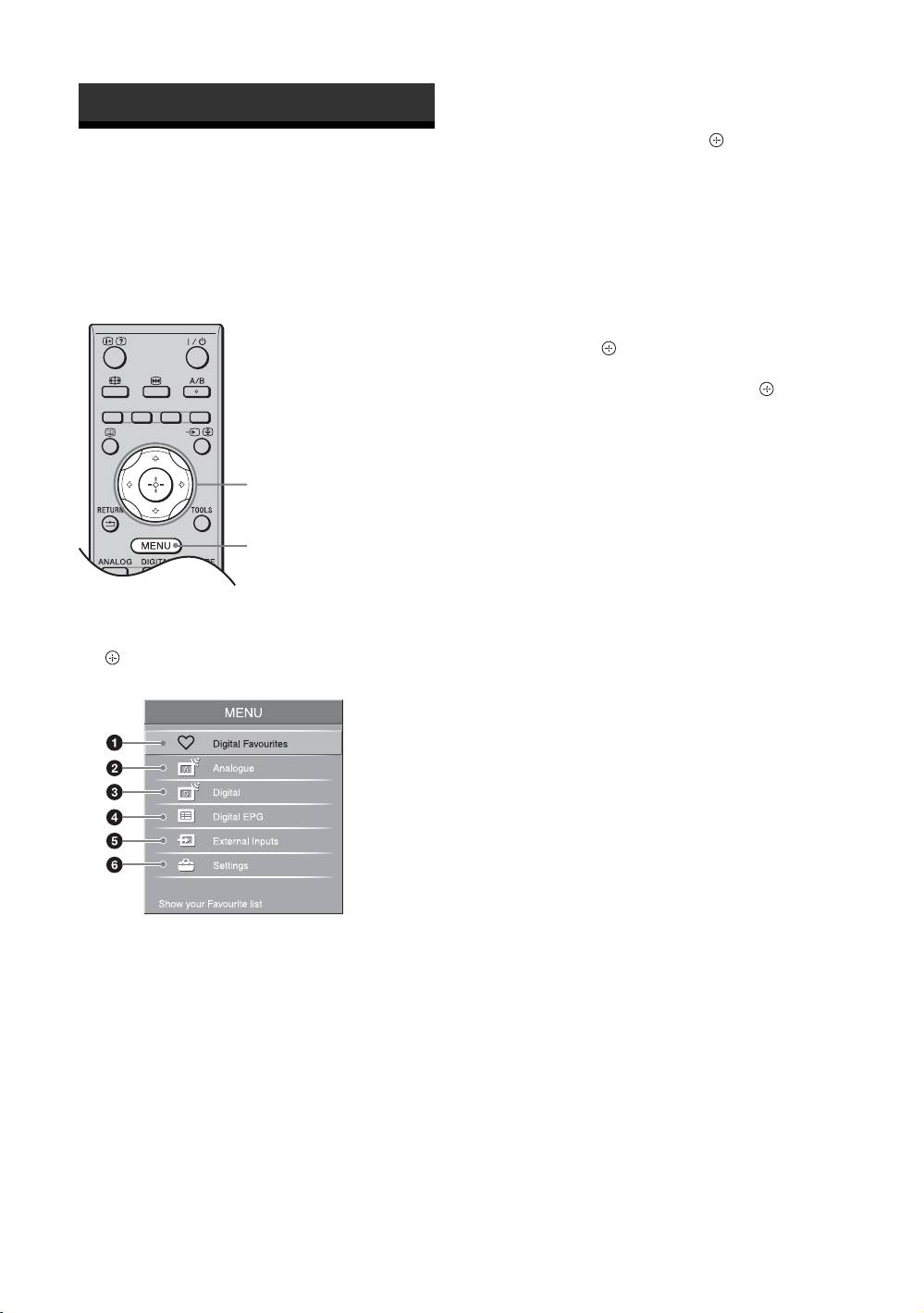
“MENU” allows you to enjoy various convenient
6 Settings
features of this TV. You can easily select channels or
Displays the “Settings” menu where most of the
inputs sources and change the settings for your TV.
advanced settings and adjustments are
performed.
1 Press F/f to select a menu icon, then
press .
2 Press F/f/G/g to select an option or
adjust a setting, then press .
For details about settings, see page 21 to 36.
~
The options you can adjust vary depending on the
situation. Unavailable options are greyed out or not
2
displayed.
* This function may not be available in some countries/
regions.
1
1 Press MENU.
2 Press F/f to select an option, then press
.
To exit the menu, press MENU.
1 Digital Favourites*
Displays the Favourite list (page 15).
2 Analogue
Returns to the last viewed analogue channel.
3 Digital*
Returns to the last viewed digital channel.
4 Digital EPG*
Displays the Digital Electronic Programme
Guide (EPG) (page 13).
GB
20
