
JVC KD-LHX557: ! Attach the control panel.
! Attach the control panel.: JVC KD-LHX557
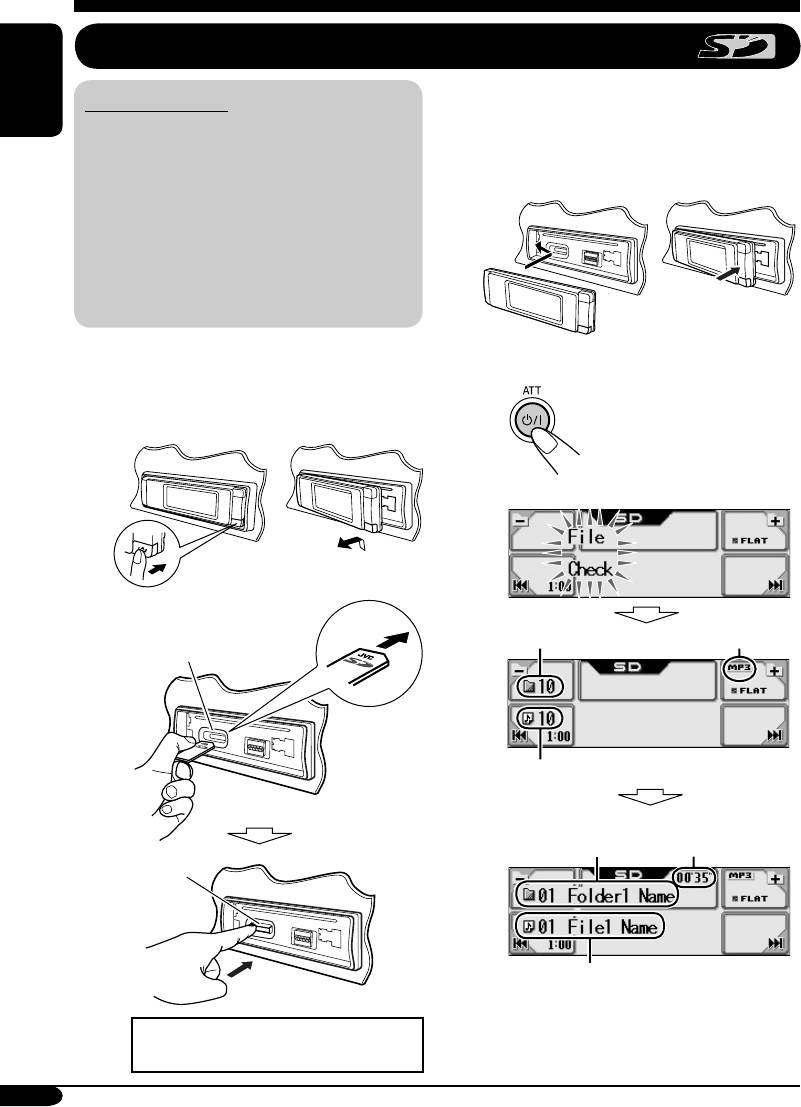
Playing an SD card
To eject the SD card, press the SD card
About the SD card
again.
ENGLISH
You can play back MP3/WMA tracks
recorded on the SD card and show the stored
image on the display during playback—
! Attach the control panel.
ImageLink. (See pages 16, 30, and 48 for
details.)
The required SD recording format is FAT
12/16 and the recommended storage type is
8 MB to 512 MB.
• You cannot use MMC or mini SD with this
receiver.
Before detaching the control panel, turn off the
power.
⁄ • The control panel goes
back to the previous
~ Detach the control panel.
position (see page 38).
Ÿ
Total folder number
File type
SD loading slot
Total track number
Elapsed playing
Current folder*
time
SD card
Current track*
Playback starts automatically if tracks
are recorded.
Press in the SD card until you hear a
clicking sound.
18
EN16-23_LHX557[EE]f.indd 18EN16-23_LHX557[EE]f.indd 18 12/29/04 9:55:47 AM12/29/04 9:55:47 AM
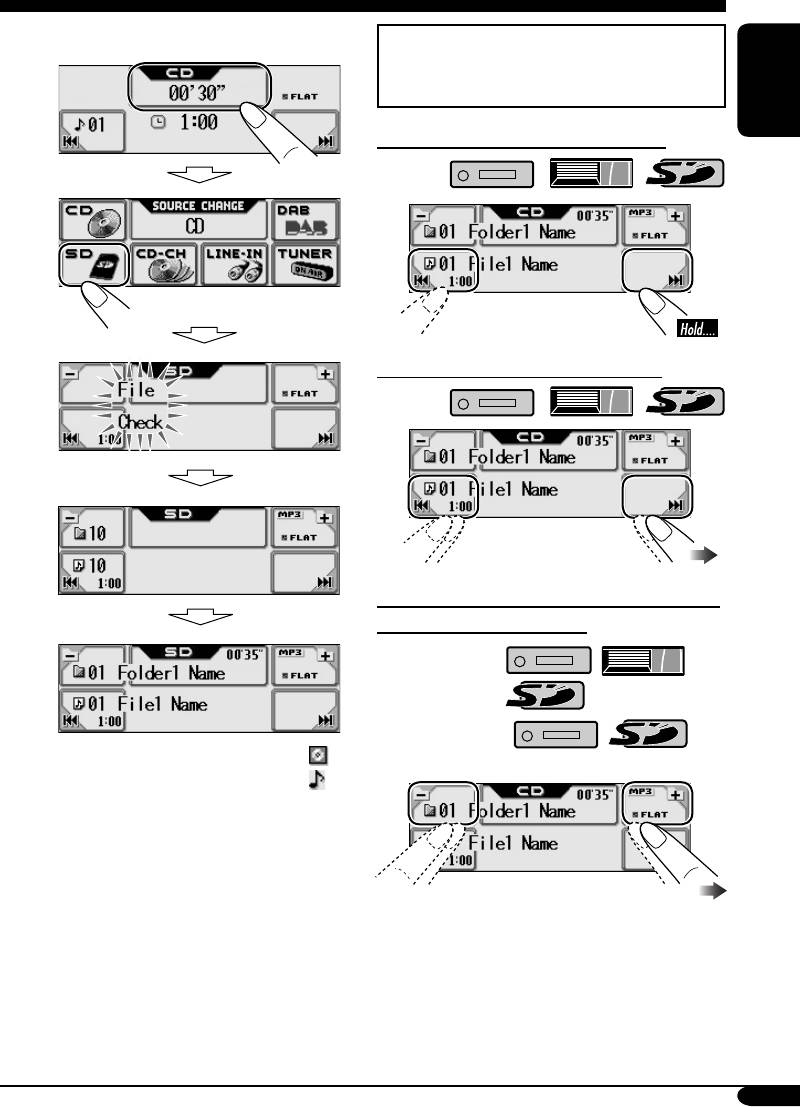
If an SD card has been loaded....
Operation screens used for the following
operations is of MP3 playback in the
receiver.
ENGLISH
To fast-forward or reverse the track
To go to the next or previous tracks
To go to the next or previous folders (only
for MP3 and WMA tracks)
For MP3 tracks:
For WMA tracks:
* The album name/performer with
indicator and the track title with
indicator will appear if “Tag” is set
to “On” (see page 32).
• If you hold the icon, the Folder List will
appear on the display (see page 20).
To be continued....
19
EN16-23_LHX557[EE]f.indd 19EN16-23_LHX557[EE]f.indd 19 12/29/04 9:55:48 AM12/29/04 9:55:48 AM
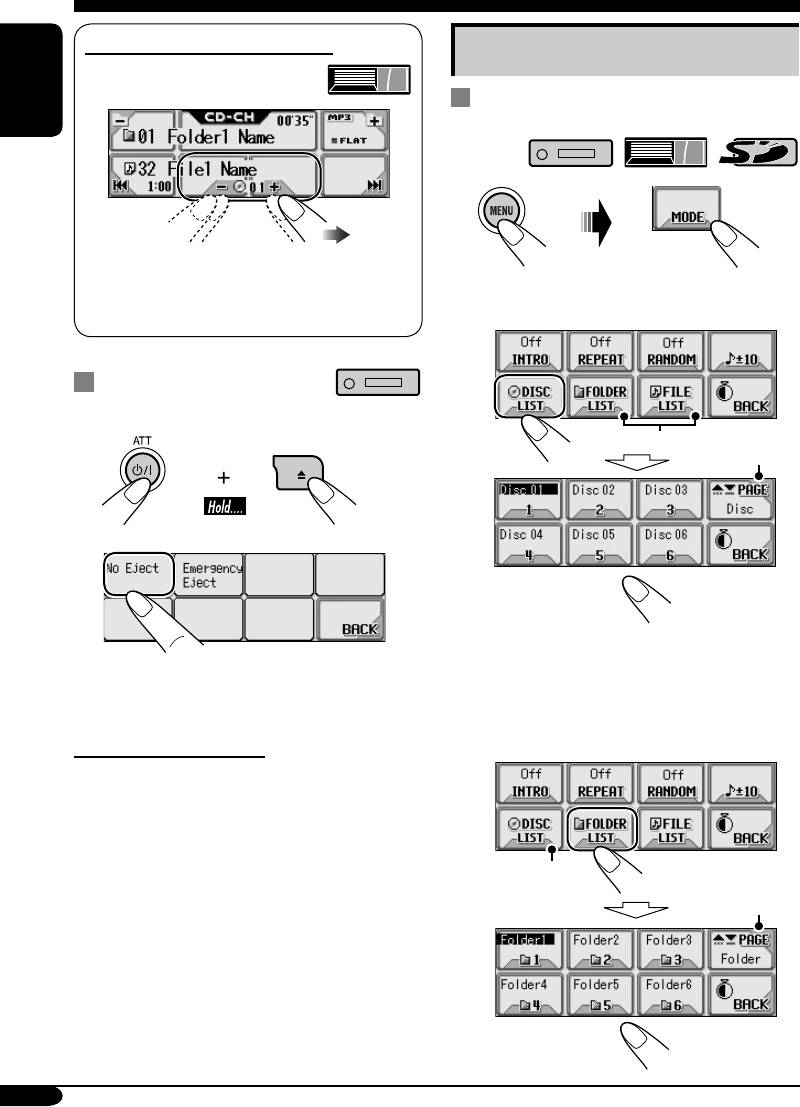
To select a disc during playback
Other main functions
Selecting a disc/folder/track on the
ENGLISH
list
1
• If you hold the icon, the Disc List will
appear on the display (see the right
2 • Select a disc (only for the CD
column).
changer).
Prohibiting disc ejection
You can lock a disc in the loading slot.
1
1
*
2
*
2
If the selected disc is an MP3/WMA disc,
its Folder List appears.
“No Eject” flashes, and the disc cannot be
ejected.
• Select a folder (only for MP3/WMA
disc or SD card).
To cancel the prohibition
In step 2 above, press “Eject OK.”
“Eject OK” flashes for a while.
3
*
2
*
20
EN16-23_LHX557[EE]f.indd 20EN16-23_LHX557[EE]f.indd 20 12/29/04 9:55:49 AM12/29/04 9:55:49 AM
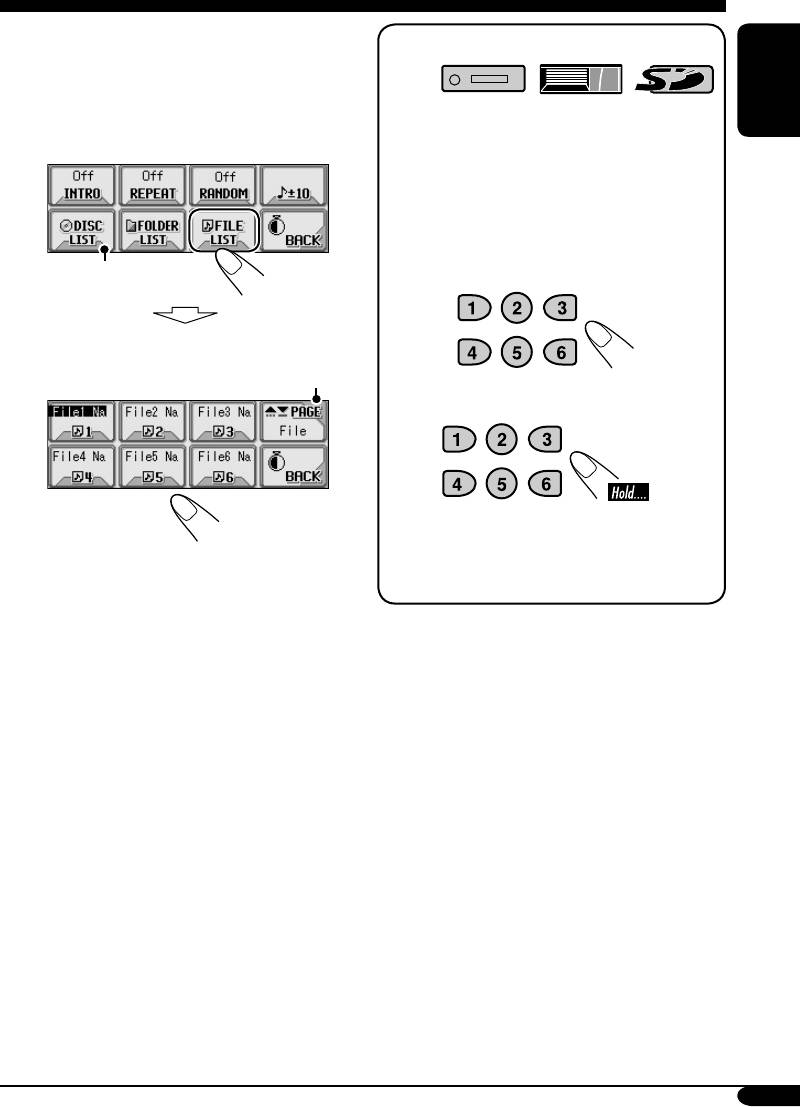
If you select the current folder
When using the remote controller....
(highlighted on the screen), its File List
appears.
• Select a track (only for MP3/WMA
• To directly select a disc in the CD
ENGLISH
changer
disc or SD card).
• To directly select a track of an audio CD
or CD Text
• To directly select a folder of an
MP3/WMA disc or an SD card
3
*
To select a number from 1 – 6:
File List of the current folder appears.
2
*
To select a number from 7 (1) – 12 (6):
It is required that folders are assigned with
2-digits number at their beginning of their
1
*
Appears only if the current disc is an
names—01, 02, 03, and so on.
MP3 discs.
2
*
Press to go to the next list; hold to go to
the previous list.
3
*
Displayed only when the source is
“CD-CH.”
21
EN16-23_LHX557[EE]f.indd 21EN16-23_LHX557[EE]f.indd 21 12/29/04 9:55:50 AM12/29/04 9:55:50 AM
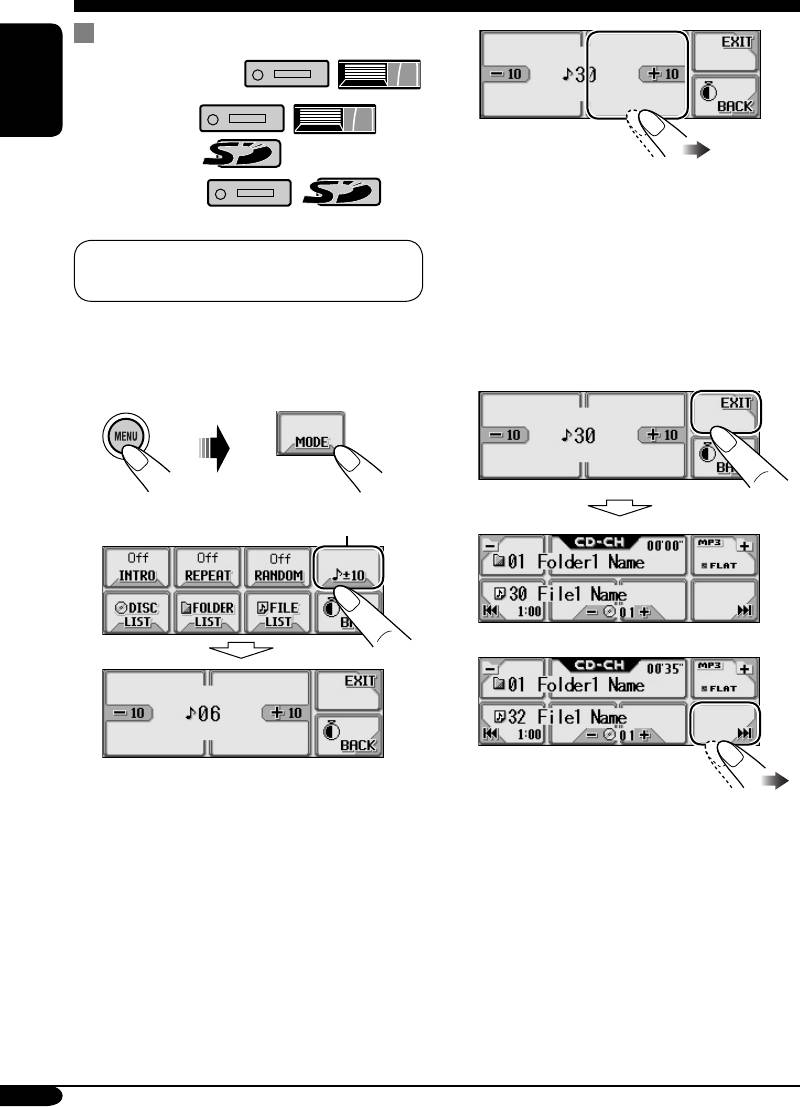
Skipping a track quickly during play
3
For audio CD/CD Text:
ENGLISH
For MP3 tracks:
(3 times)
For WMA tracks:
First time you press “+10” or “–10,” the
track skips to the nearest higher or lower
track with a track number of multiple ten
For MP3 or WMA tracks, you can skip a
(ex. 10th, 20th, 30th).
track within the same folder.
Then each time you press the button, you
can skip 10 tracks.
• After the last track, the first track will be
Ex.: To select track 32 while playing track 6 in
selected and vice versa.
the CD changer
4
1
*
2
5
(Twice)
* If the source is “CD-CH”: Works only
when JVC MP3 compatible CD changer
(CH-X1500) is connected.
22
EN16-23_LHX557[EE]f.indd 22EN16-23_LHX557[EE]f.indd 22 12/29/04 9:55:50 AM12/29/04 9:55:50 AM
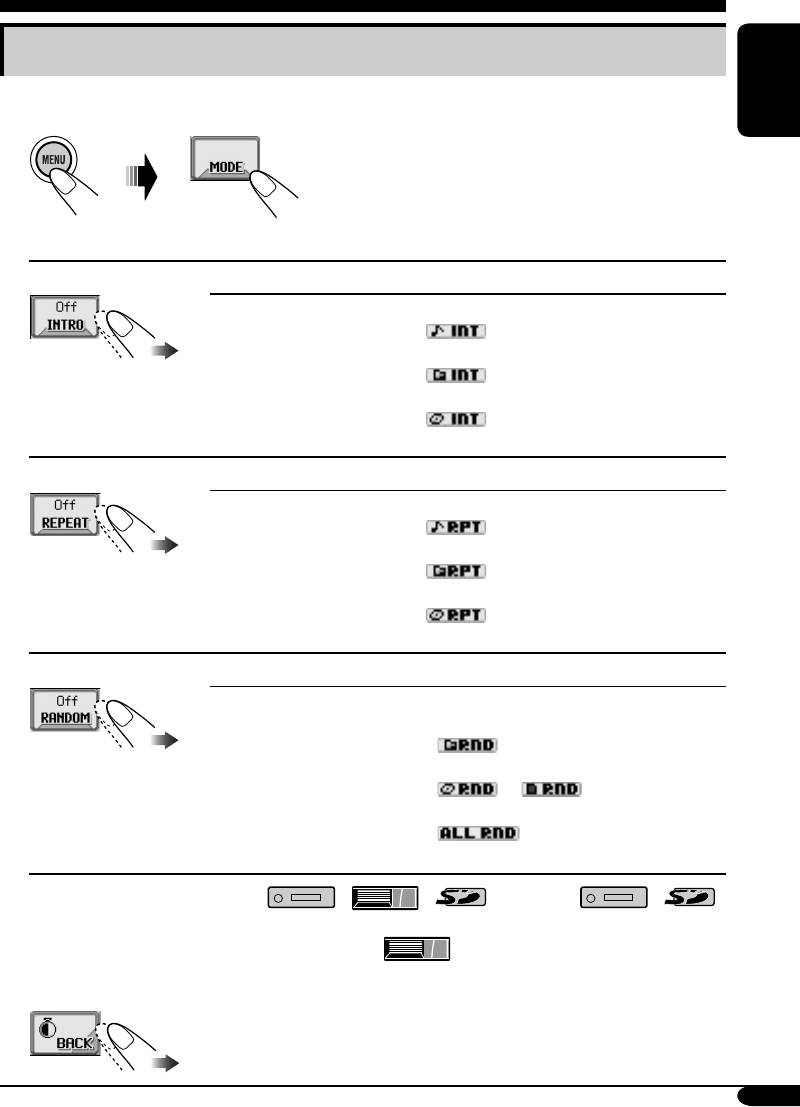
Selecting the playback modes
You can use only one of the following playback modes at a time.
ENGLISH
1
2 Select your desired playback mode.
Intro play
Mode Plays the beginning 15 seconds of ...
Track: All tracks of the current disc or the SD card.
• While playing,
lights up.
1
Folder*
: First tracks of all folders of the current disc or the SD card.
• While playing,
lights up.
2
Disc*
: First tracks of all the inserted discs.
• While playing,
lights up.
Off: Cancels.
Repeat play
Mode Plays repeatedly
Track: The current track.
• While playing,
lights up.
1
Folder*
: All tracks of the current folder.
• While playing,
lights up.
2
Disc*
: All tracks of the current disc.
• While playing,
lights up.
Off: Cancels.
Random play
Mode Plays at random
1
Folder*
: All tracks of the current folder, then tracks of the next
folder and so on.
• While playing,
lights up.
Disc or SD: All tracks of the current disc or the SD card.
• While playing,
or lights up.
2
All*
: All tracks of all inserted discs.
• While playing,
lights up.
Off: Cancels.
1
*
Only while playing an MP3 ( / / ) or WMA ( / )
track.
2
*
Only while playing discs in the CD changer ( ).
3 Exit from the setting.
23
EN16-23_LHX557[EE]f.indd 23EN16-23_LHX557[EE]f.indd 23 12/29/04 9:55:51 AM12/29/04 9:55:51 AM


