
Sony CDX-GT50UI: Welcome ! Resetting the unit Preparing the card remote commander
Welcome ! Resetting the unit Preparing the card remote commander: Sony CDX-GT50UI
Table of contents
- Table of Contents
- Welcome ! Resetting the unit Preparing the card remote commander
- Setting the clock Attaching the front panel Detaching the front panel
- Location of controls and basic operations Main unit
- wg Number buttons 7
- CD Radio Storing and receiving stations Display items Storing automatically — BTM Storing manually Repeat and shuffle play Receiving the stored stations Tuning automatically
- Setting AF and TA RDS Overview Display items
- Playing back USB devices Selecting PTY Display items Setting CT
- Listening to music on a Mass Storage Class type audio device Playing back iPod Playing tracks Listening to music on “Walkman” (ATRAC Audio Device)
- Repeat and shuffle Play Scan Selecting Album, Artist or Playlist
- Changing the sound settings Adjusting setup items — SET Adjusting the sound characteristics — BAL/FAD/SUB Customizing the equalizer curve — EQ3
- Using optional equipment Auxiliary audio equipment CD/MD changer
- Precautions Notes on discs
- About USB devices Playback order of MP3/WMA/AAC files
- About MP3 files About ATRAC files About WMA files About iPod About AAC files
- Cleaning the connectors Maintenance Replacing the lithium battery of the card remote commander Removing the unit Fuse replacement
- Specifications
- CD/MD playback Troubleshooting General Radio reception
- RDS USB playback Error displays/Messages
Welcome !
Getting Started
Thank you for purchasing this Sony Compact
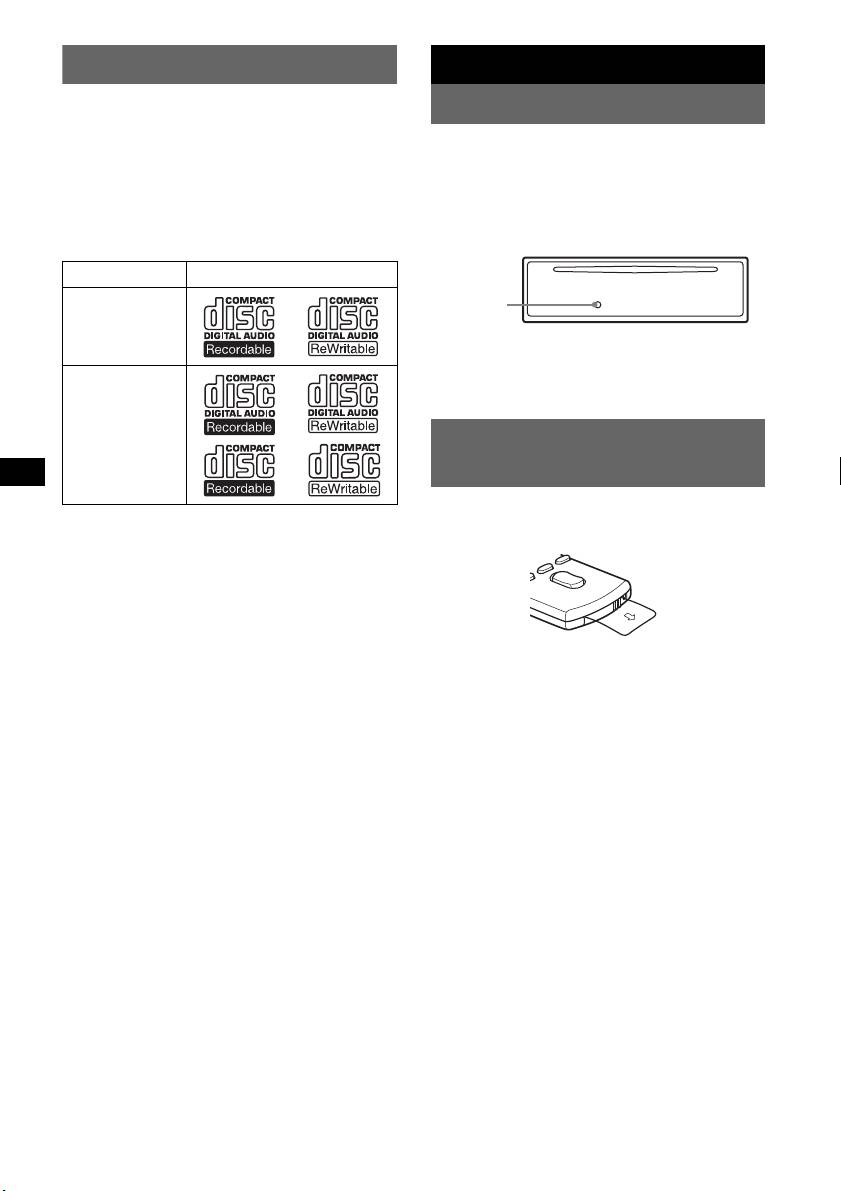
Resetting the unit
Disc Player. You can enjoy your drive with the
following functions.
Before operating the unit for the first time, or
• CD playback
after replacing the car battery or changing the
You can play CD-DA (also containing CD
connections, you must reset the unit.
1
TEXT*
), CD-R/CD-RW (MP3/WMA/AAC
Detach the front panel and press the RESET
files also containing Multi Session (
page 16))
button with a pointed object, such as a ball-point
and ATRAC CD (ATRAC3 and ATRAC3plus
pen.
format (
page 17)).
Type of discs Label on the disc
RESET
button
CD-DA
Note
Pressing the RESET button will erase the clock setting
and some stored contents.
MP3
WMA
AAC
Preparing the card remote
ATRAC CD
commander
Before using the card remote commander for the
• Radio reception
first time, remove the insulation film.
– You can store up to 6 stations per band (FM1,
FM2, FM3, MW and LW).
– BTM (Best Tuning Memory): the unit selects
strong signal stations and stores them.
• RDS services
– You can use FM station with Radio Data
System (RDS).
• Sound adjustment
– EQ3 stage2: You can choose any one of 7
preset equalizer curves.
• Optional unit operation
Various kinds of audio devices can be
connected, and operated from the unit.
– iPod: iPod connection can be made by the
dock connector cable on the rear of the unit.
– USB device: A Mass Storage Class USB
2
device, or “Walkman” (AAD*
) can be
connected to the front USB terminal. For
details on a usable devices, please refer to
About USB devices (
page 16) or the Sony
support website (page 22).
– Portable audio device: An AUX input
jack on the front of the unit allows connection
of a portable audio device (analog
connection).
– CD/MD changers: CD/MD changers can be
connected to the SONY BUS at the rear of the
unit.
*1 A CD TEXT disc is a CD-DA that includes
information such as disc, artist and track name.
*2 ATRAC Audio Device
4


