
Sony CDX-GT50UI: Cleaning the connectors Maintenance Replacing the lithium battery of the card remote commander Removing the unit Fuse replacement
Cleaning the connectors Maintenance Replacing the lithium battery of the card remote commander Removing the unit Fuse replacement: Sony CDX-GT50UI
Table of contents
- Table of Contents
- Welcome ! Resetting the unit Preparing the card remote commander
- Setting the clock Attaching the front panel Detaching the front panel
- Location of controls and basic operations Main unit
- wg Number buttons 7
- CD Radio Storing and receiving stations Display items Storing automatically — BTM Storing manually Repeat and shuffle play Receiving the stored stations Tuning automatically
- Setting AF and TA RDS Overview Display items
- Playing back USB devices Selecting PTY Display items Setting CT
- Listening to music on a Mass Storage Class type audio device Playing back iPod Playing tracks Listening to music on “Walkman” (ATRAC Audio Device)
- Repeat and shuffle Play Scan Selecting Album, Artist or Playlist
- Changing the sound settings Adjusting setup items — SET Adjusting the sound characteristics — BAL/FAD/SUB Customizing the equalizer curve — EQ3
- Using optional equipment Auxiliary audio equipment CD/MD changer
- Precautions Notes on discs
- About USB devices Playback order of MP3/WMA/AAC files
- About MP3 files About ATRAC files About WMA files About iPod About AAC files
- Cleaning the connectors Maintenance Replacing the lithium battery of the card remote commander Removing the unit Fuse replacement
- Specifications
- CD/MD playback Troubleshooting General Radio reception
- RDS USB playback Error displays/Messages
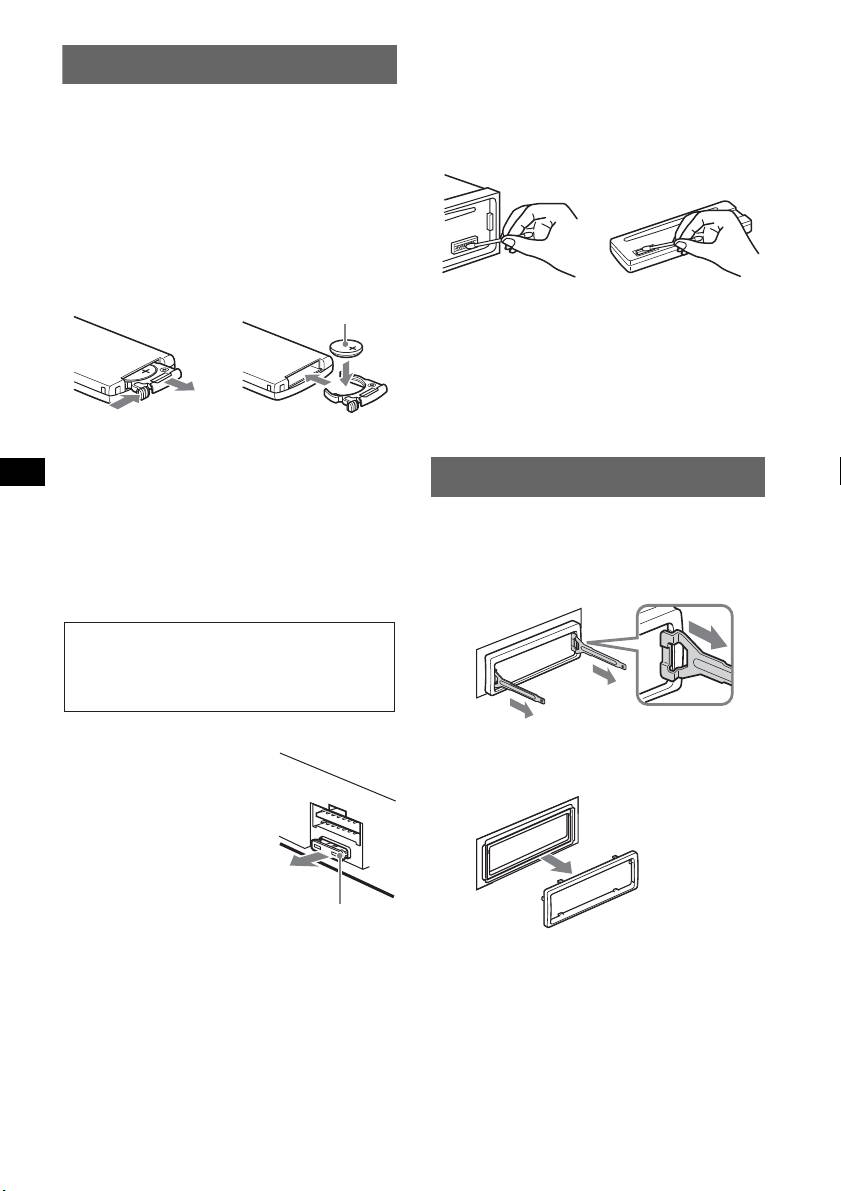
Cleaning the connectors
Maintenance
The unit may not function properly if the connectors
between the unit and the front panel are not clean. In
Replacing the lithium battery of the
order to prevent this, detach the front panel (page 5)
and clean the connectors with a cotton swab. Do not
card remote commander
apply too much force. Otherwise, the connectors
Under normal conditions, the battery will last
may be damaged.
approximately 1 year. (The service life may be
shorter, depending on the conditions of use.)
When the battery becomes weak, the range of the
card remote commander becomes shorter.
Replace the battery with a new CR2025 lithium
battery. Use of any other battery may present a
risk of fire or explosion.
Notes
• For safety, turn off the ignition before cleaning the
connectors, and remove the key from the ignition
switch.
• Never touch the connectors directly with your fingers
or with any metal device.
Notes on the lithium battery
• Keep the lithium battery out of the reach of children.
Removing the unit
Should the battery be swallowed, immediately
consult a doctor.
1 Remove the protection collar.
• Wipe the battery with a dry cloth to assure a good
contact.
1Detach the front panel (page 5).
• Be sure to observe the correct polarity when
installing the battery.
2Engage the release keys together with the
• Do not hold the battery with metallic tweezers,
protection collar.
otherwise a short-circuit may occur.
Fuse replacement
3Pull out the release keys to remove the
When replacing the fuse, be
sure to use one matching the
protection collar.
amperage rating stated on the
original fuse. If the fuse blows,
check the power connection and
replace the fuse. If the fuse
blows again after replacement,
there may be an internal
malfunction. In such a case,
consult your nearest Sony
dealer.
18
1
Main unit
Back of the front
+ side up
panel
2
c
WARNING
Battery may explode if mistreated.
Do not recharge, disassemble, or dispose of
in fire.
Orient the release
keys as shown.
Fuse (10A)


