
Sony CDX-GT50UI: Location of controls and basic operations Main unit
Location of controls and basic operations Main unit: Sony CDX-GT50UI
Table of contents
- Table of Contents
- Welcome ! Resetting the unit Preparing the card remote commander
- Setting the clock Attaching the front panel Detaching the front panel
- Location of controls and basic operations Main unit
- wg Number buttons 7
- CD Radio Storing and receiving stations Display items Storing automatically — BTM Storing manually Repeat and shuffle play Receiving the stored stations Tuning automatically
- Setting AF and TA RDS Overview Display items
- Playing back USB devices Selecting PTY Display items Setting CT
- Listening to music on a Mass Storage Class type audio device Playing back iPod Playing tracks Listening to music on “Walkman” (ATRAC Audio Device)
- Repeat and shuffle Play Scan Selecting Album, Artist or Playlist
- Changing the sound settings Adjusting setup items — SET Adjusting the sound characteristics — BAL/FAD/SUB Customizing the equalizer curve — EQ3
- Using optional equipment Auxiliary audio equipment CD/MD changer
- Precautions Notes on discs
- About USB devices Playback order of MP3/WMA/AAC files
- About MP3 files About ATRAC files About WMA files About iPod About AAC files
- Cleaning the connectors Maintenance Replacing the lithium battery of the card remote commander Removing the unit Fuse replacement
- Specifications
- CD/MD playback Troubleshooting General Radio reception
- RDS USB playback Error displays/Messages
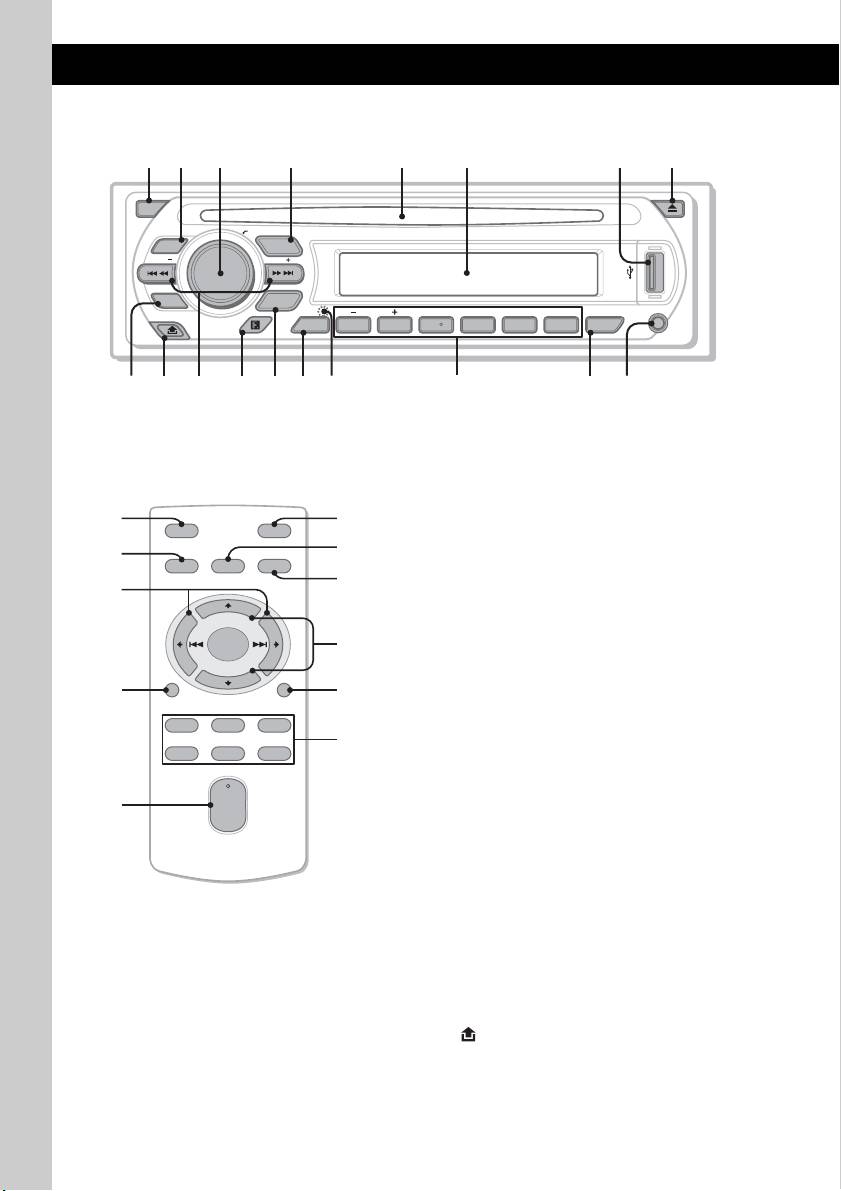
Location of controls and basic operations
Main unit
OFF
PUSH SELECT
EQ3
SOURCE
SEEK
SEEK
PTY
MODE
DIM REP SHUF
GP/ALBM
PAUSE
DSPL
123456
AF
/
TA
AUX
Card remote commander
Refer to the pages listed for details. The
corresponding buttons on the card remote
RM-X151
commander control the same functions as those
on the unit.
A OFF button
To power off; stop the source.
B EQ3 (equalizer) button 13
To select an equalizer type (XPLOD,
VOCAL, EDGE, CRUISE, SPACE,
GRAVITY, CUSTOM or OFF).
C Volume control dial/select button 13
To adjust volume (rotate); select setup items
(press and rotate).
D SOURCE button
To power on; change the source (Radio/CD/
1
MD*
/USB/AUX/PD).
E Disc slot
Insert the disc (label side up), playback
starts.
F Display window
G USB terminal 10
To connect to the USB device.
H Z (eject) button
To eject the disc.
I PTY (Program Type) button 10
To select PTY in RDS.
J (front panel release) button 5
6
1 2
q
j
q
h
4 5 863
CDX-GT50UI
q
a
q
d
q
;
9 q
s
q
f
q
g
7
q
k
1
wa
OFF
ATT
ws
4
SOURCE
SEL
MODE
qd
ql
+
wd
–
qf
DSPL
SCRL
wf
132
wg
465
+
VOL
w;
–


