
Sony CDX-GT50UI: About USB devices Playback order of MP3/WMA/AAC files
About USB devices Playback order of MP3/WMA/AAC files: Sony CDX-GT50UI
Table of contents
- Table of Contents
- Welcome ! Resetting the unit Preparing the card remote commander
- Setting the clock Attaching the front panel Detaching the front panel
- Location of controls and basic operations Main unit
- wg Number buttons 7
- CD Radio Storing and receiving stations Display items Storing automatically — BTM Storing manually Repeat and shuffle play Receiving the stored stations Tuning automatically
- Setting AF and TA RDS Overview Display items
- Playing back USB devices Selecting PTY Display items Setting CT
- Listening to music on a Mass Storage Class type audio device Playing back iPod Playing tracks Listening to music on “Walkman” (ATRAC Audio Device)
- Repeat and shuffle Play Scan Selecting Album, Artist or Playlist
- Changing the sound settings Adjusting setup items — SET Adjusting the sound characteristics — BAL/FAD/SUB Customizing the equalizer curve — EQ3
- Using optional equipment Auxiliary audio equipment CD/MD changer
- Precautions Notes on discs
- About USB devices Playback order of MP3/WMA/AAC files
- About MP3 files About ATRAC files About WMA files About iPod About AAC files
- Cleaning the connectors Maintenance Replacing the lithium battery of the card remote commander Removing the unit Fuse replacement
- Specifications
- CD/MD playback Troubleshooting General Radio reception
- RDS USB playback Error displays/Messages
• Before playing, clean the discs
with a commercially available
About USB devices
cleaning cloth. Wipe each disc
• Mass Storage Class and ATRAC Audio Device
from the center out. Do not use
type USB devices compliant with the USB
solvents such as benzine,
standard can be used. However, this unit cannot
thinner, commercially available
recognize USB devices via a USB hub, and is not
cleaners, or antistatic spray
compatible with devices that have a hub function.
intended for analog discs.
For details on the compatibility of your USB
device, visit the Sony support website (page 22).
Notes on CD-R/CD-RW discs
• Corresponding codecs differ depending on device
type.
• Some CD-Rs/CD-RWs (depending on the
– Mass Storage Class: MP3/WMA/AAC
equipment used for its recording or the condition
– ATRAC Audio Device: ATRAC/MP3/WMA/
of the disc) may not play on this unit.
AAC
• You cannot play a CD-R/a CD-RW that is not
• DRM (Digital Rights Management) files other
finalized.
than ATRAC cannot be played.
• The unit is compatible with the ISO 9660 level 1/
• Displayable data are as follows.
level 2 format, Joliet/Romeo in the expansion
Mass Storage Class:
format, and Multi Session.
– Folders (Albums): 512, Files (Tracks): 65535
• The maximum number of:
ATRAC Audio Device: ATRAC/MP3/WMA/AAC
– folders (albums): 150 (including root and empty
– Albums/Artists/Playlists: 65535, Tracks: 65535
folders).
– files (tracks) and folders contained in a disc: 300
Notes on USB devices
(if a folder/file names contain many characters,
• When using a cable, use the one supplied with the
this number may become less than 300).
USB devices to connect.
– displayable characters for a folder/file name is
• Do not use USB devices that are so large or heavy
32 (Joliet), or 64 (Romeo).
that may interfere with driving operations.
• When the disc is recorded in Multi Session, only
• Do not leave USB devices in a parked car, as
malfunctions may result.
the first track of the first session format is
• It may take time for playback to begin, depending on
recognized and played (any other format is
the amount of recorded data.
skipped). The priority of the format is CD-DA,
• Backup of data in USB devices is recommended.
ATRAC CD and MP3/WMA/AAC.
– When the first track is a CD-DA, only CD-DA of
the first session is played.
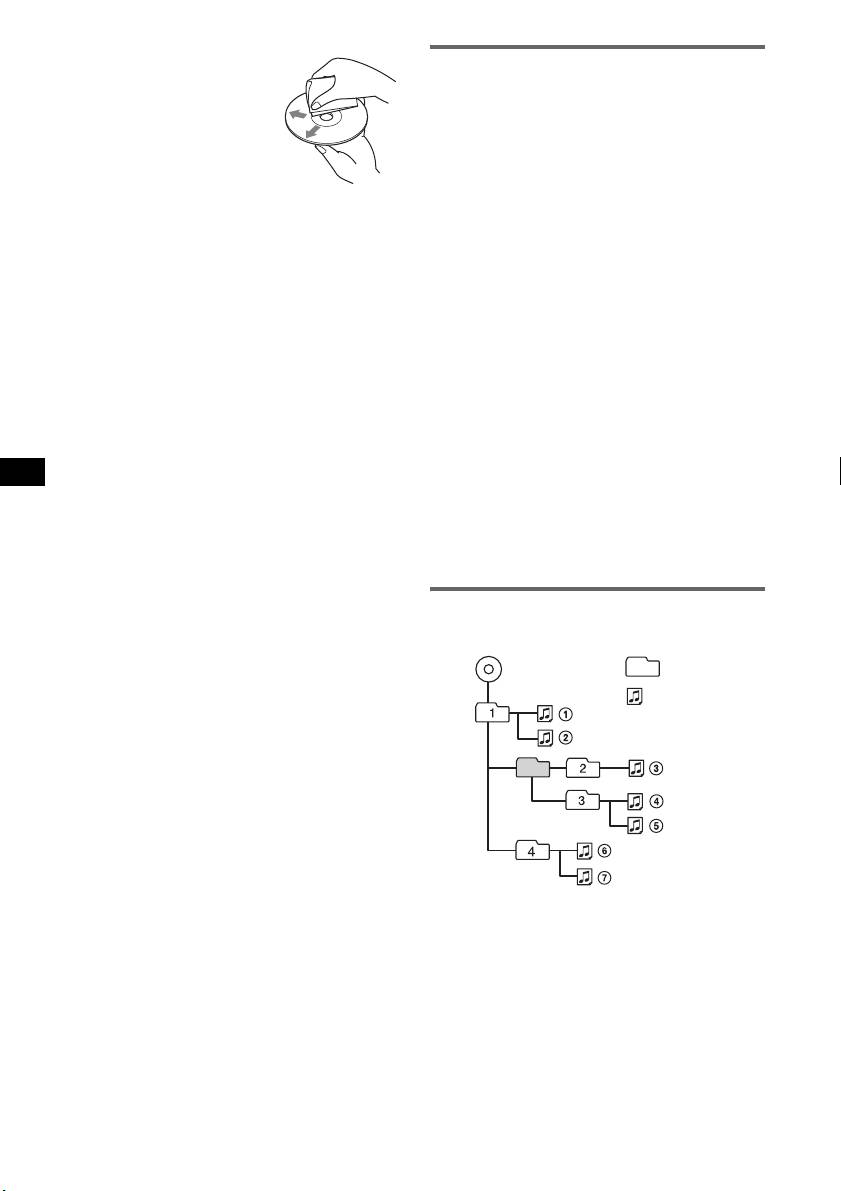
Playback order of MP3/WMA/AAC
– When the first track is not a CD-DA, an ATRAC
CD or MP3/WMA/AAC session is played. If the
files
disc has no data in any of these formats, “NO
Folder
MP3/WMA/AAC
MUSIC” is displayed.
(album)
MP3/WMA/
Music discs encoded with copyright
AAC file
protection technologies
(track)
This product is designed to play back discs that
conform to the Compact Disc (CD) standard.
Recently, various music discs encoded with
copyright protection technologies are marketed by
some record companies. Please be aware that among
those discs, there are some that do not conform to
the CD standard and may not be playable by this
product.
Note on DualDiscs
A DualDisc is a two sided disc product which
mates DVD recorded material on one side with
digital audio material on the other side. However,
since the audio material side does not conform to
the Compact Disc (CD) standard, playback on this
product is not guaranteed.
16


