
Sony CDX-GT50UI: Playing back USB devices Selecting PTY Display items Setting CT
Playing back USB devices Selecting PTY Display items Setting CT: Sony CDX-GT50UI
Table of contents
- Table of Contents
- Welcome ! Resetting the unit Preparing the card remote commander
- Setting the clock Attaching the front panel Detaching the front panel
- Location of controls and basic operations Main unit
- wg Number buttons 7
- CD Radio Storing and receiving stations Display items Storing automatically — BTM Storing manually Repeat and shuffle play Receiving the stored stations Tuning automatically
- Setting AF and TA RDS Overview Display items
- Playing back USB devices Selecting PTY Display items Setting CT
- Listening to music on a Mass Storage Class type audio device Playing back iPod Playing tracks Listening to music on “Walkman” (ATRAC Audio Device)
- Repeat and shuffle Play Scan Selecting Album, Artist or Playlist
- Changing the sound settings Adjusting setup items — SET Adjusting the sound characteristics — BAL/FAD/SUB Customizing the equalizer curve — EQ3
- Using optional equipment Auxiliary audio equipment CD/MD changer
- Precautions Notes on discs
- About USB devices Playback order of MP3/WMA/AAC files
- About MP3 files About ATRAC files About WMA files About iPod About AAC files
- Cleaning the connectors Maintenance Replacing the lithium battery of the card remote commander Removing the unit Fuse replacement
- Specifications
- CD/MD playback Troubleshooting General Radio reception
- RDS USB playback Error displays/Messages
Local Link function (UK only)
USB devices
This function enables you to select other local
stations in the area, even if they are not stored on
your number buttons.
Playing back USB devices
1 During FM reception, press a number button
((1) to (6)) on which a local station is stored.
2 Within 5 seconds, press again a number button
of the local station.
Repeat this procedure until the local station is
received.
Selecting PTY
1 Press (PTY) during FM reception.
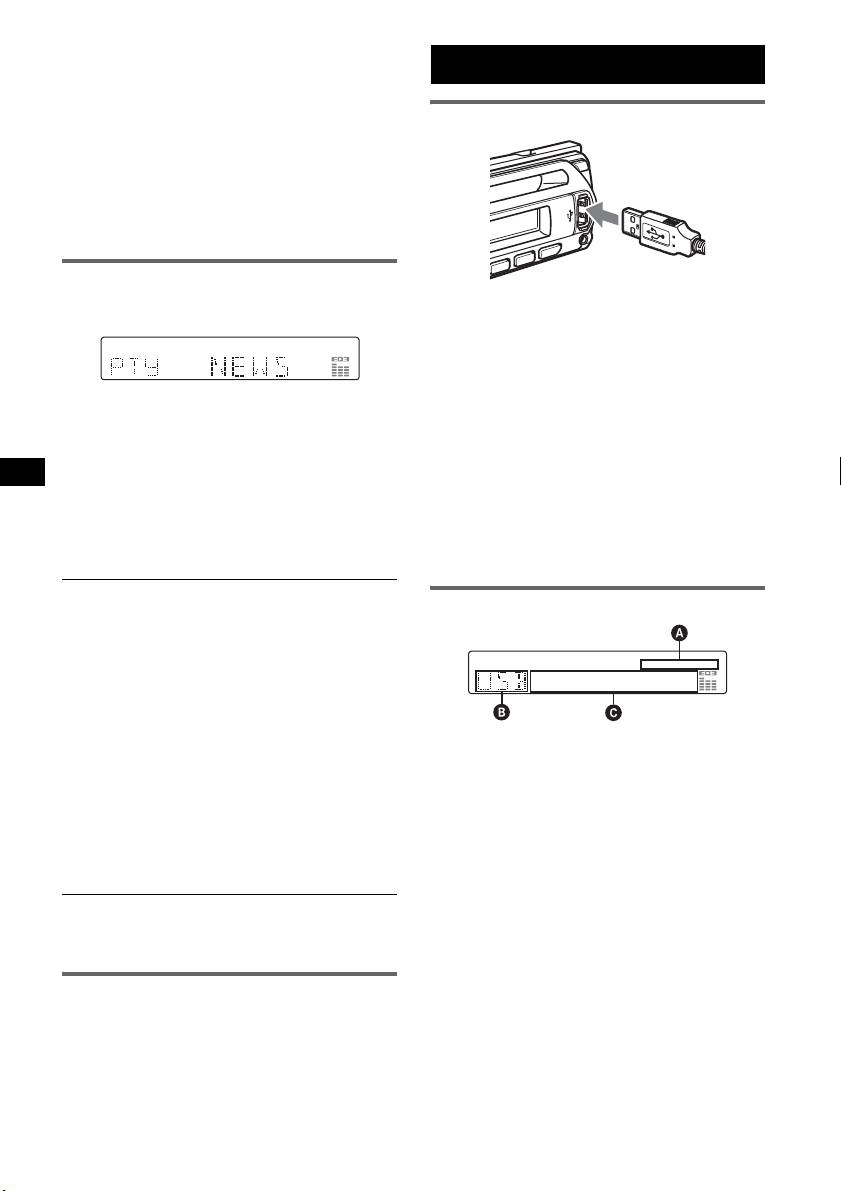
1 Connect the USB device to the USB
terminal.
Playback starts.
If a USB device is already connected, press
(SOURCE) repeatedly until “USB” appears, to
The current program type name appears if the
start playback.
station is transmitting PTY data.
Press (OFF) to stop playback.
2 Press (PTY) repeatedly until the
desired program type appears.
Notes
• Before removing a USB device, be sure to stop
3 Press (S EEK) –/+.
playback first. If you remove your USB device during
The unit starts to search for a station
playback, data in the USB device may be damaged.
broadcasting the selected program type.
• Do not use USB devices so large or heavy that they
may fall down due to vibration, or cause a loose
connection.
Type of programs
NEWS (News), AFFAIRS (Current Affairs),
Display items
INFO (Information), SPORT (Sports),
EDUCATE (Education), DRAMA (Drama),
CULTURE (Culture), SCIENCE (Science),
VARIED (Varied), POP
M (Popular Music),
ROCK
M (Rock Music), EASY M (Easy
Listening), LIGHT
M (Light Classical),
CLASSICS (Classical), OTHER
M (Other
Music Type), WEATHER (Weather),
A AAC/WMA/ATRAC/MP3 indication
FINANCE (Finance), CHILDREN (Children’s
B ATRAC Audio Device: ALB, ART, PLY
Programs), SOCIAL
A (Social Affairs),
Mass Storage Class: USB
RELIGION (Religion), PHONE
IN (Phone In),
C Track/album/group number, Disc/artist/
TRAVEL (Travel), LEISURE (Leisure), JAZZ
album/group/track name, Elapsed playing
(Jazz Music), COUNTRY (Country Music),
time, Text information, Clock
NATION
M (National Music), OLDIES (Oldies
To change display items C, press (D SPL);
Music), FOLK
M (Folk Music), DOCUMENT
scroll display items C, press (SCRL) on the
(Documentary)
card remote commander or set “A.SCRL-ON”
Note
(
page 13).
You cannot use this function in countries/regions
Tip
where no PTY data is available.
Displayed items will differ, depending on the recorded
format and settings. For details on MP3/WMA/AAC,
see
page 16; ATRAC CD, see page 17.
Setting CT
Note
1 Set “CT-ON” in setup (page 13).
The display differs depending on the Mass Storage
Class type USB device and ATRAC Audio Device.
Notes
• The CT function may not work even though an RDS
station is being received.
• There might be a difference between the time set by
the CT function and the actual time.
10


