
Sony CDX-GT50UI: Precautions Notes on discs
Precautions Notes on discs: Sony CDX-GT50UI
Table of contents
- Table of Contents
- Welcome ! Resetting the unit Preparing the card remote commander
- Setting the clock Attaching the front panel Detaching the front panel
- Location of controls and basic operations Main unit
- wg Number buttons 7
- CD Radio Storing and receiving stations Display items Storing automatically — BTM Storing manually Repeat and shuffle play Receiving the stored stations Tuning automatically
- Setting AF and TA RDS Overview Display items
- Playing back USB devices Selecting PTY Display items Setting CT
- Listening to music on a Mass Storage Class type audio device Playing back iPod Playing tracks Listening to music on “Walkman” (ATRAC Audio Device)
- Repeat and shuffle Play Scan Selecting Album, Artist or Playlist
- Changing the sound settings Adjusting setup items — SET Adjusting the sound characteristics — BAL/FAD/SUB Customizing the equalizer curve — EQ3
- Using optional equipment Auxiliary audio equipment CD/MD changer
- Precautions Notes on discs
- About USB devices Playback order of MP3/WMA/AAC files
- About MP3 files About ATRAC files About WMA files About iPod About AAC files
- Cleaning the connectors Maintenance Replacing the lithium battery of the card remote commander Removing the unit Fuse replacement
- Specifications
- CD/MD playback Troubleshooting General Radio reception
- RDS USB playback Error displays/Messages
Skipping albums and discs
Additional Information
1 During playback, press (1)/(2) (GP/ALBM –
/+).
Precautions
Press (1)/(2) (GP/ALBM –/
To skip
• If your car has been parked in direct sunlight,
+)
allow the unit to cool off before operating it.
album and release (hold for a
• Power antenna (aerial) will extend automatically
moment).
while the unit is operating.
album
within 2 seconds of first
Moisture condensation
continuously
releasing.
On a rainy day or in a very damp area, moisture
discs repeatedly.
condensation may occur inside the lenses and
display of the unit. Should this occur, the unit will
discs
then, press again within 2
not operate properly. In such a case, remove the disc
continuously
seconds and hold.
and wait for about an hour until the moisture has
evaporated.
Repeat and shuffle play
To maintain high sound quality
1 During playback, press (3) (REP) or (4)
Be careful not to splash juice or other soft drinks
(SHUF) repeatedly until the desired setting
onto the unit or discs.
appears.
Select To play
Notes on discs
1
DISC*
disc repeatedly.
• To keep a disc clean, do not touch its surface.
Handle the disc by its edge.
SHUF
tracks in the changer in random
• Keep your discs in their cases or disc magazines
1
CHANGER*
order.
when not in use.
2
• Do not subject discs to heat/high temperature.
SHUF ALL*
tracks in all units in random
Avoid leaving them in a parked car or on a
order.
dashboard/rear tray.
*1 When one or more CD/MD changers are
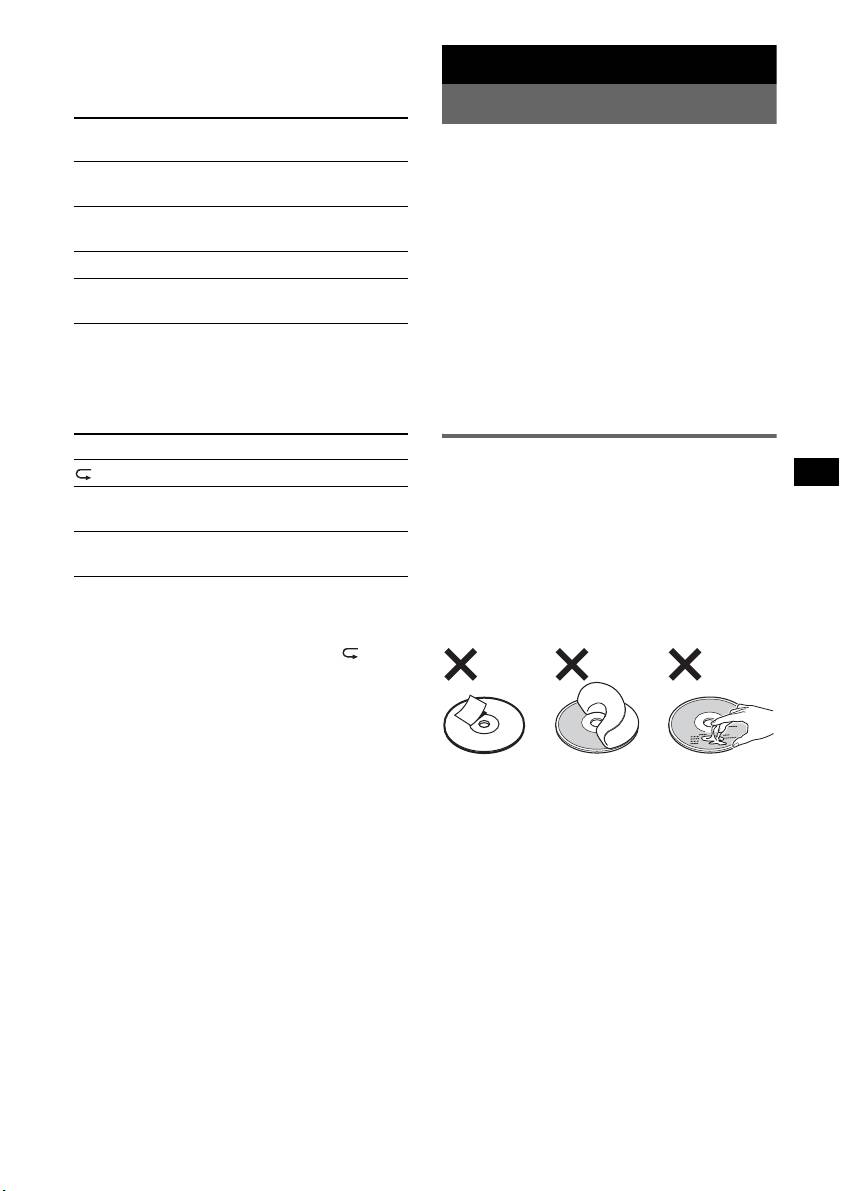
• Do not attach labels, or use discs with sticky ink/
connected.
residue. Such discs may stop spinning when used,
*2 When two or more MD changers are connected.
causing a malfunction, or may ruin the disc.
To return to normal play mode, select “ OFF”
or “SHUF OFF.”
• Do not use any discs with labels or stickers
attached.
The following malfunctions may result from using
such discs:
– Inability to eject a disc (due to a label or sticker
peeling off and jamming the eject mechanism).
– Inability to read audio data correctly (e.g.,
playback skipping, or no playback) due to heat
shrinking of a sticker or label causing a disc to
warp.
• Discs with non-standard shapes (e.g., heart,
square, star) cannot be played on this unit.
Attempting to do so may damage the unit. Do not
use such discs.
1
• You cannot play 8 cm (3
/4 in) CDs.
continue to next page t
15


