
Sony TDM-MP10: To adjust the unit’s To put the mobile phone connector position into the unit’s connector
To adjust the unit’s To put the mobile phone connector position into the unit’s connector: Sony TDM-MP10
Table of contents
- WARNING
- Compatible Sony Ericsson mobile phones
- Table of Contents
- Overview
- 1: Checking supplied items 2: List of parts locations
- 3: Installing the TDM-MP10 To connect/disconnect the unit
- To adjust the unit’s To put the mobile phone connector position into the unit’s connector
- Controlling the mobile phone Performing basic operations
- Additional Information Troubleshooting
- Precautions On safety On placement On heat buildup
- Cleaning the unit Specifications General
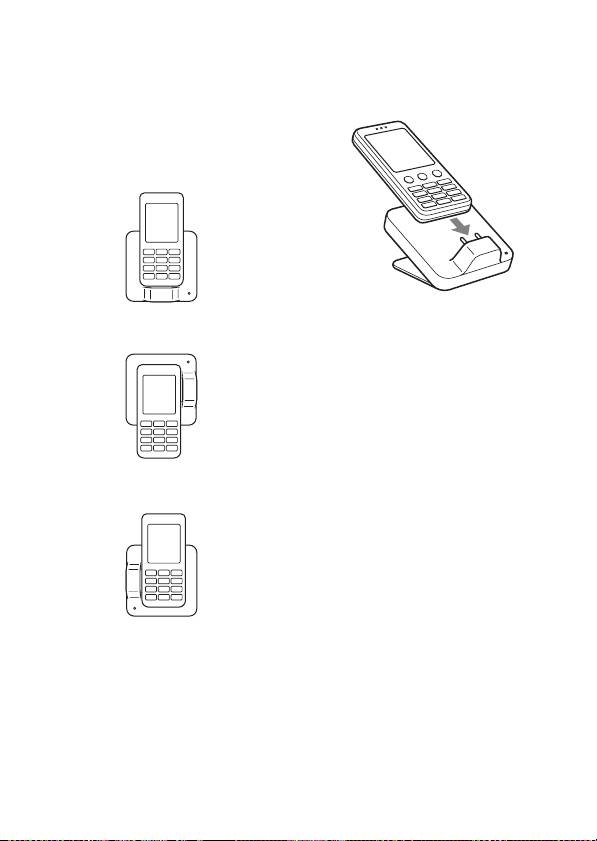
To adjust the unit’s
To put the mobile phone
connector position
into the unit’s connector
This unit can be rotated 90 degrees
Put the mobile phone into the
to the left or right according to the
unit’s connector.
position of the connector on the
mobile phone.
For a mobile phone with the
connector on the bottom
Tip
For a mobile phone with the
connector on the right side
Depending on the type of mobile phone,
there may be a gap between the back of
the mobile phone and the unit. If this
gap is large and the mobile phone is
unstable, use the supplied padding
stickers to fill the gap.
Notes
• When placing or removing the mobile
phone, do not twist or sway the
For a mobile phone with the
mobile phone, keeping it aligned with
connector on the left side
the unit, to prevent connector
damage.
• Do not carry the unit with a mobile
phone set on the connector. Doing so
may cause a malfunction.
• When placing or removing the mobile
phone, brace the unit with one hand
and take care not to press the controls
of the mobile phone by mistake.
Note
• When placing the mobile phone,
Do not excessively rotate the unit.
pause playback.
Doing so may damage the unit.
GB
8
