
Sony TDM-MP10: 3: Installing the TDM-MP10 To connect/disconnect the unit
3: Installing the TDM-MP10 To connect/disconnect the unit: Sony TDM-MP10
Table of contents
- WARNING
- Compatible Sony Ericsson mobile phones
- Table of Contents
- Overview
- 1: Checking supplied items 2: List of parts locations
- 3: Installing the TDM-MP10 To connect/disconnect the unit
- To adjust the unit’s To put the mobile phone connector position into the unit’s connector
- Controlling the mobile phone Performing basic operations
- Additional Information Troubleshooting
- Precautions On safety On placement On heat buildup
- Cleaning the unit Specifications General
3: Installing the TDM-MP10
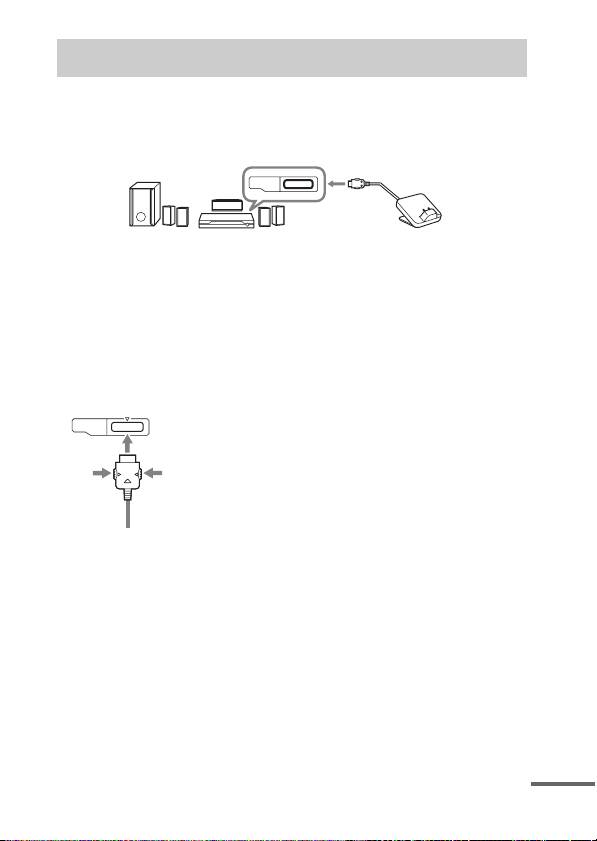
Connect and position the TDM-MP10 as illustrated below.
DIGITAL MEDIA
PORT cable
DMPORT
AV system (Sony DAV
TDM-MP10
series, STR series, etc.)
Note
This unit turns on/off automatically whenever the connected AV system (DAV
series, etc.) turns on/off.
To connect/disconnect
Connecting
the unit
1 Connect the DIGITAL MEDIA
PORT cable of this unit to the
DMPORT
To DMPORT jack
DIGITAL MEDIA PORT jack of
Connect the cable
an AV system (DAV series,
so that both f
etc.). Make sure the AV system
marks are aligned.
is turned off before connecting.
2 Turn on the AV system with a
DIGITAL MEDIA PORT jack
To remove the DIGITAL MEDIA PORT
connected to this unit, and
cable from the DMPORT jack, press
both side buttons.
select the DIGITAL MEDIA
PORT function.
Disconnecting
Before disconnecting, turn off the
AV system.
continued
GB
7
Top 10 manuals
100.00
NZXT HALE90 1000W99.99
Samsung SM-R38099.97
AEG BSB 18C99.97
Dell 2700W99.97
Smeg KSEC70X99.96
Beurer HDE 4099.96
Pyramida KH 50 v.299.96
MSI CSM-H81M-P3299.96
AEG HR 562799.95
Melissa 640-048