
Sony CPD-E200E: Precautions
Precautions: Sony CPD-E200E
Table of contents
- Owner’s Record
- Table of Contents
- Precautions
- Identifying parts and controls
- Setup Step 1:Connect your monitor to your computer Step 2:Connect the power cord
- Step 3:Turn on the monitor and Selecting the on-screen menu computer language (LANG)
- Customizing Your Monitor Navigating the menu
- Adjusting the brightness and contrast Adjusting the centering of the picture (CENTER) Adjusting the size of the picture (SIZE)
- Enlarging or reducing the picture Adjusting the color of the picture (ZOOM) (COLOR) Adjusting the shape of the picture (GEOM) Adjusting the convergence (CONV)
- Additional settings (OPTION)
- Helpful hints and information Resetting the adjustments
- Technical Features Troubleshooting
- Trouble symptoms and remedies Symptom Check these items
- Symptom Check these items
- Self-diagnosis function Specifications
D:\###sagyou\0622-yama\386765711CPDE200EAEP\01GB03BAS-AEP.fm
masterpage:Left
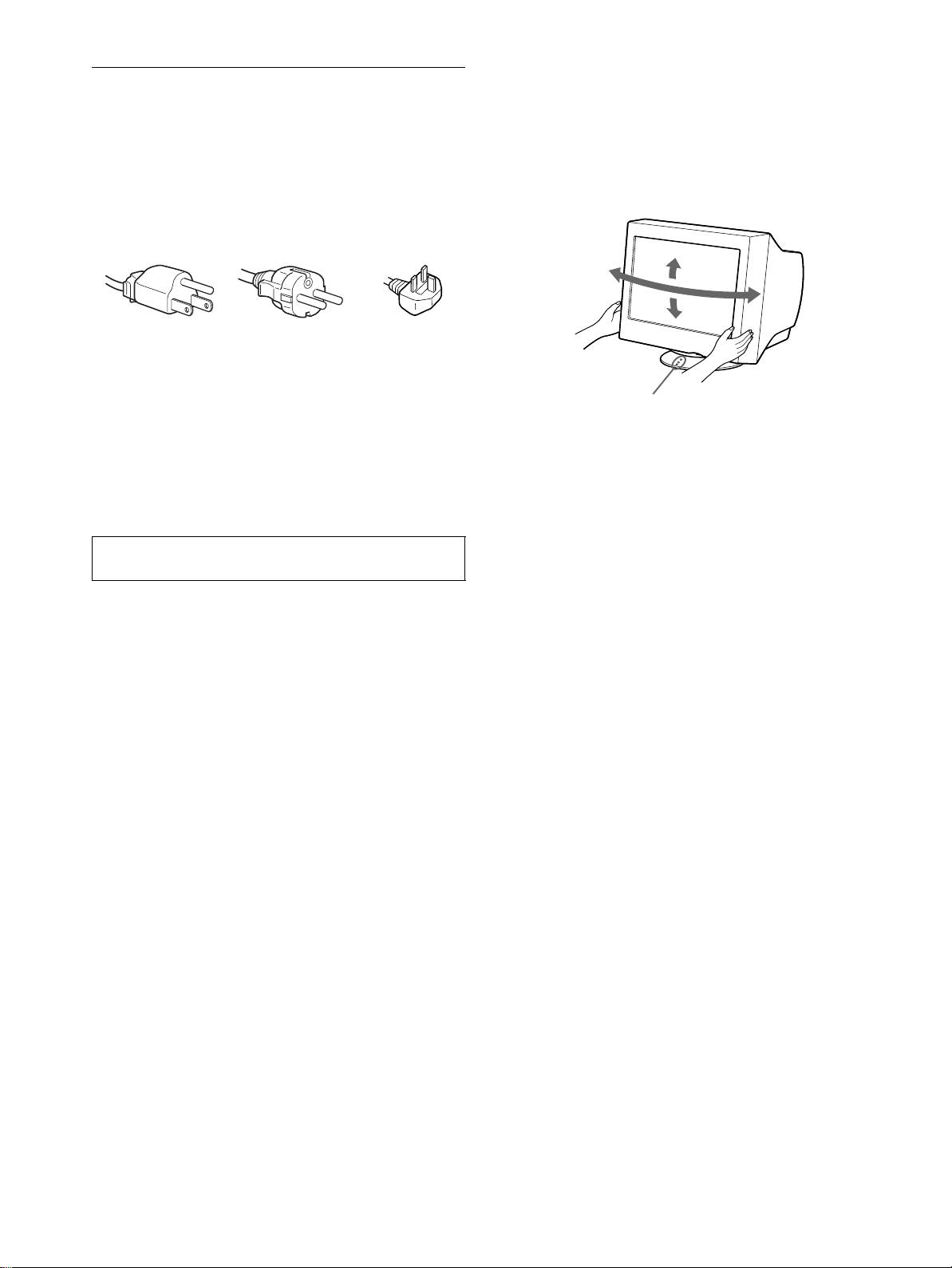
Use of the tilt-swivel
Precautions
This monitor can be adjusted within the angles shown below. To
find the center of the monitor’s turning radius, align the center of
Warning on power connections
the monitor’s screen with the centering dots on the stand.
• Use the supplied power cord. If you use a different power cord,
Hold the monitor at the bottom with both hands when you turn it
be sure that it is compatible with your local power supply.
horizontally or vertically. Be careful not to pinch your fingers at
For the customers in the UK
the back of the monitor when you tilt the monitor up vertically.
If you use the monitor in the UK, be sure to use the supplied UK
power cable.
Example of plug types
for 100 to 120 V AC for 200 to 240 V AC for 240 V AC only
• Before disconnecting the power cord, wait at least 30 seconds
after turning off the power to allow the static electricity on the
screen’s surface to discharge.
• After the power is turned on, the screen is demagnetized
(degaussed) for about 5 seconds. This generates a strong
magnetic field around the screen which may affect data stored
on magnetic tapes and disks placed near the monitor. Be sure to
keep magnetic recording equipment, tapes, and disks away
from the monitor.
The equipment should be installed near an easily accessible
outlet.
Installation
Do not install the monitor in the following places:
• on surfaces (rugs, blankets, etc.) or near materials (curtains,
draperies, etc.) that may block the ventilation holes
• near heat sources such as radiators or air ducts, or in a place
subject to direct sunlight
• in a place subject to severe temperature changes
• in a place subject to mechanical vibration or shock
• on an unstable surface
• near equipment which generates magnetism, such as a
transformer or high voltage power lines
• near or on an electrically charged metal surface
Maintenance
• Clean the screen with a soft cloth. If you use a glass cleaning
liquid, do not use any type of cleaner containing an anti-static
solution or similar additive as this may scratch the screen’s
coating.
• Do not rub, touch, or tap the surface of the screen with sharp or
abrasive items such as a ballpoint pen or screwdriver. This type
of contact may result in a scratched picture tube.
• Clean the cabinet, panel and controls with a soft cloth lightly
moistened with a mild detergent solution. Do not use any type
of abrasive pad, scouring powder or solvent, such as alcohol or
benzene.
Transportation
When you transport this monitor for repair or shipment, use the
original carton and packing materials.
4
3-867-657-11 (1)
CPD-E200E
90°
15°
90°
5°
Centering dots
01GB01COV-AEP.book Page 4 Monday, June 21, 1999 7:09 PM
