
Sony Bravia KDL-26U25xx: Overview of the remote
Overview of the remote: Sony Bravia KDL-26U25xx
Table of contents
- Trademark information Introduction Disposal of the TV set Notice for Digital TV function
- Table of Contents
- 1: Checking the 2: Connecting an aerial/ accessories VCR
- 3: Bundling the cables 4: Preventing the TV from toppling over 5: Selecting the language and country/region
- 6: Auto-tuning the TV
- Safety information Installation/Set-up Mains lead
- Precautions Prohibited Usage Broken pieces: When not in use For children If the following problems occur...
- Overview of the remote
- Overview of the TV buttons and indicators Watching TV
- Additional operations To access Text Picture Freeze PIP in PC Mode (Picture in Picture)
- Checking the Digital Electronic Programme Guide (EPG) To Do this
- Using the Favourite list To Do this
- Navigating through menus
- Picture Adjustment menu
- Sound Adjustment menu
- Features menu
- Timer Set-up menu
- Sound Offset Manual Programme Preset
- Digital Set-up menu
- Connecting optional equipment Connecting to the TV (side)
- Connecting to the TV (rear)
- Viewing pictures from connected equipment
- Specifications
- Troubleshooting Picture Problem Cause/Remedy
- Sound Channels General
010COV.book Page 9 Tuesday, June 26, 2007 12:18 PM
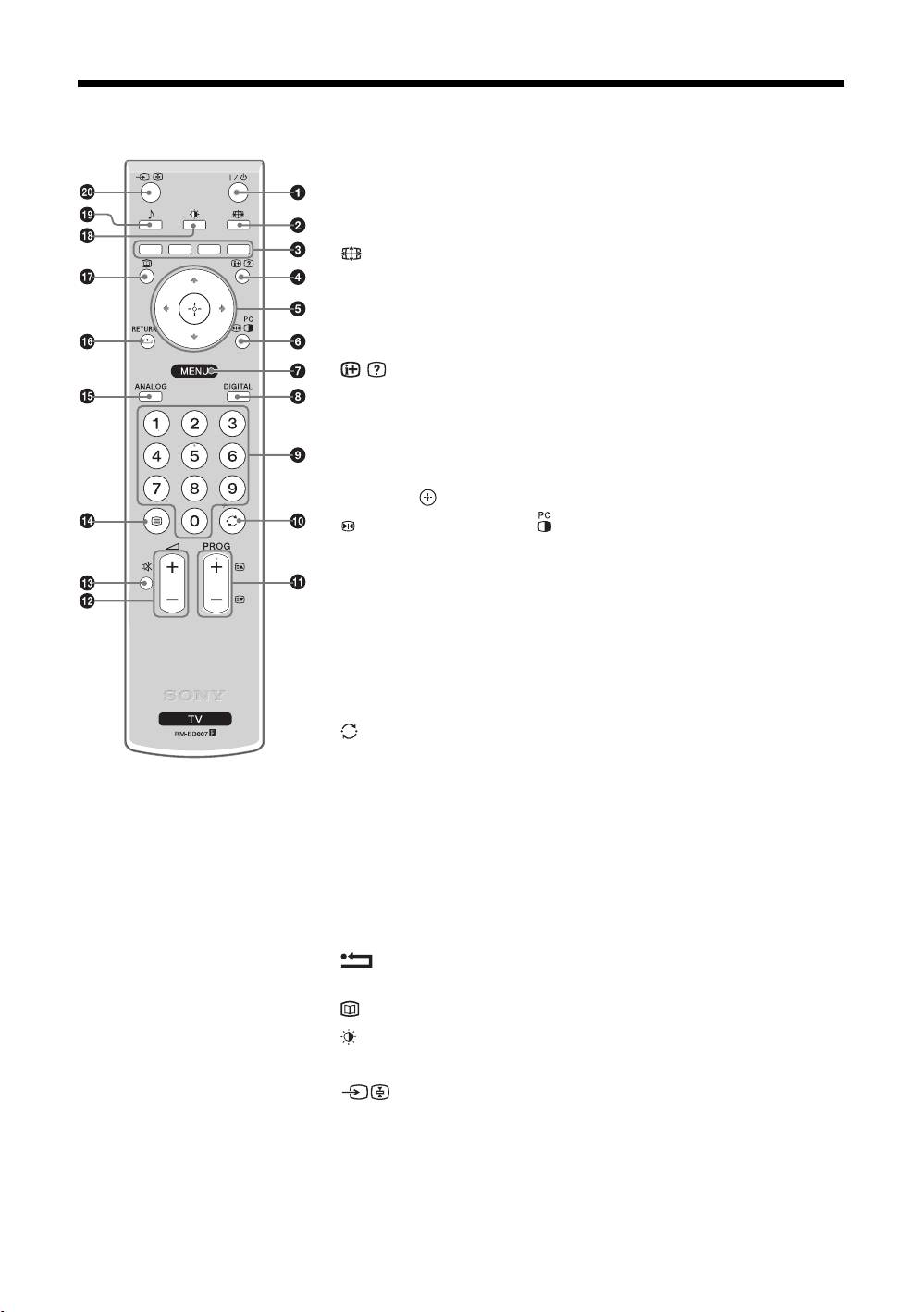
Overview of the remote
1 "/1 – TV standby
Switches the TV on and off from standby mode.
Note
To disconnect the TV completely, pull the plug from the mains.
2 – Screen mode (page 11)
3 Coloured buttons
• In digital mode (page 12, 13): Selects the options at the bottom of the
Favourite and EPG digital menus.
• In Text mode (page 11): Used for Fastext.
4 / – Info / Text reveal
• In digital mode: Displays brief details of the programme currently being
watched.
• In analogue mode: Displays information such as current channel number and
screen mode.
• In Text mode (page 11): Reveals hidden information (e.g., answers to a quiz).
5 F/f/G/g/ (page14)
6 Picture Freeze (page 11)/
PIP in PC Mode (page 11)
• In TV mode: Freezes the TV picture.
• In PC mode: Displays a small picture (PIP).
7 MENU (page 14)
8 DIGITAL – Digital mode (page 10)
9 Number buttons
• In TV mode: Selects channels. To select channel numbers 10 and above using
the number buttons, enter the second and third digits within two seconds.
• In Text mode: Enters the three digit page number to select the page.
0 – Previous channel
Returns to the previous channel watched (for more than five seconds).
qa PROG +/- (page 10)
• In TV mode: Selects the next (+) or previous (-) channel.
• In Text mode: Selects the next (+) or previous (-) page.
qs 2 +/- – Volume
qd % – Mute
qf
/ – Text (page 11)
qg ANALOG – Analogue mode (page 10)
qh / RETURN
Returns to the previous screen of any displayed menu.
qj – EPG (Digital Electronic Programme Guide) (page 12)
qk – Picture mode (page 15)
ql 9 – Sound effect (page 16)
w; – Input select / Text hold
• In TV mode (page 21): Selects the input source from equipment connected to
the TV sockets.
• In Text mode (page 11): Holds the current page.
Tip
The PROG + and number 5 buttons have tactile dots. Use the tactile dots as references when operating the TV.
GB
9
