
Sony Bravia KDL-26U25xx: Connecting optional equipment Connecting to the TV (side)
Connecting optional equipment Connecting to the TV (side): Sony Bravia KDL-26U25xx
Table of contents
- Trademark information Introduction Disposal of the TV set Notice for Digital TV function
- Table of Contents
- 1: Checking the 2: Connecting an aerial/ accessories VCR
- 3: Bundling the cables 4: Preventing the TV from toppling over 5: Selecting the language and country/region
- 6: Auto-tuning the TV
- Safety information Installation/Set-up Mains lead
- Precautions Prohibited Usage Broken pieces: When not in use For children If the following problems occur...
- Overview of the remote
- Overview of the TV buttons and indicators Watching TV
- Additional operations To access Text Picture Freeze PIP in PC Mode (Picture in Picture)
- Checking the Digital Electronic Programme Guide (EPG) To Do this
- Using the Favourite list To Do this
- Navigating through menus
- Picture Adjustment menu
- Sound Adjustment menu
- Features menu
- Timer Set-up menu
- Sound Offset Manual Programme Preset
- Digital Set-up menu
- Connecting optional equipment Connecting to the TV (side)
- Connecting to the TV (rear)
- Viewing pictures from connected equipment
- Specifications
- Troubleshooting Picture Problem Cause/Remedy
- Sound Channels General
010COV.book Page 21 Tuesday, June 26, 2007 12:18 PM
Using Optional Equipment
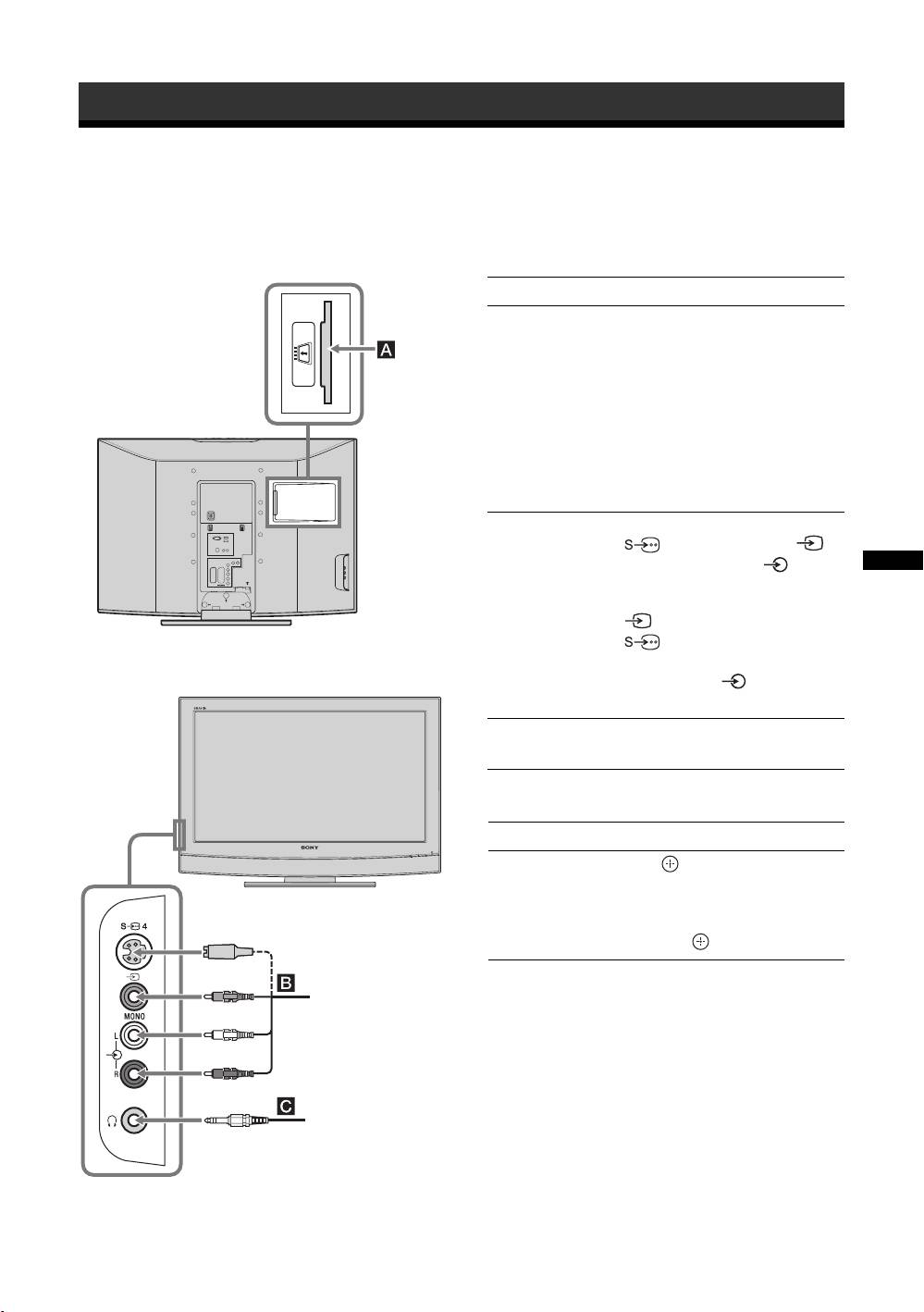
Connecting optional equipment
You can connect a wide range of optional equipment to your TV. Connecting cables are not supplied.
Connecting to the TV (side)
To connect Do this
Conditional Access
To use Pay Per View services.
Module (CAM) A
For details, refer to the instruction
manual supplied with your CAM.
To use the CAM, remove the
rubber cover from the CAM slot.
Switch off the TV when inserting
your CAM into the CAM slot.
When you do not use the CAM, we
recommend that you replace the
cover on the CAM slot.
S VHS/Hi8/DVC
Connect to the S video socket
camcorder B
4 or the video socket 4,
and the audio sockets 4. To
avoid picture noise, do not connect
Using Optional Equipment
the camcorder to the video socket
4 and the S video socket
4 at the same time. If you
connect mono equipment, connect
to the L socket 4, and set
“Dual Sound” to “A” (page 16).
Headphones C Connect to the i socket to listen to
sound from the TV on headphones.
Additional operations
To Do this
Access the Input
Press to access the Input signal
signal index table
index table. (Then, only in
analogue mode, press
g.) To
select an input source, press
F/f,
then press .
S VHS/Hi8/DVC
camcorder
Headphones
GB
21
