
Sony ST-SB920: Receiving Broadcasts
Receiving Broadcasts: Sony ST-SB920
Table of contents
- Precautions
- TABLE OF CONTENTS Welcome! About This Manual
- Unpacking Hooking Up the System
- FM aerial hookups Amplifier hookups
- Selecting the German Display Changing the FM Reception Mode
- Receiving Preset Stations
- About the Menu Entry System Customizing the Display
- Receiving Broadcasts
- Tips for Better FM Reception Presetting Radio Stations
- Naming the Preset Stations
- Organizing the Preset Stations
- Troubleshooting Specifications
- Index
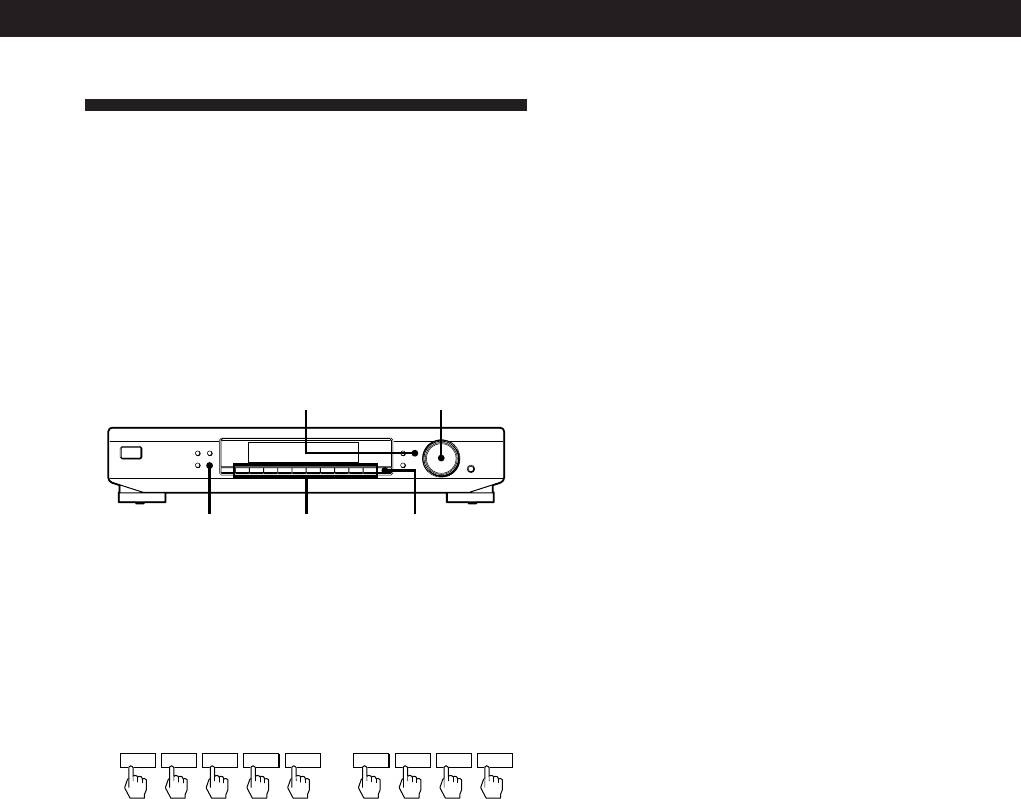
Advanced Tuner Operations
z If you enter a frequency not covered by the tuning
interval
Receiving Broadcasts
The entered value is automatically rounded up or down
to the closest covered value.
This tuner lets you enter a station’s frequency directly
Tuning intervals for direct tuning are:
by using the numeric buttons (Direct Tuning). If you
FM: 50 kHz intervals
don’t know the frequency of the station you want, see
AM: 9 kHz intervals
“Receiving broadcasts by scanning stations (Automatic
Tuning)” on this page.
Before you begin, make sure you have:
Receiving broadcasts by scanning stations
• Connected an FM/AM aerial to the tuner as
(Automatic Tuning)
indicated on pages 4 and 5.
With automatic tuning you can quickly tune in a
station without having to know its frequency.
TUNE MODE
TUNING / SELECT
MEMORY
DISPLAY
MENU
TUNE MODE
TUNING / SELECT
1 Press BAND repeatedly to select FM (FM 1 or FM
FM MODE BAND
RETURN
ENTER
SHIFT DIRECT
0987654321
2) or AM.
2 Press TUNE MODE so that “AUTO” appears in
BAND
Numeric
DIRECT
the display.
buttons
3 Turn TUNING/SELECT slightly and release it
1 Press BAND repeatedly to select FM* (FM 1 or
when the frequency numbers start changing.
FM 2) or AM (MW).
Turn the control to the right for a higher
frequency; turn it to the left for a lower frequency.
2 Press DIRECT.
When the tuner locates a station, it stops
automatically, “TUNED” appears in the display.
3 Press the numeric buttons to enter the frequency.
Example 1: FM 102.50 MHz Example 2: AM 1350 kHz
4 Repeat step 3 until you tune in the appropriate
1 0250
1 350
station.
To store the station, see “Presetting Radio
Stations” on page 10.
To receive other stations
Repeat steps 1 to 3.
z If you cannot tune in the station you want
* FM 1 is received in POLAR mode (Stereo Plus) and FM 2
(Manual Tuning)
is received in PILOT TONE mode (see page 6).
With manual tuning you can search through all stations
broadcasting on each band, and tune in stations with
extremely weak signals that you might not be able to
z When you tune in AM stations
receive with automatic tuning.
Adjust the direction of the AM loop aerial for optimum
1 Press BAND repeatedly to select FM (FM 1 or FM 2)
reception.
or AM.
2 Press TUNE MODE repeatedly until “AUTO” and
“PRESET” go off.
z If the STEREO indicator remains off
3 Turn TUNING/SELECT until you tune in the station
Press FM MODE when an FM stereo broadcast is
you want.
received.
Turn the control to the right for a higher frequency;
turn it to the left for a lower frequency.
z If an FM stereo programme is distorted
The STEREO indicator flashes. Press FM MODE to
Note
change to monaural (MONO). You will not have the
When you reach the highest or lowest frequency of any
stereo effect but the distortion will be reduced. To
band, tuning stops.
return to stereo mode, press this button again.
z If you cannot tune in a station and the entered
numbers are flashing
Make sure you’ve entered the right frequency. If not,
press DIRECT and reenter the frequency you want.
If the entered numbers are still flashing, the frequency is
not used in your area.
GB
9
