
Sony HVL-F36AM – page 2
Manual for Sony HVL-F36AM
Table of contents
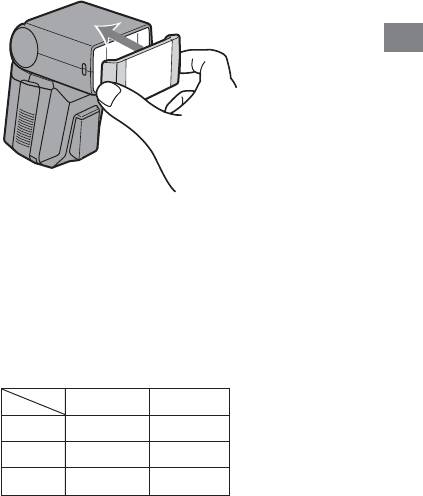
Wide panel (17 mm zoom angle)
Attaching the wide panel expands flash coverage to a focal length of 17
mm.
Attach the supplied wide panel to the flashtube.
• Push the wide panel onto the flashtube until it clicks into place.
• If removing the wide panel is difficult, pull one side off first.
Applications
• When using the wide panel, only set the zoom coverage to 24 mm.
• When photographing a flat subject from the front at a focal length of
about 17 mm, the periphery of the screen may darken slightly because
the focal distances at the center and periphery of the screen are different.
• When using a wide-angle lens with a focal length below 17 mm, the
periphery of the screen may darken.
• When using the wide panel, press the high-speed-sync button to keep
the high-speed-sync lamp off.
• See the following table for the flash range when using the wide panel.
ISO100 ISO400
2.8 1 - 4 1 - 8
41 - 2.8 1 - 5.6
5.6 1 - 2 1 - 4
(unit : m)
21
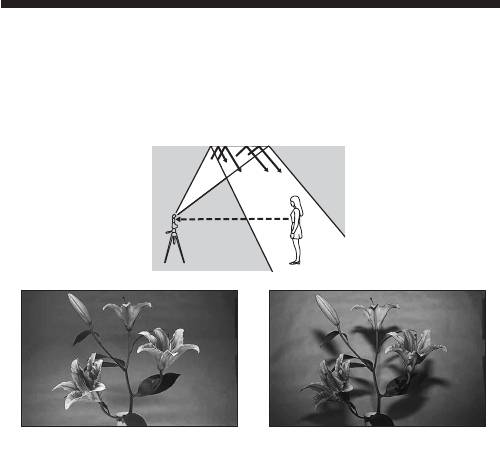
Bounce flash
Using the flash with a wall directly behind the subject produces strong
shadows on the wall. By directing the flash at the ceiling you can
illuminate the subject with reflected light, reducing the intensity of the
shadows and producing a softer light on the screen.
Bounce flash Normal flash
22
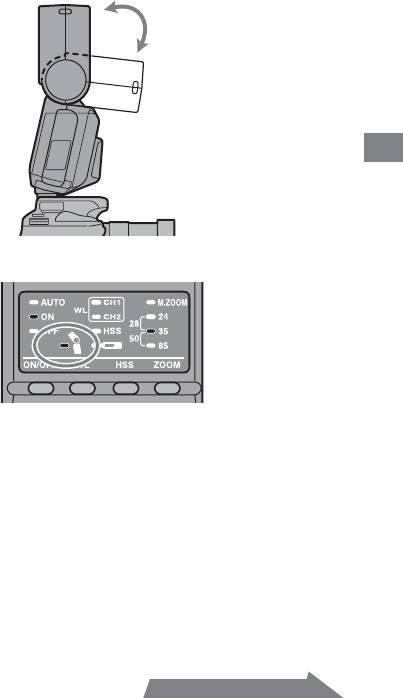
Rotate the flash upwards.
• The flash can be set to 45°, 60°, 75° or 90°.
Applications
• The bounce lamp on the control panel comes on.
• High-speed sync (p. 26) is cancelled when using bounce flash.
• Use a white ceiling or wall to reflect the flash. A colored surface may
color the light. High ceilings or glass are not recommended.
Continued on the next page
23
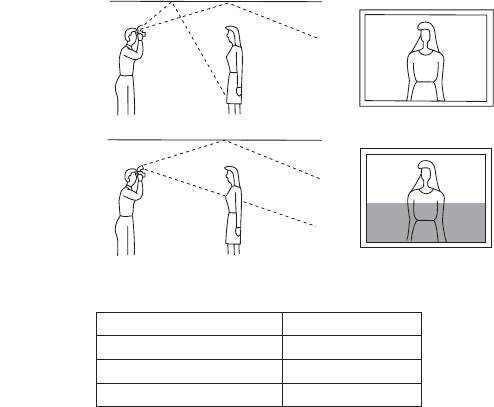
Adjusting bounce angle
Simultaneously using direct light and bounced light from the flash
produces uneven lighting. Determine the bounce angle with respect to the
distance to the reflective surface, the distance from the camera to the
subject, the focal length of the lens etc.
Correct
Incorrect
Determine the angle in relation to the following table.
Focal length of lens Bounce angle
70 mm minimum 45°
28 - 70 mm 60°
28 mm maximum 75°, 90°
24
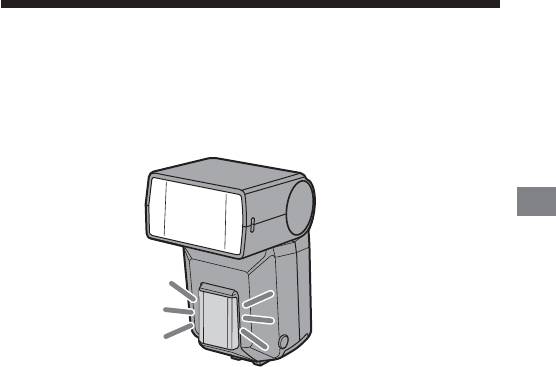
AF illuminator
In low-light or when subject contrast is low, when the shutter button is
pressed partway down for Auto Focus, the red lamp on the front of the
flash unit will light. This is the AF illuminator used as an aid in Auto
Focus.
Applications
• The AF illuminator operates even when the flash is off.
• The camera AF illuminator does not operate while the flash AF
illuminator is operating.
• The AF illuminator does not operate while Continuous AF is used in
focusing mode (when continually focusing on a moving subject).
• The AF illuminator may not operate if the focal length of the lens is
greater than 300 mm. The flash will not operate when removed from the
camera.
25
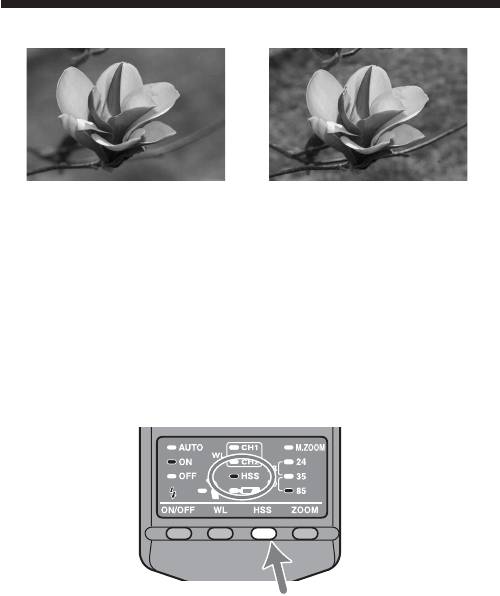
High-speed sync (HSS)
High-speed sync Normal flash
High-speed sync eliminates the restrictions of flash sync speed and enables
the flash to be used through the entire shutter speed range of the camera.
The increased selectable aperture range allows flash photography with a
wide aperture, leaving the background out of focus and accentuating the
front subject. Even when photographing at a wide f-stop in the A mode or
M mode, when the background is very bright and the shot will normally
be over-exposed, you can adjust the exposure by using the high-speed
shutter.
Press the high-speed sync button (HSS).
• The high-speed-sync lamp comes on.
26
• If you press the high-speed sync button (HSS) again, high-speed sync is
cancelled. When high-speed sync is cancelled, the shutter speed cannot
be set faster than the sync speed.
• Taking photos in bright locations is recommended.
• The flash range with high-speed sync is smaller than with normal flash
photography.
You can find the accurate flash range with high-speed sync by using the
HSS flat flash (ISO100) table on page 41. Divide the guide number by the
aperture to obtain the maximum distance of the flash range.
For example, with a 1/500 shutter speed and 28 mm focal length, the
guide number is 8 according to the table. Since 8 (the guide number)
divided by 4 (the aperture) equals 2, the flash range in this case would
Applications
be 2 m.
The number is doubled when using ISO400.
• High-speed sync cannot be used with bounce flash.
• When using a flash meter or color meter, high-speed sync cannot be
used because it interferes with the proper exposure.
Flash Sync Speed
Flash photography is generally associated with a maximum shutter
speed referred to as the flash sync speed. This restriction does not
apply to cameras designed for high-speed sync (HSS) photography
(p. 26), since they allow flash photography at the maximum shutter
speed of the camera.
27
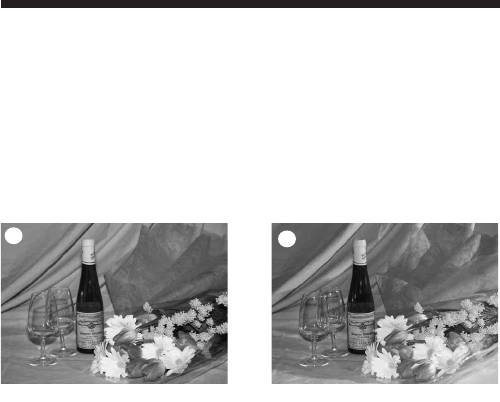
Wireless flash mode (WL)
Photographs taken with the flash attached to the camera are flat as shown
in photo 1. In such cases, remove the flash from the camera and position
it to obtain a more three-dimensional effect as shown in photo 2.
When taking this type of photograph with a single lens reflex camera, the
camera and the flash unit are most commonly connected by a cable. This
flash eliminates the need for a cable to transmit signals to the flash unit by
using the light of the built-in flash itself as a signal. The correct exposure is
determined automatically by the camera.
1
2
Normal flash Wireless flash
Wireless Flash Range
The wireless flash uses a light signal from the built-in flash as a trigger to
operate the off-camera flash unit. Follow the points below when
positioning the camera, flash, and subject.
• Photograph in dark locations indoors.
• Place the off-camera flash within the gray area in the following diagram.
28
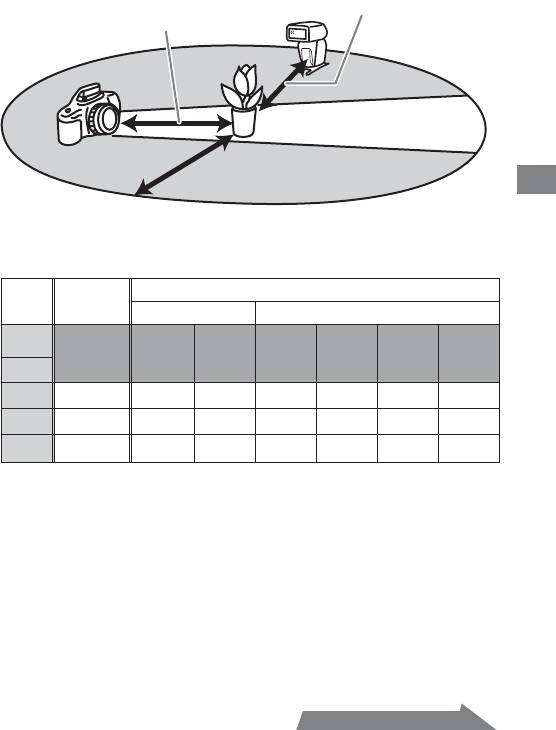
Distance between flash and
Distance between camera
subject (see Table 2)
and subject (see Table 1)
Do not place the flash
directly behind the subject
Place the camera and flash unit
within a 5 m radius of the
subject
Applications
Distance camera-HVL-F36AM-subject
Distance
Distance HVL-F36AM - subject (Table 2)
camera- subject
(Table 1)
Other than HSS HSS
Shutter
1/60 to
speed
All shutter
Maximum
1/250
1/500
1/1000
1/2000
sync
speeds
1/60 sec
sec
sec
sec
sec
speed
Aperture
2.8 1.4 - 5 1.4 - 5 1 - 5 1 - 4 1 - 3 1 - 2 1 - 1.5
41 - 51 - 3.5 1 - 5 1 - 3 1 - 2 1 - 1.5 –
5.6 1 - 5 1 - 2.5 1 - 3.5 1 - 2 1 - 1.5 – –
Unit : m
• The distances in the above table assume the use of ISO 100. If ISO 400 is
used the distances must be multiplied by a factor of two (assume a limit
of 5 m).
Continued on the next page
29
Notes on wireless flash
• You cannot use a flash meter or color meter in wireless flash mode
because the camera’s built-in pre-flash goes off.
• The zoom position for the HVL-F36AM is automatically set to 24 mm.
• When photographing with the wireless flash, the flash may in rare cases
go off by mistake due to ambient static electricity or electromagnetic
noise.
When the flash is not in use, turn it off using the flash ON/OFF button.
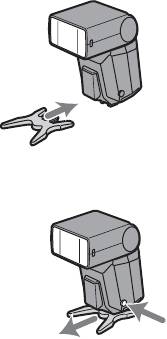
Attaching and removing the mini-stand
• Use the supplied mini-stand when the flash unit is separate from the
camera.
• You can attach the flash unit to a tripod using the tripod socket holes in
the mini-stand.
Attachment
Removal
30
Photography with wireless flash
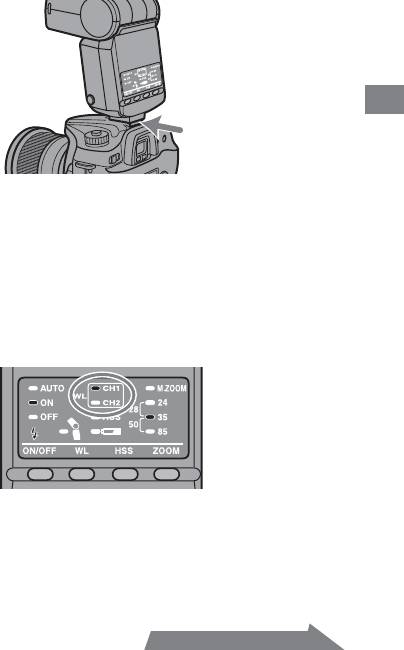
1 Attach the flash to the camera and turn the power of
the flash and camera on.
Applications
2 Set the camera to wireless flash.
• The setting method differs depending on the camera used. For
details, see the operating instructions of your camera.
• When the camera is set to wireless the flash is also set to wireless
automatically, and WL is displayed on the control panel.
• The channel 1 “CH1” lamp for the wireless flash comes on. When
channel 2 is selected, the “CH2” lamp is lit. For details on changing
the channel settings, see page 33.
Continued on the next page
31
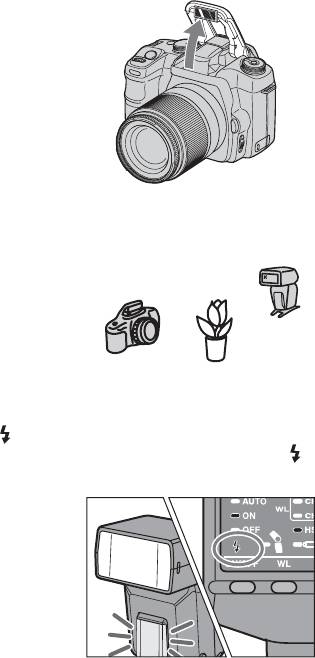
3 Remove the flash from the camera and raise the built-
in flash.
• When the flash is removed from the camera, the high-speed-sync
lamp comes on.
4 Set up the camera and flash.
• Set up the camera and flash in a dark location, such as indoors.
• See page 28 for details.
5 Make sure that the built-in flash and flash are fully
charged.
• is lit in the viewfinder when the built-in flash is fully charged.
• The AF illuminator on the front blinks, and on the rear is lit, when
the flash is fully charged.
32

6 Use test flash to check the flash.
• The test flash method differs depending on the camera used. For
details, see the operation instructions of your camera.
• If the test flash does not work, change the position of the camera,
flash or subject.
7 Check again that the built-in flash and the flash are
fully charged, and press the shutter button to take the
photo.
Applications
Changing the channel setting
If another wireless flash is being used nearby, such as at a photo session,
your flash may be set off by the light signal from the built-in flash of
another camera. To prevent this, you can change the channel as follows.
1 Make sure that the wireless flash lamps “CH1” and
“CH2“ are both off.
• If they are on, press the wireless flash button to turn them off.
2 Press the wireless flash button for three seconds.
• After three seconds the channel is changed, and the channel
indicator lamp changes accordingly.
3 Attach the flash to the camera and press the shutter
button partway down.
• This operation transmits the channel information from the flash to
the camera.
Continued on the next page
33
Setting wireless flash by flash only
When the flash is attached to the camera and the wireless flash set up, the
channel information is transmitted to the camera. This means that if you
continue to use the same camera and flash combination without changing
the wireless channel then you can also set the flash and camera separately
to wireless.
Camera setting:
Set to the wireless flash mode.
For details, refer to the operating instructions supplied with your camera.
Flash setting:
Press the wireless flash button to turn on the “CH1” or
“CH2” lamp.
34
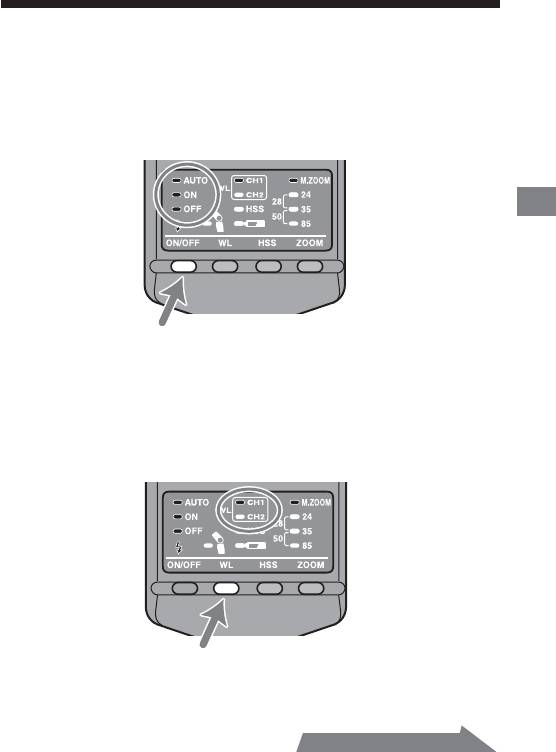
Time to auto power off
You can change the time to auto power off.
1 Press the flash ON/OFF button for three seconds.
• The auto lamp, flash-ON lamp and flash-OFF lamp come on at the
same time.
Applications
2 Press the wireless flash button to select a channel.
• Channel 1“CH1”
Auto power off
• Channel 2 “CH2”
Auto power off when wireless flash is set
Continued on the next page
35
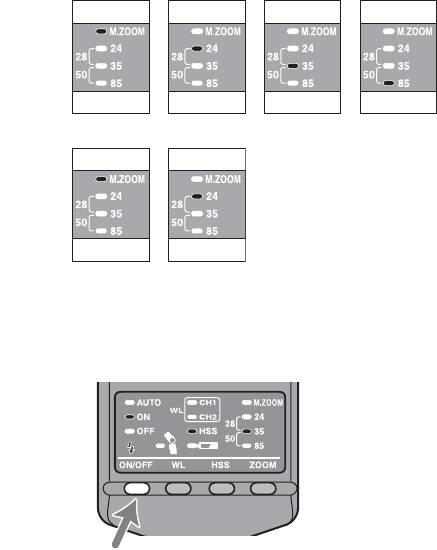
3 Press the zoom selection button to select the desired
time until auto power off.
• Channel 1 “CH1” Auto power off
Options
4
minutes
15
minutes
60
minutes
None
Lamps
[M.ZOOM]
[24 mm] [35 mm] [85 mm]
• Channel 2 “CH2” Auto power off in wireless flash mode
Options
60
minutes
None
Lamps
[M.ZOOM]
[24 mm]
4 Press the flash ON/OFF button to return to normal
status.
• The selected settings are maintained even if the flash unit is
switched off or the battery is removed.
36
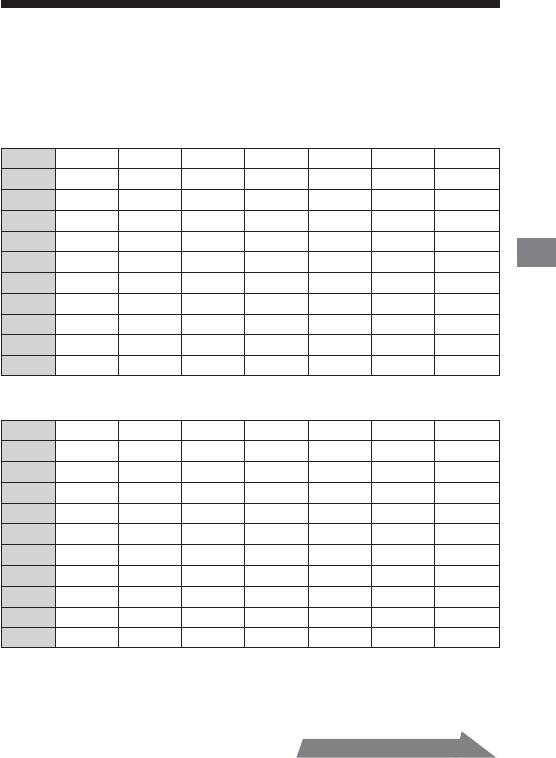
Flash range
The following tables show the flash range when taking photos with the
flash attached to the camera (i.e. the appropriate range to provide a correct
exposure).
When the focal length is 17 mm (unit: m)
ISO25 ISO50 ISO100 ISO200 ISO400 ISO800 ISO1000
F32 - - - - - - 1.0 - 1.1
F22 - - - - - 1.0 - 1.4 1.0 - 1.6
F16 - - - - 1.0 - 1.4 1.0 - 1.9 1.0 - 2.2
F11 - - - 1.0 - 1.4 1.0 - 2.0 1.0 - 2.7 1.0 - 3.2
F8 - - 1.0 - 1.4 1.0 - 1.9 1.0 - 2.8 1.0 - 3.8 1.0 - 4.4
Addiional Information
F5.6 - 1.0 - 1.4 1.0 - 2.0 1.0 - 2.8 1.0 - 3.9 1.0 - 5.4 1.0 - 6.3
F4 1.0 - 1.4 1.0 - 1.9 1.0 - 2.8 1.0 - 3.9 1.0 - 5.5 1.0 - 7.5 1.0 - 8.8
F2.8 1.0 - 2.0 1.0 - 2.8 1.0 - 3.9 1.0 - 5.5 1.0 - 7.9 1.0 - 11 1.0 - 13
F2 1.0 - 2.8 1.0 - 3.9 1.0 - 5.5 1.0 - 7.7 1.0 - 11 1.0 - 15 1.0 - 18
F1.4 1.0 - 3.9 1.0 - 5.5 1.0 - 7.6 1.0 - 11 1.0 - 16 1.0 - 21 1.1 - 25
When the focal length is 24 mm (unit: m)
ISO25 ISO50 ISO100 ISO200 ISO400 ISO800 ISO1000
F32 - - - - 1.0 - 1.3 1.0 - 1.7 1.0 - 2.0
F22 - - - 1.0 - 1.3 1.0 - 1.8 1.0 - 2.5 1.0 - 2.9
F16 - - 1.0 - 1.3 1.0 - 1.8 1.0 - 2.5 1.0 - 3.4 1.0 - 3.9
F11 - 1.0 - 1.3 1.0 - 1.8 1.0 - 2.5 1.0 - 3.6 1.0 - 5.0 1.0 - 5.7
F8 1.0 - 1.3 1.0 - 1.8 1.0 - 2.5 1.0 - 3.5 1.0 - 5.0 1.0 - 6.9 1.0 - 7.9
F5.6 1.0 - 1.8 1.0 - 2.5 1.0 - 3.6 1.0 - 5.0 1.0 - 7.1 1.0 - 9.8 1.0 - 11
F4 1.0 - 2.5 1.0 - 3.5 1.0 - 5.0 1.0 - 7.0 1.0 - 10 1.0 - 14 1.0 - 16
F2.8 1.0 - 3.6 1.0 - 5.0 1.0 - 7.1 1.0 - 10 1.0 - 14 1.0 - 20 1.0 - 23
F2 1.0 - 5.0 1.0 - 7.0 1.0 - 10 1.0 - 14 1.0 - 20 1.3 - 28 1.4 - 32
F1.4 1.0 - 7.1 1.0 - 10 1.0 - 14 1.0 - 20 1.3 - 28 1.8 - 40 2.0 - 45
• The flash range at a focal length of 28 mm is roughly between the long
range limit values at focal lengths of 24 mm and 35 mm. The flash range
at a focal length of 50 mm is roughly between the long range limit
values at focal lengths of 35 mm and 80 mm.
Continued on the next page
37
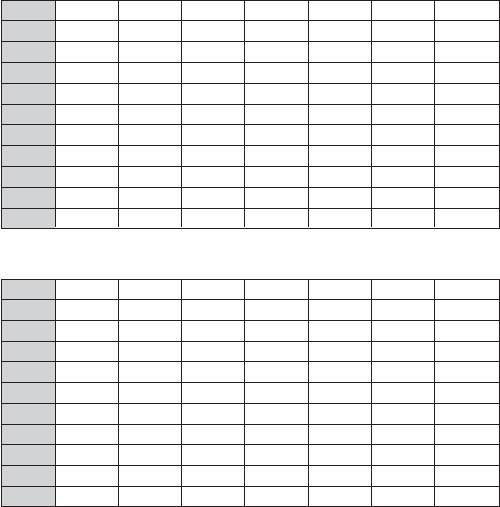
When the focal length is 35 mm (unit: m)
ISO25 ISO50 ISO100 ISO200 ISO400 ISO800 ISO1000
F32 - - - 1.0 - 1.1 1.0 - 1.6 1.0 - 2.2 1.0 - 2.5
F22 - - 1.0 - 1.1 1.0 - 1.6 1.0 - 2.3 1.0 - 3.1 1.0 - 3.6
F16 - 1.0 - 1.1 1.0 - 1.6 1.0 - 2.2 1.0 - 3.1 1.0 - 4.3 1.0 - 5.0
F11 1.0 - 1.1 1.0 - 1.6 1.0 - 2.3 1.0 - 3.2 1.0 - 4.5 1.0 - 6.3 1.0 - 7.2
F8 1.0 - 1.6 1.0 - 2.2 1.0 - 3.1 1.0 - 4.4 1.0 - 6.3 1.0 - 8.6 1.0 - 9.9
F5.6 1.0 - 2.2 1.0 - 3.1 1.0 - 4.5 1.0 - 6.3 1.0 - 8.9 1.0 - 12 1.0 - 14
F4 1.0 - 3.1 1.0 - 4.4 1.0 - 6.3 1.0 - 8.8 1.0 - 12 1.0 - 17 1.0 - 20
F2.8 1.0 - 4.5 1.0 - 6.2 1.0 - 8.9 1.0 - 13 1.0 - 18 1.1 - 25 1.3 - 28
F2 1.0 - 6.2 1.0 - 8.8 1.0 -13 1.0 - 18 1.1 - 25 1.6 - 35 1.8 - 40
F1.4 1.0 - 8.9 1.0 - 13 1.0 - 18 1.1 - 25 1.6 - 36 2.2 - 50 2.5 - 56
When the focal length is 85 mm (unit: m)
ISO25 ISO50 ISO100 ISO200 ISO400 ISO800 ISO1000
F32 - - 1.0 - 1.1 1.0 - 1.6 1.0 - 2.3 1.0 - 3.1 1.0 - 3.6
F22 - 1.0 - 1.1 1.0 - 1.6 1.0 - 2.3 1.0 - 3.3 1.0 - 4.5 1.0 - 5.2
F16 1.0 - 1.1 1.0 - 1.6 1.0 - 2.3 1.0 - 3.2 1.0 - 4.5 1.0 - 6.2 1.0 - 7.1
F11 1.0 - 1.6 1.0 - 2.3 1.0 - 3.3 1.0 - 4.6 1.0 - 6.5 1.0 - 9 1.0 - 10
F8 1.0 - 2.3 1.0 - 3.2 1.0 - 4.5 1.0 - 6.3 1.0 - 9.0 1.0 - 12 1.0 - 14
F5.6 1.0 - 3.2 1.0 - 4.5 1.0 - 6.4 1.0 - 9.0 1.0 - 13 1.0 - 18 1.0 - 20
F4 1.0 - 4.5 1.0 - 6.3 1.0 - 9 1.0 - 13 1.0 - 18 1.1 - 25 1.3 - 28
F2.8 1.0 - 6.4 1.0 - 9.0 1.0 - 13 1.0 - 18 1.1 - 26 1.6 - 35 1.8 - 40
F2 1.0 - 9.0 1.0 - 13 1.0 - 18 1.1 - 25 1.6 - 36 2.3 - 50 2.6 - 56
F1.4 1.0 - 13 1.0 - 18 1.1 - 26 1.6 - 36 2.3 - 51 3.2 - 71 3.6 - 80
• When photographing at a distance of less than 1 m, the lens may block
the light from the flash causing a shadow to appear at the bottom of the
photo. Photograph in wireless flash mode.
38
Notes on use
While shooting
• This flash unit generates strong light, so it should not be used directly in
front of the eyes.
Batteries
• The battery level displayed on the control panel may be lower than the
actual battery capacity, temperature, and storage conditions. The
displayed battery level is restored to the correct value after the flash has
been used a few times. When blinks to indicate that the flash
cannot be used, pressing the flash ON/OFF button a number of times
may result in restoration of the correct battery level display. If the
Additional Information
battery level is still not restored, replace the battery.
• When using lithium batteries, if the batteries become hot due to high
temperature or continuous use, may blink and the flash may not
work for a while. Wait for the batteries to cool down before using the
flash again.
• Nickel-metal hydride batteries can lose power suddenly. If starts
blinking or the flash can no longer be used while taking pictures, change
or recharge the batteries.
• The flash frequency and number of flashes provided by new batteries
may vary from the values shown in the table, depending on the time
elapsed since manufacture of the batteries.
Continued on the next page
39
Temperature
• The flash unit may be used over a temperature range of 0 °C to 40 °C.
• Do not expose the flash unit to extremely high temperatures (e.g. in
direct sunlight inside a vehicle) or high humidity.
• To prevent condensation forming on the flash, place it in a sealed plastic
bag when bringing it from a cold environment into a warm
environment. Allow it to reach room temperature before removing it
from the bag.
• Battery capacity decreases at colder temperatures. Keep your camera
and spare batteries in a warm inside pocket when shooting in cold
weather. may come on even when there is some power left in the
batteries in cold weather. Batteries will regain some of their capacity
when warmed to normal operating temperature.
• This flash unit is not waterproof. Be careful not to bring it into contact
with water or sand when using it at the seashore, for example. Contact
with water, sand, dust, or salt may result in a malfunction.
Maintenance
Remove this unit from the camera. Clean the flash with a dry soft cloth. If
the flash has been in contact with sand, wiping will damage the surface,
and it should therefore be cleaned gently using a blower. In the event of
stubborn stains, use a cloth lightly dampened with a mild detergent
solution, and then wipe the unit clean with a dry soft cloth. Never use
strong solvents, such as thinner or benzine, as these damage the surface
finish.
40
