
Sony CDX-2500R: Setting the clock Other Functions automatically Labelling the rotary commander
Setting the clock Other Functions automatically Labelling the rotary commander: Sony CDX-2500R
Table of contents
- Table of Contents
- Location of controls
- Getting Started Resetting the unit Detaching the front panel
- Setting the clock
- CD Player Listening to a CD
- Playing a CD in various Radio modes Memorising stations automatically
- Receiving the memorised stations Memorising only the desired stations
- RDS Overview of the RDS function Displaying the station name
- Retuning the same programme automatically
- Listening to traffic announcements
- Presetting the RDS stations with the AF and TA data
- Locating a station by programme type
- Setting the clock Other Functions automatically Labelling the rotary commander
- Using the rotary commander
- Adjusting the sound characteristics Attenuating the sound
- Changing the sound and display settings
- Additional Boosting the bass sound Information Precautions
- Notes on moisture condensation When you play 8 cm CDs Notes on discs
- Maintenance Dismounting the unit
- Specifications CD player section General Tuner section Power amplifier section
- Troubleshooting guide General CD playback
- Radio reception RDS
Setting the clock
Other Functions
automatically
The CT (Clock Time) data from the RDS
You can also control this unit with an optional
transmission sets the clock automatically.
rotary commander.
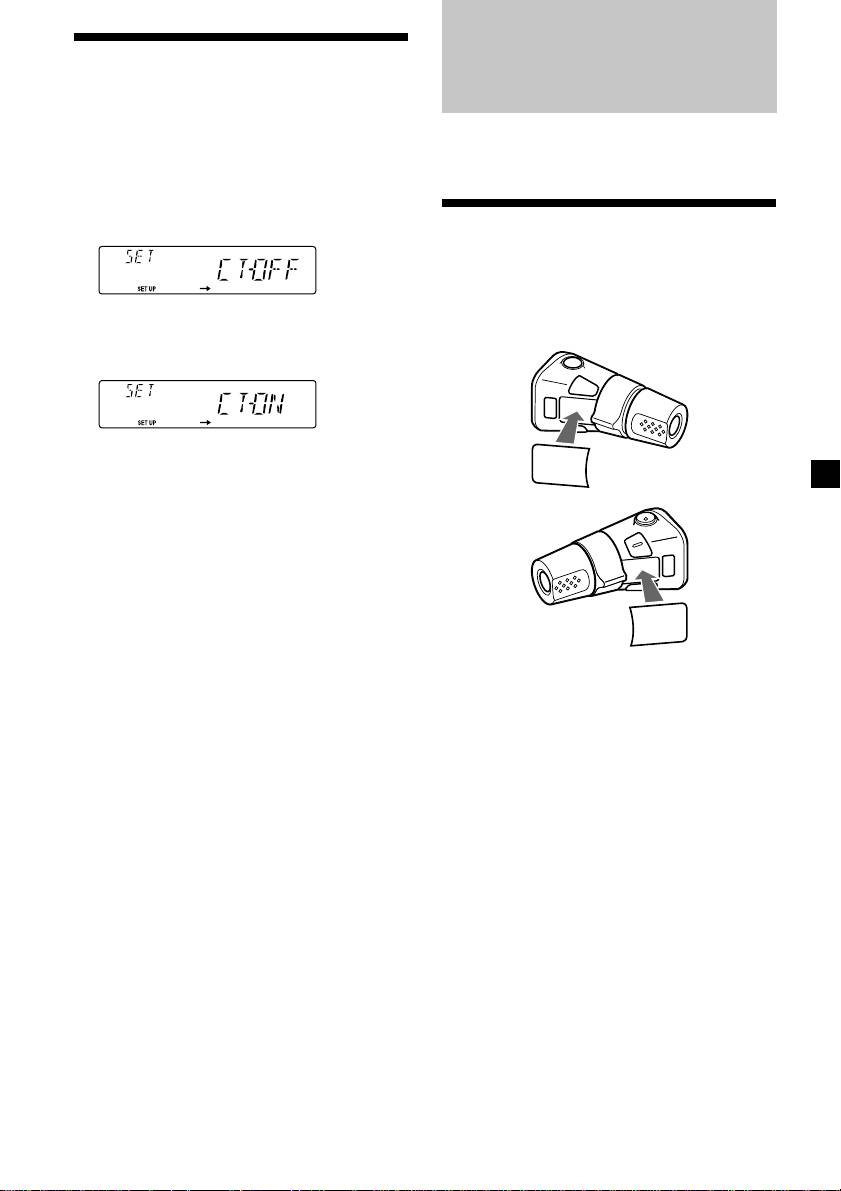
1 During radio reception, press (SHIFT),
then press (2) (SET UP) repeatedly until
“CT” appears.
Labelling the rotary
commander
Depending on how you mount the rotary
commander, attach the appropriate label as
2 Press (4) (n) repeatedly until “CT-ON”
shown in the illustration below.
appears.
The clock is set.
LIST
3 Press (SHIFT) to return to the normal
MODE
SOUND
display.
To cancel the CT function
Select “CT-OFF” in step 2 above.
Notes
• The CT function may not work even though an
SOUND
RDS station is being received.
MODE
• There might be a difference between the time
LIST
set by the CT function and the actual time.
15
Top 10 manuals
100.00
NZXT HALE90 1000W99.99
Samsung SM-R38099.97
AEG BSB 18C99.97
Dell 2700W99.97
Smeg KSEC70X99.96
Beurer HDE 4099.96
Pyramida KH 50 v.299.96
MSI CSM-H81M-P3299.96
AEG HR 562799.95
Melissa 640-048

