
Sony CDX-2500R: Setting the clock
Setting the clock: Sony CDX-2500R
Table of contents
- Table of Contents
- Location of controls
- Getting Started Resetting the unit Detaching the front panel
- Setting the clock
- CD Player Listening to a CD
- Playing a CD in various Radio modes Memorising stations automatically
- Receiving the memorised stations Memorising only the desired stations
- RDS Overview of the RDS function Displaying the station name
- Retuning the same programme automatically
- Listening to traffic announcements
- Presetting the RDS stations with the AF and TA data
- Locating a station by programme type
- Setting the clock Other Functions automatically Labelling the rotary commander
- Using the rotary commander
- Adjusting the sound characteristics Attenuating the sound
- Changing the sound and display settings
- Additional Boosting the bass sound Information Precautions
- Notes on moisture condensation When you play 8 cm CDs Notes on discs
- Maintenance Dismounting the unit
- Specifications CD player section General Tuner section Power amplifier section
- Troubleshooting guide General CD playback
- Radio reception RDS
2 Press (SHIFT).
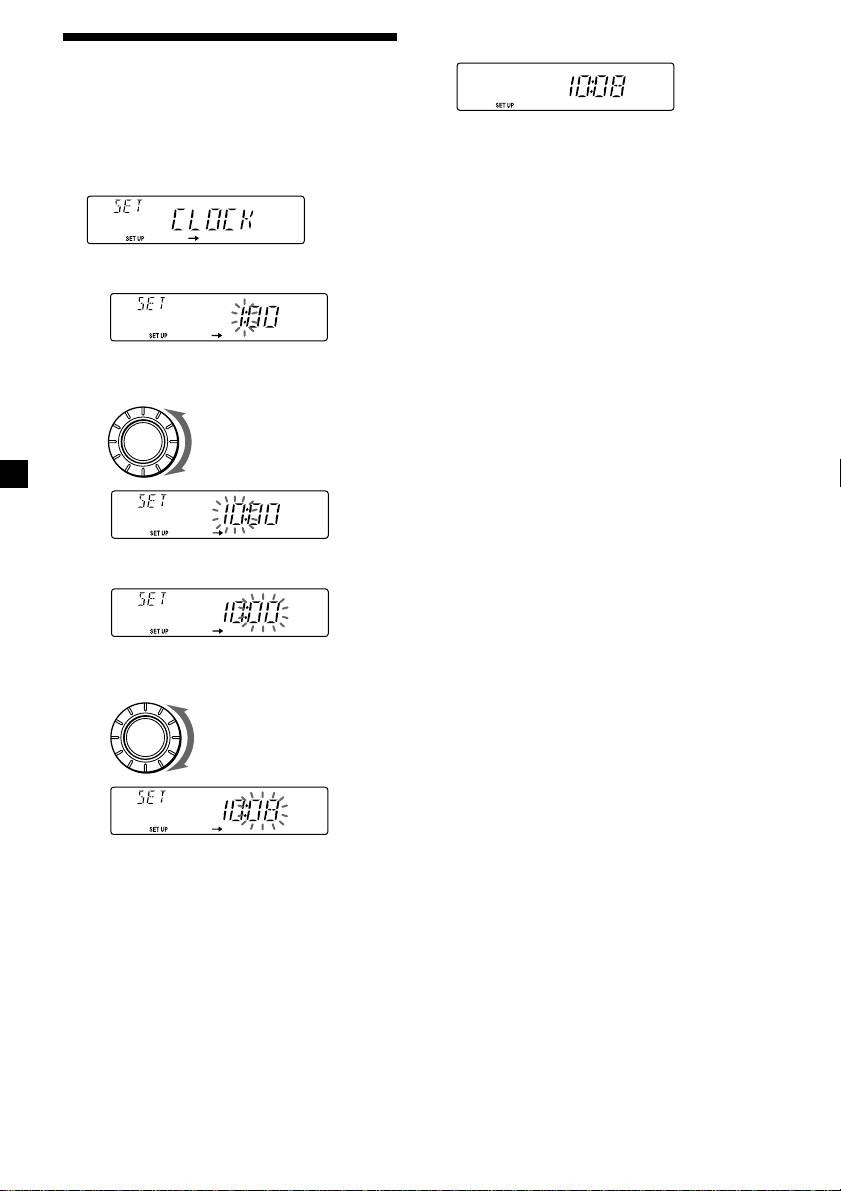
Setting the clock
The clock uses a 24-hour digital indication.
Example: To set the clock to 10:08
The clock starts.
1 Press (SHIFT), then press (2) (SET UP)
repeatedly until “CLOCK” appears.
3 Press (SHIFT).
After the clock setting is complete, the
display returns to normal playback mode.
1 Press (4) (n).
The hour indication flashes.
2 Set the hour.
to go backward
SOURCE
to go forward
3 Press (4) (n).
The minute indication flashes.
4 Set the minute.
to go backward
SOURCE
to go forward
6
Top 10 manuals
100.00
NZXT HALE90 1000W99.99
Samsung SM-R38099.97
AEG BSB 18C99.97
Dell 2700W99.97
Smeg KSEC70X99.96
Beurer HDE 4099.96
Pyramida KH 50 v.299.96
MSI CSM-H81M-P3299.96
AEG HR 562799.95
Melissa 640-048

