
Sony BRAVIA KDL-26P25: Start-up Guide 1: Checking the 2: Connecting an aerial/ accessories VCR
Start-up Guide 1: Checking the 2: Connecting an aerial/ accessories VCR: Sony BRAVIA KDL-26P25
Table of contents
- Trademark information Introduction Notice for Digital TV function
- Table of Contents
- Start-up Guide 1: Checking the 2: Connecting an aerial/ accessories VCR
- 3: Bundling the cables 4: Preventing the TV from toppling over 5: Selecting the language and country/region
- 6: Auto-tuning the TV
- Safety information
- GB
- GB
- Precautions Disposal of the TV set
- Overview of the remote
- Overview of the TV buttons and indicators Watching TV
- Additional operations To access Text Picture Freeze PIP in PC Mode (Picture in Picture)
- Checking the Digital Electronic Programme Guide (EPG)
- Using the Favourite list
- Navigating through menus
- Picture Adjustment menu
- Sound Adjustment menu
- Features menu
- Set-up menu
- Sound Offset Manual Programme Preset
- Digital Set-up menu
- Using Optional Equipment Connecting optional equipment Connecting to the TV (side)
- Connecting to the TV (rear)
- Viewing pictures from connected equipment
- Additional Information Specifications
- Troubleshooting Picture Problem Cause/Remedy
- Problem Cause/Remedy Sound Channels General
010COV.book Page 4 Friday, January 19, 2007 9:53 AM
Start-up Guide
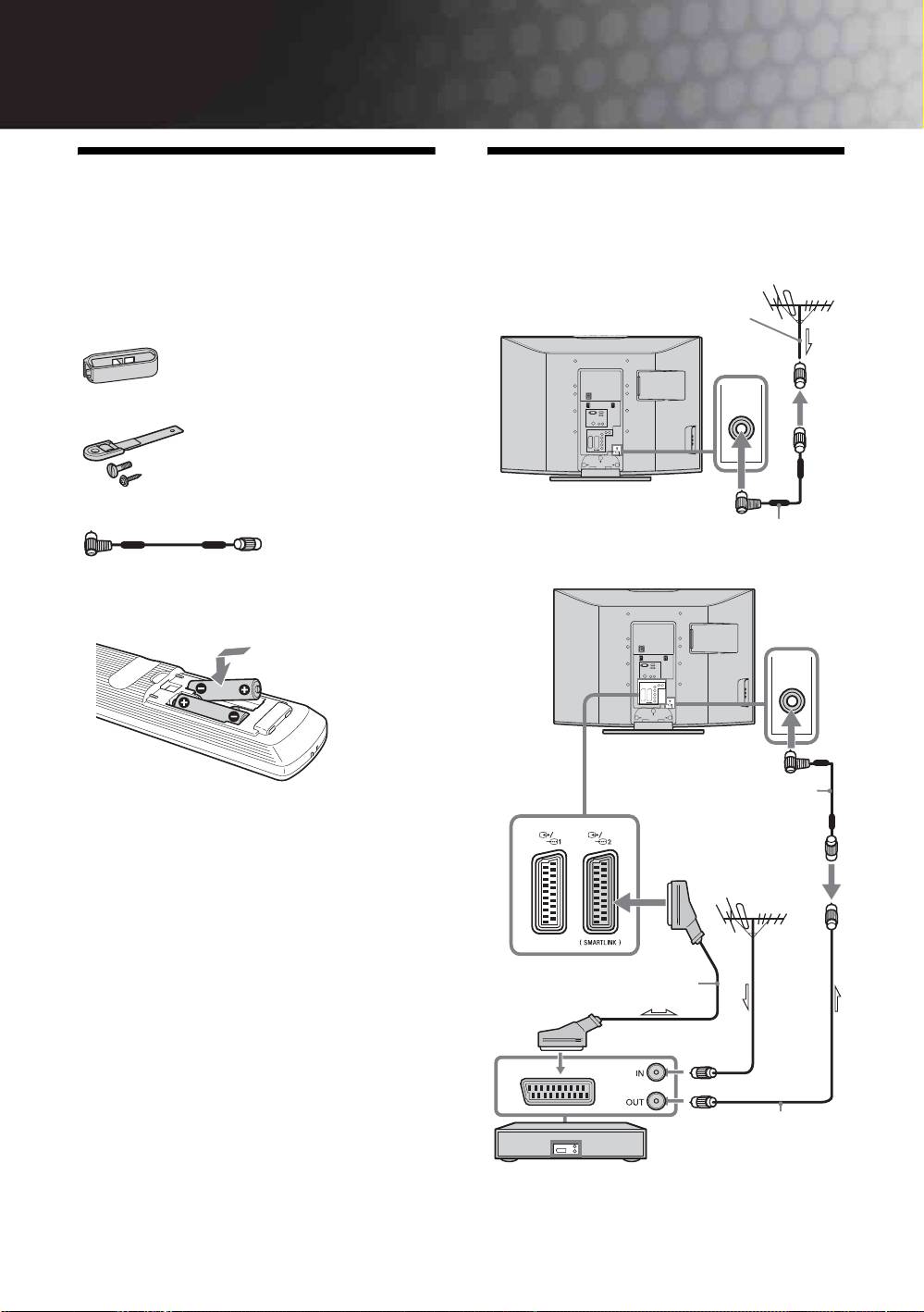
1: Checking the
2: Connecting an aerial/
accessories
VCR
Remote RM-ED007 (1)
Connecting an aerial only
Size AA batteries (R6 type) (2)
Coaxial cable (not supplied)
Cable holder (1) (only for KDL-40P25xx)
Support belt (1) and screws (2)
Aerial adaptador (1) (only for KDL-26P25xx)
(only for KDL-26P25xx)
Connecting an aerial and VCR
To insert batteries into the remote
(only for
Notes
KDL-26P25xx)
• Observe the correct polarity when inserting batteries.
• Dispose of batteries in an environmentally friendly way.
Certain regions may regulate disposal of the battery.
Please consult your local authority.
• Do not use different types of batteries together or mix old
and new batteries.
• Handle the remote with care. Do not drop or step on it, or
spill liquid of any kind onto it.
• Do not place the remote in a location near a heat source, or
in a place subject to direct sunlight, or in a damp room.
Scart lead (not supplied)
RF lead
(not supplied)
VCR
GB
4
KDL-40/32/26U2000
2-693-044-41(0)
