
Sony BRAVIA KDL-26P25: Overview of the TV buttons and indicators Watching TV
Overview of the TV buttons and indicators Watching TV: Sony BRAVIA KDL-26P25
Table of contents
- Trademark information Introduction Notice for Digital TV function
- Table of Contents
- Start-up Guide 1: Checking the 2: Connecting an aerial/ accessories VCR
- 3: Bundling the cables 4: Preventing the TV from toppling over 5: Selecting the language and country/region
- 6: Auto-tuning the TV
- Safety information
- GB
- GB
- Precautions Disposal of the TV set
- Overview of the remote
- Overview of the TV buttons and indicators Watching TV
- Additional operations To access Text Picture Freeze PIP in PC Mode (Picture in Picture)
- Checking the Digital Electronic Programme Guide (EPG)
- Using the Favourite list
- Navigating through menus
- Picture Adjustment menu
- Sound Adjustment menu
- Features menu
- Set-up menu
- Sound Offset Manual Programme Preset
- Digital Set-up menu
- Using Optional Equipment Connecting optional equipment Connecting to the TV (side)
- Connecting to the TV (rear)
- Viewing pictures from connected equipment
- Additional Information Specifications
- Troubleshooting Picture Problem Cause/Remedy
- Problem Cause/Remedy Sound Channels General
010COV.book Page 12 Friday, January 19, 2007 9:53 AM
Watching TV
Overview of the TV
buttons and indicators
Watching TV
1
1
2
2
3
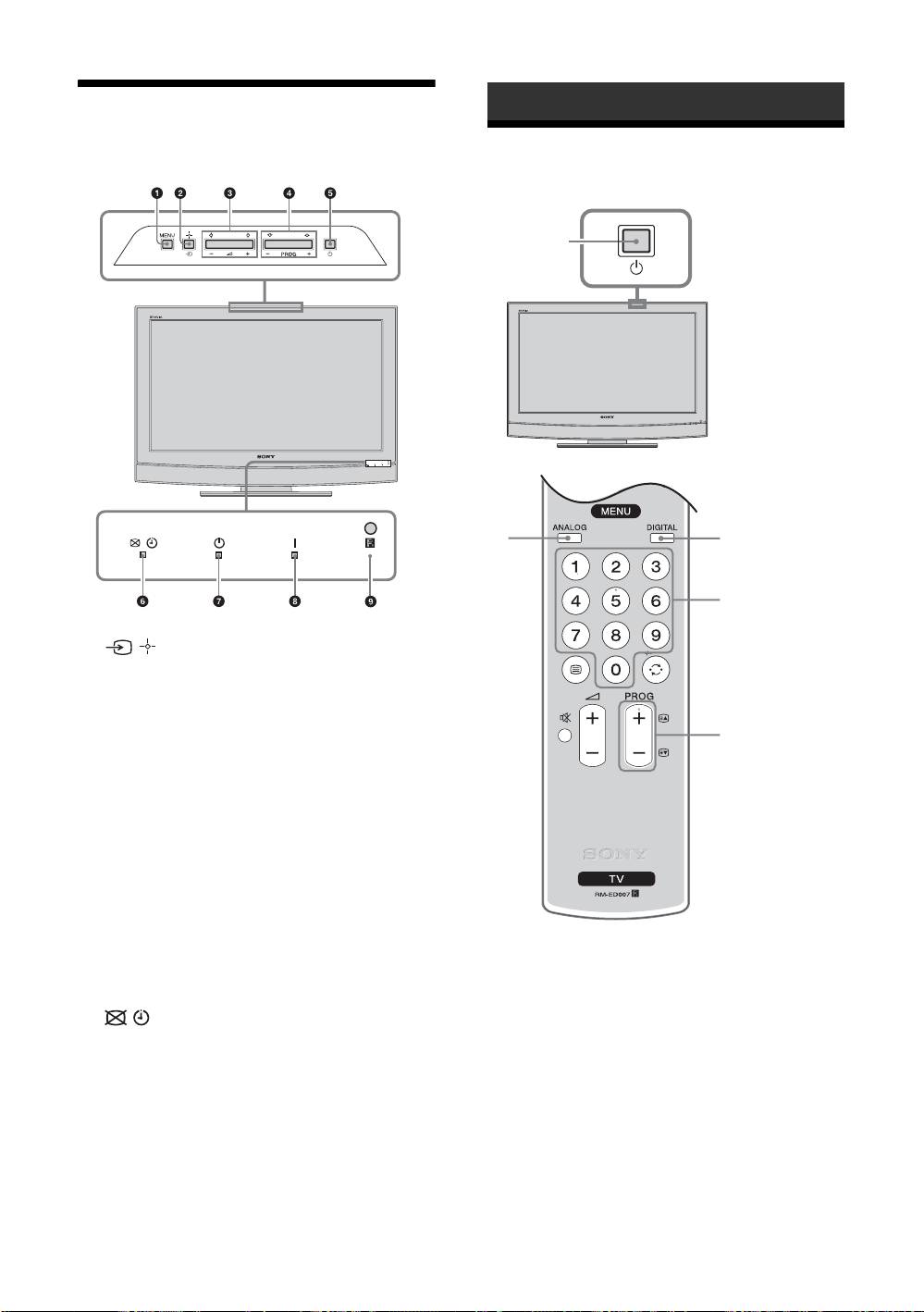
1 MENU (page 16)
2 / – Input select/OK
• In TV mode (page 23): Selects the input source
from equipment connected to the TV sockets.
• In TV menu: Selects the menu or option, and
confirm the setting.
3
3 2 +/-/G/g
• Increases (+) or decreases (-) the volume.
• In TV menu: Moves through the options left (
G)
or right (
g).
4 PROG +/-/F/f
• In TV mode: Selects the next (+) or previous (-)
channel.
• In TV menu: Moves through the options up (
F) or
down (
f).
5 1 – Power
Switches the TV on or off.
1 Press 1 on the TV (top side) to switch on
Note
the TV.
To disconnect the TV completely, pull the plug from
When the TV is in standby mode (the 1 (standby)
the mains.
indicator on the TV (front) is red), press "/1 on
6 – Picture Off/Timer indicator
the remote to switch on the TV.
• Lights up in green when the picture is switched off
(page 19).
2 Press DIGITAL to switch to digital mode or
• Lights up in orange when the timer is set
ANALOG to switch to analogue mode.
(page 20).
The channels available vary depending on the
• Lights up in red when digital REC starts in standby
mode.
mode.
7 1 – Standby indicator
3 Press the number buttons or PROG +/- to
Lights up in red when the TV is in standby mode.
select a TV channel.
8 " – Power indicator
Lights up in green when the TV is switched on.
9 Remote control sensor
GB
12
KDL-40/32/26U2000
2-693-044-41(0)
