
Sony BRAVIA KDL-26P25: GB
GB: Sony BRAVIA KDL-26P25
Table of contents
- Trademark information Introduction Notice for Digital TV function
- Table of Contents
- Start-up Guide 1: Checking the 2: Connecting an aerial/ accessories VCR
- 3: Bundling the cables 4: Preventing the TV from toppling over 5: Selecting the language and country/region
- 6: Auto-tuning the TV
- Safety information
- GB
- GB
- Precautions Disposal of the TV set
- Overview of the remote
- Overview of the TV buttons and indicators Watching TV
- Additional operations To access Text Picture Freeze PIP in PC Mode (Picture in Picture)
- Checking the Digital Electronic Programme Guide (EPG)
- Using the Favourite list
- Navigating through menus
- Picture Adjustment menu
- Sound Adjustment menu
- Features menu
- Set-up menu
- Sound Offset Manual Programme Preset
- Digital Set-up menu
- Using Optional Equipment Connecting optional equipment Connecting to the TV (side)
- Connecting to the TV (rear)
- Viewing pictures from connected equipment
- Additional Information Specifications
- Troubleshooting Picture Problem Cause/Remedy
- Problem Cause/Remedy Sound Channels General
010COV.book Page 8 Friday, January 19, 2007 9:53 AM
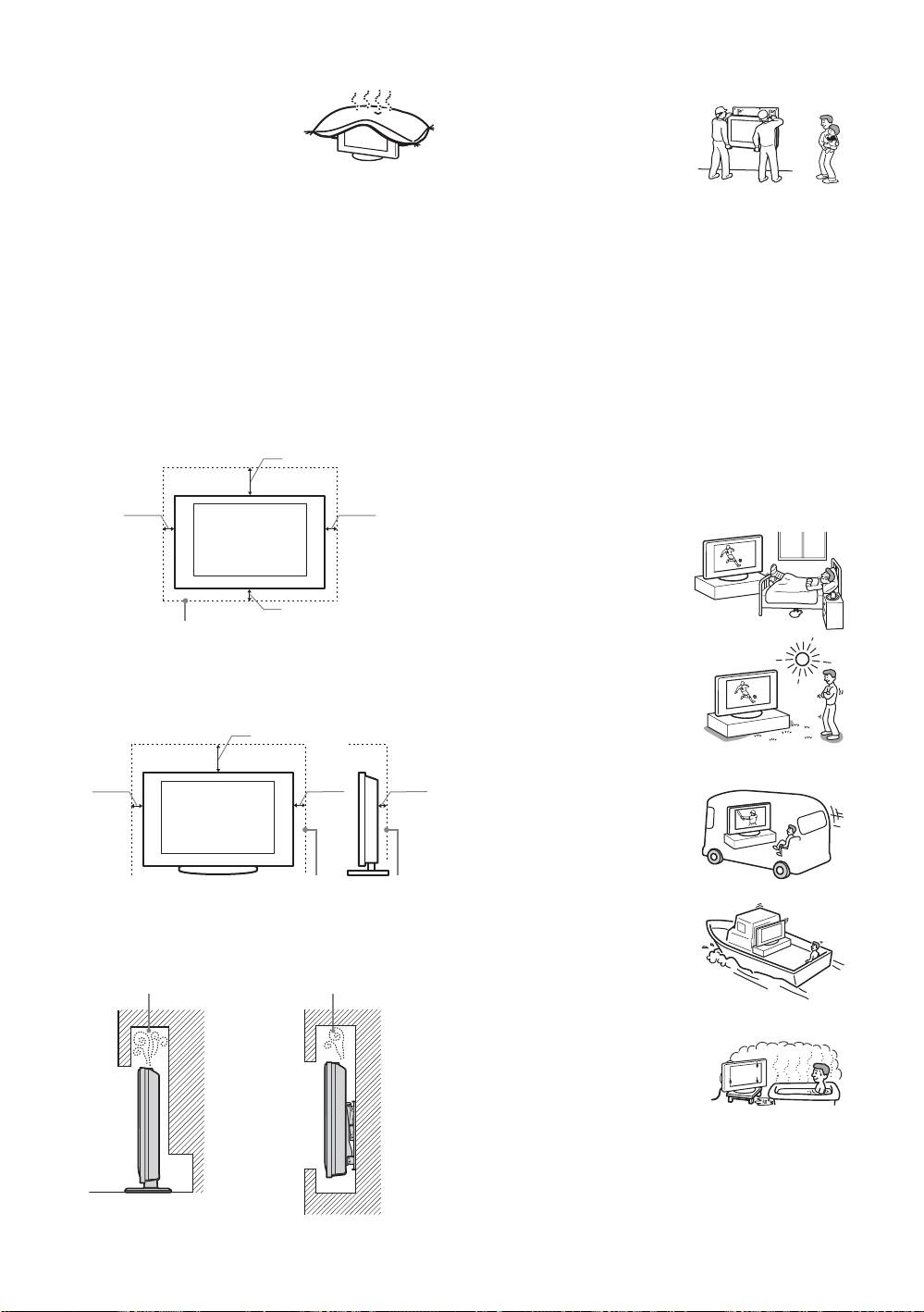
Ventilation
Optional accessories
• Never cover the ventilation
Observe the following when
holes or insert anything in the
installing the TV set using a stand
cabinet. It may cause
or wall-mount bracket. If you do
overheating and result in a fire.
not do so, the TV set may fall and
• Unless proper ventilation is
cause serious injury.
provided, the TV set may gather dust and get dirty. For
– KDL-40P25xx:
proper ventilation, observe the following:
Wall-mount bracket SU-WL51.
– Do not install the TV set turned backwards or sideways.
– KDL-32P25xx/KDL-26P25xx:
– Do not install the TV set turned over or upside down.
Wall-mount bracket SU-WL31.
– Do not install the TV set on a shelf or in a closet.
• It is strongly recommended that you use the official Sony
– Do not place the TV set on a rug or bed.
wall-mount bracket to allow adequate air circulation and
– Do not cover the TV set with cloth, such as curtains, or
to avoid accumulated dust on the TV.
items such as newspapers, etc.
• If the TV set is to be installed on a wall, have the
installation carried out by qualified service personnel.
• Leave some space around the TV set as shown below.
Improper installation may render the TV set unsafe.
Otherwise, air-circulation may be inadequate and causing
• Secure the TV set properly, following the instructions
overheating, which may cause a fire or damage to the TV
supplied with your stand when installing the TV set.
set.
• Be sure to attach the brackets supplied with your stand.
Installed on the wall
Wiring
30 cm
• When wiring cables, be sure to unplug the mains lead for
your safety.
• Take care not to catch your feet on the cables. It may
10 cm
10 cm
damage the TV set.
Medical institutions
Do not place this TV set in a place
where medical equipment is in
use. It may cause a malfunction of
medical instruments.
10 cm
Outdoor use
Leave at least this space around the set.
• Do not install this TV set
outdoors. If the TV set is
exposed to rain, it may result in a
Installed with stand
fire or an electrical shock.
• If this TV set is exposed to direct
30 cm
sunlight, the TV set may heat up
and it may damage the TV set.
10 cm10 cm
6 cm
Vehicle, Ships and other
vessels
• Do not install this TV set in a
vehicle. The motion of the
vehicle may cause the TV set
to fall down and cause injury.
Leave at least this space around the set.
• Do not install this TV set on a
ship or other vessel. If the TV
• Never install the TV set as follows:
set is exposed to seawater, it
may cause a fire or damage
Air circulation is
Air circulation is
the TV set.
blocked.
blocked.
Water and moisture
• Do not use this TV set near water
– for example, near a bathtub or
shower room. Also do not expose
Wall Wall
to rain, moisture or smoke. This
may result in a fire or an electric
shock.
GB
8
KDL-46/40/32V2000
2-680-539-11(2)
