
Sony BRAVIA KDL-20S2000: Sound Adjustment menu Sound Effect Treble Bass Balance Reset Dual Sound Auto Volume
Sound Adjustment menu Sound Effect Treble Bass Balance Reset Dual Sound Auto Volume: Sony BRAVIA KDL-20S2000
Table of contents
- Table of Contents
- Start-up Guide 1: Checking the accessories 2: Connecting an aerial/ VCR
- 3: Bundling the cables 4: Preventing the TV from toppling over 5: Selecting the language and country/region
- 6: Auto-tuning the TV
- Safety information Carrying Placement
- Ventilation Optional accessories Wiring Medical institutions Outdoor use Vehicle, Ships and other vessels Water and moisture Moisture and flammable objects Lightning storms
- Broken pieces Dangerously high Voltage are
- Precautions Disposal of the TV set
- Overview of the remote
- Overview of the TV buttons and indicators
- Watching TV Additional operations
- To access Text Picture Freeze PIP in PC Mode (Picture in Picture)
- Checking the Digital Electronic Programme Guide (EPG)
- Using the Favourite list
- Viewing pictures from connected equipment
- Navigating through menus Using MENU Functions
- Picture Adjustment menu
- Sound Adjustment menu Sound Effect Treble Bass Balance Reset Dual Sound Auto Volume
- TV Speakers
- Features menu Screen Power Saving AV2 Output RGB Center
- PC Adjustment Timer
- Set-up menu Auto Start-up Language Country Auto Tuning Programme Sorting AV Preset Sound Offset
- Manual Programme Preset
- Digital Set-up menu Digital Tuning
- Digital Set-up
- Connecting optional equipment Using Optional Equipment Connecting to the TV (side)
- Connecting to the TV (rear)
- Specifications Additional Information
- Troubleshooting Picture
- Sound Channels General
21
GB
KDL-20S2020
2-685-333-41(0)
Using MENU Functions
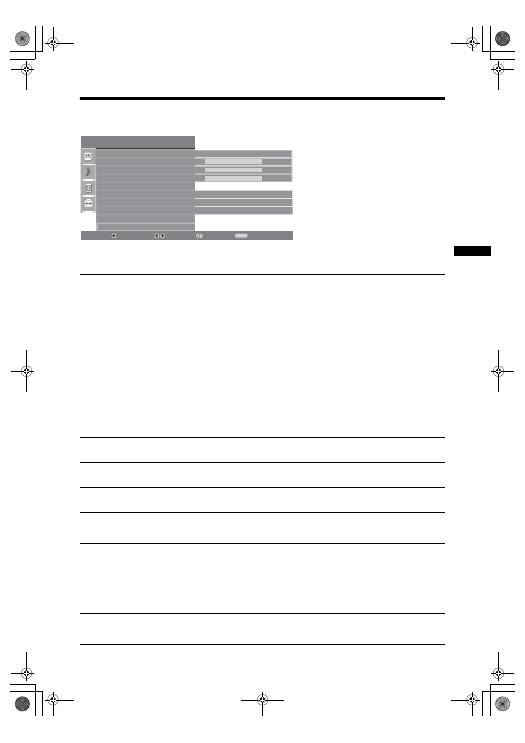
Sound Adjustment menu
You can select the options listed below on the
Sound menu. To select options in “Settings”,
see “Navigating through menus” (page 19).
Sound Effect
Selects the sound mode.
•
“
Standard”: Enhances clarity, detail, and sound presence by using “BBE High definition
Sound System.”
• “Dynamic”: Intensifies clarity and sound presence for better intelligibility and musical
realism by using the “BBE High definition Sound System.”
• “BBE ViVA”: BBE ViVA Sound provides musically accurate natural 3D image with Hi-Fi
sound. The clarity of the sound is improved by BBE while the width depth and height of
sound image are expanded by BBE’s proprietary 3D sound process. BBE ViVA Sound is
compatible with all TV programs including news, music, dramas, movies, sports and
electronic games.
• “Dolby Virtual
”
: Uses the TV speakers to simulate the surround effect produced by a multi
channel system.
• “Off”: Flat response.
Tips
• You can change sound effect by pressing
9
repeatedly.
• If you set “Auto Volume” to “On”, “Dolby Virtual” changes to “Natural”.
Treble
Adjusts higher-pitched sounds.
Bass
Adjusts lower-pitched sounds.
Balance
Emphasizes left or right speaker balance.
Reset
Resets all the sound settings to the factory settings.
Dual Sound
Selects the sound from the speaker for a stereo or bilingual broadcast.
• “Stereo”, “Mono”: For a stereo broadcast.
• “A”/“B”/“Mono”: For a bilingual broadcast, select “A” for sound channel 1, “B”
for sound channel 2, or “Mono” for a mono channel, if available.
Tip
If you select other equipment connected to the TV, set “Dual Sound” to “Stereo”, “A” or “B”.
Auto Volume
Keeps a constant volume level even when volume level gaps occur (e.g., adverts tend
to be louder than programmes).
Sound Adjustment
Select:
Enter:
Exit:
MENU
Sound Effect
Treble
Bass
Balance
Reset
Dual Sound
Auto Volume
TV Speakers
Standard
50
50
0
Mono
On
On
Back:
010COV.book Page 21 Monday, June 12, 2006 3:29 PM
