
Sony BRAVIA KDL-20S2000: Connecting to the TV (rear)
Connecting to the TV (rear): Sony BRAVIA KDL-20S2000
Table of contents
- Table of Contents
- Start-up Guide 1: Checking the accessories 2: Connecting an aerial/ VCR
- 3: Bundling the cables 4: Preventing the TV from toppling over 5: Selecting the language and country/region
- 6: Auto-tuning the TV
- Safety information Carrying Placement
- Ventilation Optional accessories Wiring Medical institutions Outdoor use Vehicle, Ships and other vessels Water and moisture Moisture and flammable objects Lightning storms
- Broken pieces Dangerously high Voltage are
- Precautions Disposal of the TV set
- Overview of the remote
- Overview of the TV buttons and indicators
- Watching TV Additional operations
- To access Text Picture Freeze PIP in PC Mode (Picture in Picture)
- Checking the Digital Electronic Programme Guide (EPG)
- Using the Favourite list
- Viewing pictures from connected equipment
- Navigating through menus Using MENU Functions
- Picture Adjustment menu
- Sound Adjustment menu Sound Effect Treble Bass Balance Reset Dual Sound Auto Volume
- TV Speakers
- Features menu Screen Power Saving AV2 Output RGB Center
- PC Adjustment Timer
- Set-up menu Auto Start-up Language Country Auto Tuning Programme Sorting AV Preset Sound Offset
- Manual Programme Preset
- Digital Set-up menu Digital Tuning
- Digital Set-up
- Connecting optional equipment Using Optional Equipment Connecting to the TV (side)
- Connecting to the TV (rear)
- Specifications Additional Information
- Troubleshooting Picture
- Sound Channels General
31
GB
KDL-20S2020
2-685-333-41(0)
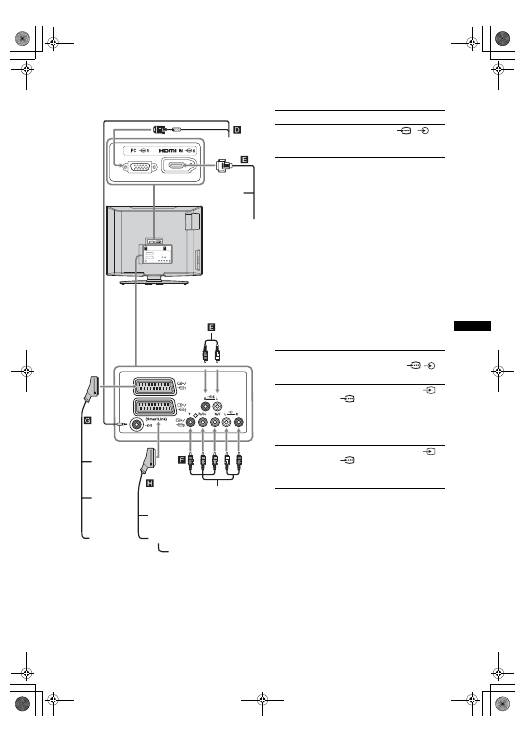
Using Optional Equipment
Connecting to the TV (rear)
DVD player
with component output
DVD player
Decoder
DVD recorder
VCR
Video game
equipment
DVD player
Digital satellite
receiver
PC
Decoder
To connect
Do this
PC
D
Connect to the PC
5/
5
sockets. It is recommended to use
a PC cable with ferrites.
Digital satellite
receiver or DVD
player
E
Connect to the HDMI IN 6 socket
if the equipment has a HDMI
socket. The digital video and audio
signals are input from the
equipment. If the equipment has a
DVI socket, connect the DVI
socket to the HDMI IN 6 socket
through a DVI - HDMI adaptor
interface (not supplied), and
connect the equipment’s audio out
sockets to the audio in HDMI IN 6
sockets.
Notes
• The HDMI sockets only support
the following Video inputs: 480i,
480p, 576i, 576p, 720p and
1080i. To connect a PC, please
use the PC input socket.
• Use HDMI certified cable with
HDMI logo.
DVD player with
component output
F
Connect to the component sockets
and the audio sockets
/
3.
Video game
equipment, DVD
player or decoder
G
Connect to the scart socket
/
1. When you connect the
decoder, the scrambled signal from
the TV tuner is output to the
decoder, then the unscrambled
signal is output from the decoder.
DVD recorder or
VCR that supports
SmartLink
H
Connect to the scart socket
/
2. SmartLink is a direct link
between the TV and a VCR/DVD
recorder.
010COV.book Page 31 Monday, June 12, 2006 3:29 PM
