
Sony BRAVIA KDL-20S2000: Navigating through menus Using MENU Functions
Navigating through menus Using MENU Functions: Sony BRAVIA KDL-20S2000
Table of contents
- Table of Contents
- Start-up Guide 1: Checking the accessories 2: Connecting an aerial/ VCR
- 3: Bundling the cables 4: Preventing the TV from toppling over 5: Selecting the language and country/region
- 6: Auto-tuning the TV
- Safety information Carrying Placement
- Ventilation Optional accessories Wiring Medical institutions Outdoor use Vehicle, Ships and other vessels Water and moisture Moisture and flammable objects Lightning storms
- Broken pieces Dangerously high Voltage are
- Precautions Disposal of the TV set
- Overview of the remote
- Overview of the TV buttons and indicators
- Watching TV Additional operations
- To access Text Picture Freeze PIP in PC Mode (Picture in Picture)
- Checking the Digital Electronic Programme Guide (EPG)
- Using the Favourite list
- Viewing pictures from connected equipment
- Navigating through menus Using MENU Functions
- Picture Adjustment menu
- Sound Adjustment menu Sound Effect Treble Bass Balance Reset Dual Sound Auto Volume
- TV Speakers
- Features menu Screen Power Saving AV2 Output RGB Center
- PC Adjustment Timer
- Set-up menu Auto Start-up Language Country Auto Tuning Programme Sorting AV Preset Sound Offset
- Manual Programme Preset
- Digital Set-up menu Digital Tuning
- Digital Set-up
- Connecting optional equipment Using Optional Equipment Connecting to the TV (side)
- Connecting to the TV (rear)
- Specifications Additional Information
- Troubleshooting Picture
- Sound Channels General
19
GB
KDL-20S2020
2-685-333-41(0)
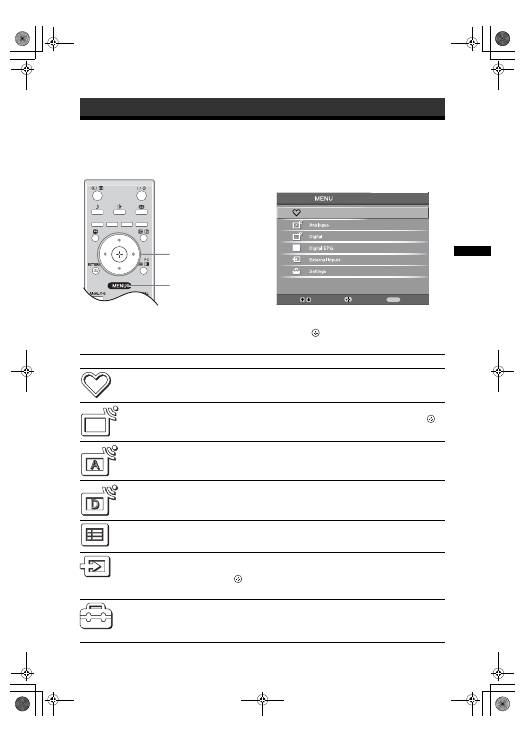
Using MENU Functions
Navigating through menus
“MENU” allows you to enjoy various convenient features of this TV. You can easily select channels or external
inputs with the remote. Also, settings for your TV can be changed easily using “MENU”.
1
Press MENU to display the menu.
2
Press
F
/
f
to select an option.
3
Press
to confirm a selected option.
To exit the menu, press MENU.
Using MENU Functions
1
2,3
Select:
Enter:
Exit:
MENU
Digital Favourites
Menu
Description
Digital Favourites
(in digital mode only)
Launches the Favourite list. For details about settings, see page 17.
Programme List
(in analogue mode
only)
Allows you to select TV programs from a list of channel labels.
• To watch the desired channel, select the channel, then press
.
• To assign a label to a program, see page 26.
Analogue
(in digital mode only)
Returns to the last viewed analogue channel.
Digital
(in digital mode only)
Returns to the last viewed digital channel.
Digital EPG
(in digital mode only)
Launches the Digital Electronic Programme Guide (EPG).
For details about settings, see page 15.
External Inputs
Selects equipment connected to your TV.
• To watch the desired external input, select the input source, then
press .
• To assign a label to an external input, see page 25.
Settings
Opens the Settings menu screen where most of advanced settings and
adjustments are performed. Select a menu icon, select an option and make the
desired change or adjustment using
F
/
f
/
G
/
g
.
For details about settings, see page 20 to 29.
010COV.book Page 19 Monday, June 12, 2006 3:29 PM
