
Sony CPF-MP001: To listen to music on a portable audio player
To listen to music on a portable audio player: Sony CPF-MP001
Table of contents
- Regulatory Information Table of Contents
- Checking Supplied Items
- Installation
- Listening to Music
- To listen to music on a portable audio player
- FAQ Troubleshooting
- Precautions Specifications
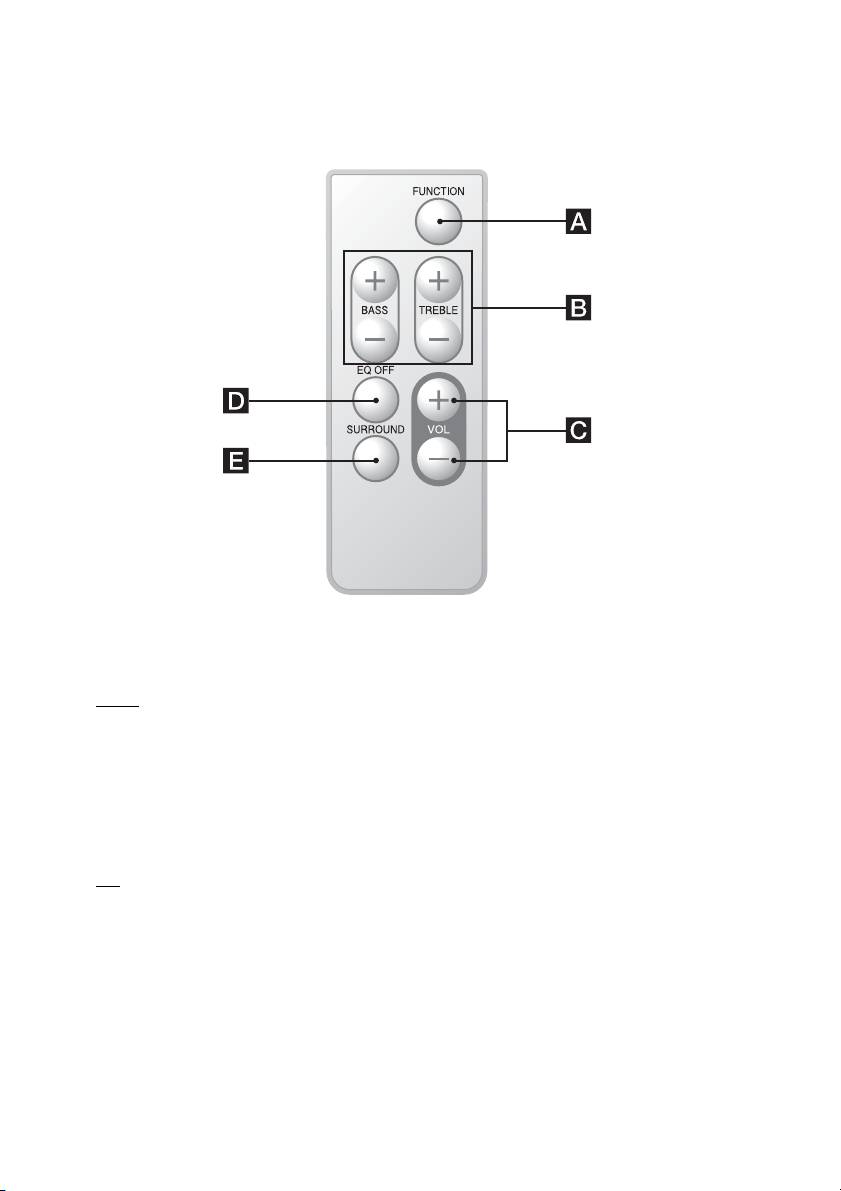
The default settings are underlined.
A FUNCTION: Switches the input source.
Phone
y LINE
B BASS +/–: Adjusts the bass. (±3 steps)
TREBLE +/–: Adjusts the treble. (±3 steps)
C VOL +/–: Adjusts the volume. (10 levels)
D EQ OFF: Resets the bass and treble.
E SURROUND: Turns the surround sound effect on and off.
Off
y On
Note
If your cell phone is equipped with an equalizer or other sound control functions, turn them off before using the cell
phone with the system.
To listen to music on a portable audio player
Switch the function to LINE in step 2, and then start play on your portable audio player.
The LINE indicator lights up.
GB
7
Top 10 manuals
100.00
NZXT HALE90 1000W99.99
Samsung SM-R38099.97
AEG BSB 18C99.97
Dell 2700W99.97
Smeg KSEC70X99.96
Beurer HDE 4099.96
Pyramida KH 50 v.299.96
MSI CSM-H81M-P3299.96
AEG HR 562799.95
Melissa 640-048