
Sony CPF-MP001: Listening to Music
Listening to Music: Sony CPF-MP001
Table of contents
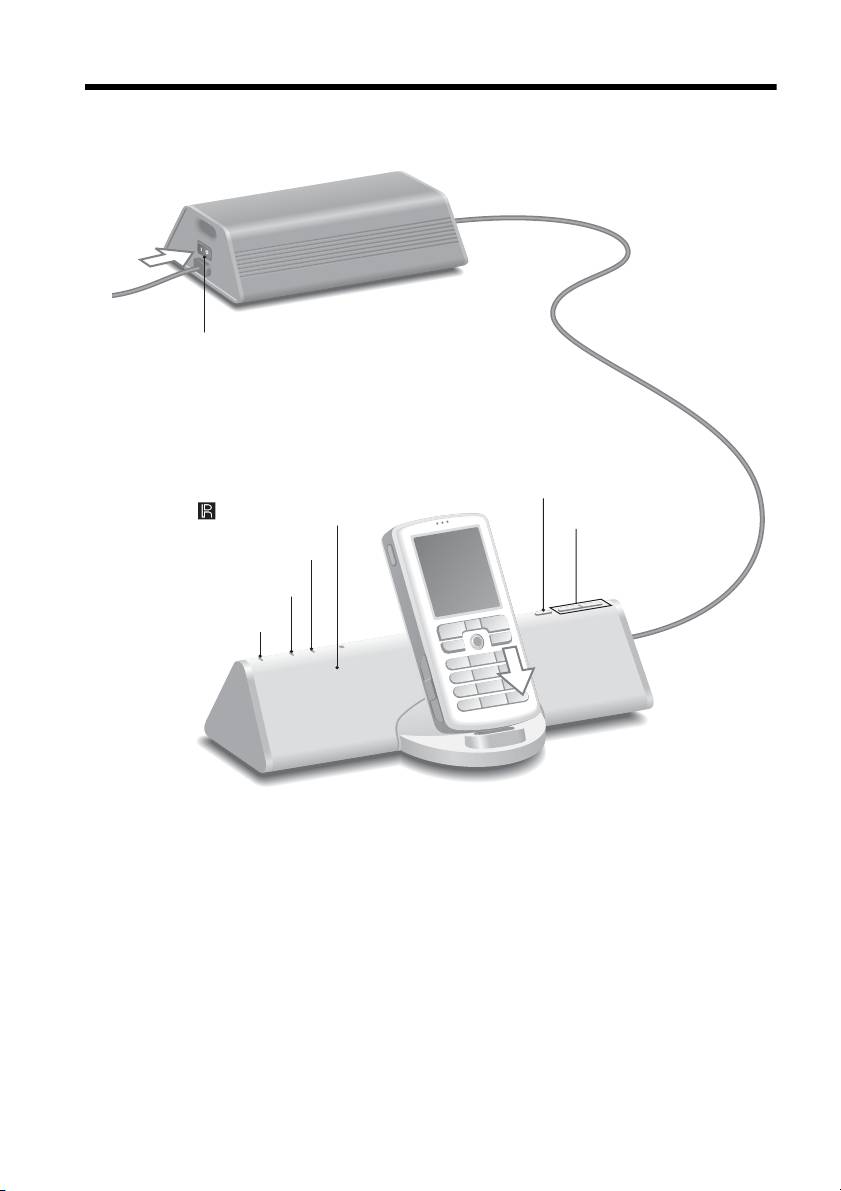
Listening to Music
1 Turn on the AC adaptor with subwoofer.
The power is also supplied to the main unit.
Power switch ?/a (on/off)
2 Press FUNCTION to switch the function from LINE to
the phone.
The LINE indicator turns off.
FUNCTION
Remote sensor (inside)
VOLUME +/–
SURROUND indicator
LINE indicator
ON indicator
3 Select songs and start play on your cell phone, and put the cell
phone in the main unit’s connector.
The system charges the cell phone’s battery at the same time.
Use your cell phone to play, stop and perform other operations.
When operating the cell phone while it is in the connector, brace the
phone with your other hand.
To use the system as a battery charger
Put the cell phone in the main unit’s connector. Battery charging starts automatically.
GB
6
Top 10 manuals
100.00
NZXT HALE90 1000W99.99
Samsung SM-R38099.97
AEG BSB 18C99.97
Dell 2700W99.97
Smeg KSEC70X99.96
Beurer HDE 4099.96
Pyramida KH 50 v.299.96
MSI CSM-H81M-P3299.96
AEG HR 562799.95
Melissa 640-048