
Sony BRAVIA KDL-20S2020: Safety information
Safety information: Sony BRAVIA KDL-20S2020
Table of contents
- Trademark information Introduction Notice for Digital TV function
- Table of Contents
- Start-up Guide 1: Checking the 2: Connecting an aerial/ accessories VCR
- 3: Bundling the cables 4: Preventing the TV from toppling over 5: Selecting the language and country/region
- 6: Auto-tuning the TV
- Safety information
- GB
- GB
- Precautions
- Overview of the remote
- Overview of the TV buttons and indicators
- Watching TV
- To access Text Picture Freeze PIP in PC Mode (Picture in Picture) To change the screen mode manually to suit the broadcast GB
- Checking the Digital Electronic Programme Guide To Do this
- To Do this
- Using the Favourite list To Do this
- Viewing pictures from connected equipment
- Navigating through menus
- Picture Adjustment menu
- Sound Adjustment menu
- TV Speakers
- Features menu
- Timer
- Set-up menu
- Manual Programme Preset
- Skip
- Digital Set-up menu Digital Tuning
- Digital Set-up
- Using Optional Equipment Connecting optional equipment Connecting to the TV (side)
- Connecting to the TV (rear)
- Additional Information Specifications
- Troubleshooting Picture
- Sound Channels General
010COV.book Page 7 Monday, June 12, 2006 3:29 PM
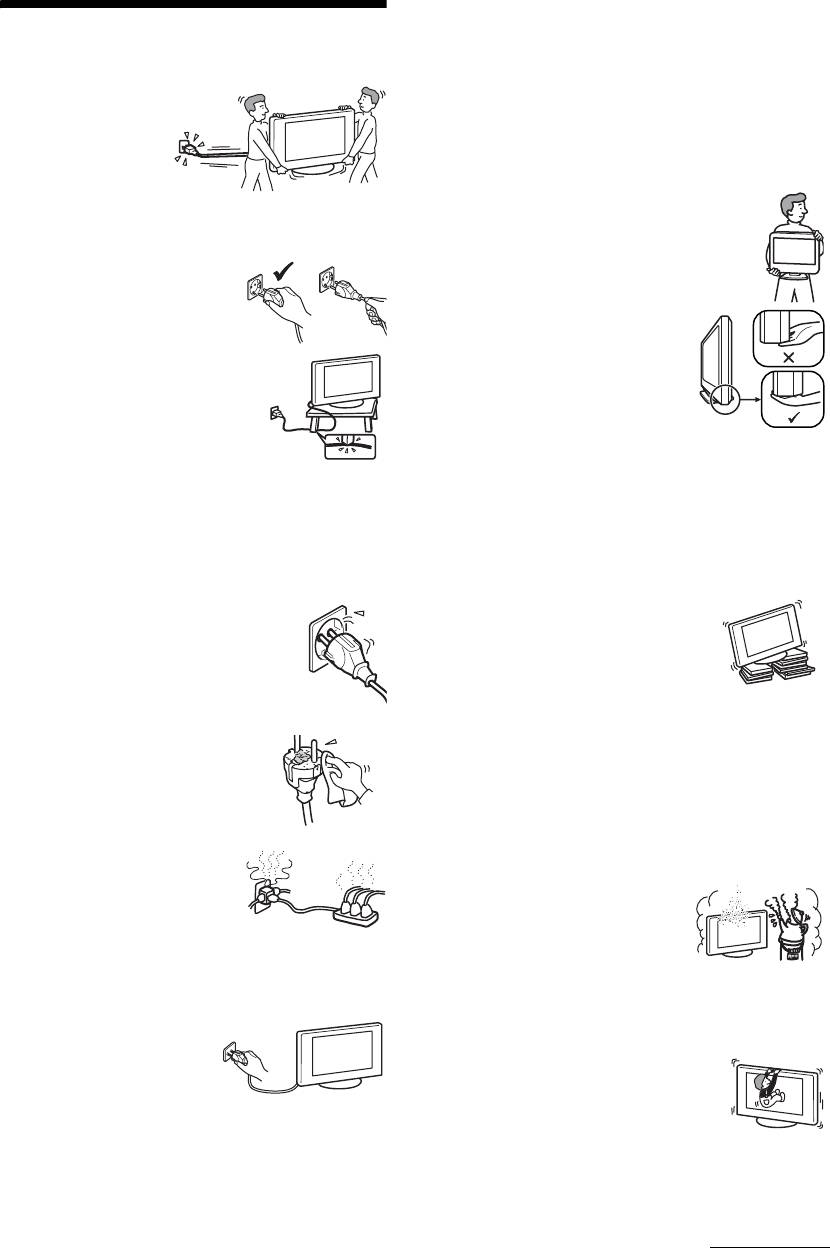
• The TV set is not disconnected from the mains when the
TV set is switched off. To disconnect the TV set
Safety information
completely, pull the plug from the mains. However, some
TV sets may have features which need the TV set to be left
Mains lead
in standby to work correctly. The instructions in this
manual will inform you if this applies.
• Observe the followings
to prevent the mains
Carrying
lead being damaged.
• Before carrying the TV set, disconnect all the cables from
If the mains lead is
the TV set.
damaged, it may result
• When you carry the TV set by
in a fire or an electric
hand, hold the TV set as illustrated
shock.
on the right. When lifting the TV
– When you disconnect the mains
set or moving the panel of the TV
lead, disconnect it from the
set, hold it firmly from the bottom.
mains socket first.
If you do not do so, the TV set may
– Be sure to grasp the plug when
fall and be damaged or cause
disconnecting the mains lead.
serious injury.
Do not pull on the mains lead
• When transporting it, do not
itself.
subject the TV set to jolts or
– Do not pinch, bend, or twist the
excessive vibration. The TV set
mains lead excessively. The core
may fall and be damaged or cause
conductors may be exposed or
serious injury.
broken.
• If the TV set has been dropped or
– Do not modify the mains lead.
damaged, have it checked
– Do not put anything heavy on the mains lead.
immediately by qualified service personnel.
– Keep the mains lead away from heat sources.
• When you carry the TV set in for repair or when you move
• If you damage the mains lead, stop using it and ask your
it, pack it using the original carton and packing material.
dealer or Sony service centre to exchange it.
• Do not use the supplied mains lead on any other
Placement
equipment.
• The TV set should be installed near an easily accessible
• Use only an original Sony mains lead, not other brands.
mains socket.
• Place the TV set on a stable, level
Mains socket
surface. Do not hang anything on the
Do not use a poor fitting mains socket. Insert
TV set. If you do, the TV set may fall
the plug fully into the mains socket. A poor
from the stand, causing damage or
fit may cause arcing and result in a fire.
serious injury.
Contact your electrician to have the mains
• Do not install the TV set in places
socket changed.
subject to extreme temperature, for example in direct
sunlight, or near a radiator, or heating vent. If the TV set
Cleaning the mains plug
is exposed to extreme temperature, the TV set may
Unplug the mains plug and clean it
overheat and cause deformation of the casing or cause the
regularly. If the plug is covered with dust
TV set to malfunction.
and it picks up moisture, its insulation
• Do not install the TV set in a place exposed to direct air
may deteriorate and result in a fire.
conditioning. If the TV set is installed in such a location,
Overloading
moisture may condense inside and may cause a
This TV set is designed to operate
malfunction.
on a 220–240 V AC supply only.
• Never place the TV set in hot, oily,
Take care not to connect too many
humid or excessively dusty places.
appliances to the same mains
• Do not install the TV set where
socket as this could result in fire or
insects may enter.
electric shock.
• Do not install the TV set where it
may be exposed to mechanical vibration.
When not in use
• Do not install the TV set in a location where it may
• If you will not be using the TV
protrude, such as on or behind a pillar, or where you might
set for several days, the TV set
bump your head on it. Otherwise, it may result in injury.
should be disconnected from
• Do not allow children to climb on
the mains for environmental
the TV set.
and safety reasons.
• If you use the TV set near the
seashore, salt may corrode metal
parts of the TV set and cause
internal damage or fire.
Continued
7
GB
2-685-333-41(0)
KDL-20S2020
