
Sony BRAVIA KDL-20S2020: GB
GB: Sony BRAVIA KDL-20S2020
Table of contents
- Trademark information Introduction Notice for Digital TV function
- Table of Contents
- Start-up Guide 1: Checking the 2: Connecting an aerial/ accessories VCR
- 3: Bundling the cables 4: Preventing the TV from toppling over 5: Selecting the language and country/region
- 6: Auto-tuning the TV
- Safety information
- GB
- GB
- Precautions
- Overview of the remote
- Overview of the TV buttons and indicators
- Watching TV
- To access Text Picture Freeze PIP in PC Mode (Picture in Picture) To change the screen mode manually to suit the broadcast GB
- Checking the Digital Electronic Programme Guide To Do this
- To Do this
- Using the Favourite list To Do this
- Viewing pictures from connected equipment
- Navigating through menus
- Picture Adjustment menu
- Sound Adjustment menu
- TV Speakers
- Features menu
- Timer
- Set-up menu
- Manual Programme Preset
- Skip
- Digital Set-up menu Digital Tuning
- Digital Set-up
- Using Optional Equipment Connecting optional equipment Connecting to the TV (side)
- Connecting to the TV (rear)
- Additional Information Specifications
- Troubleshooting Picture
- Sound Channels General
010COV.book Page 8 Monday, June 12, 2006 3:29 PM
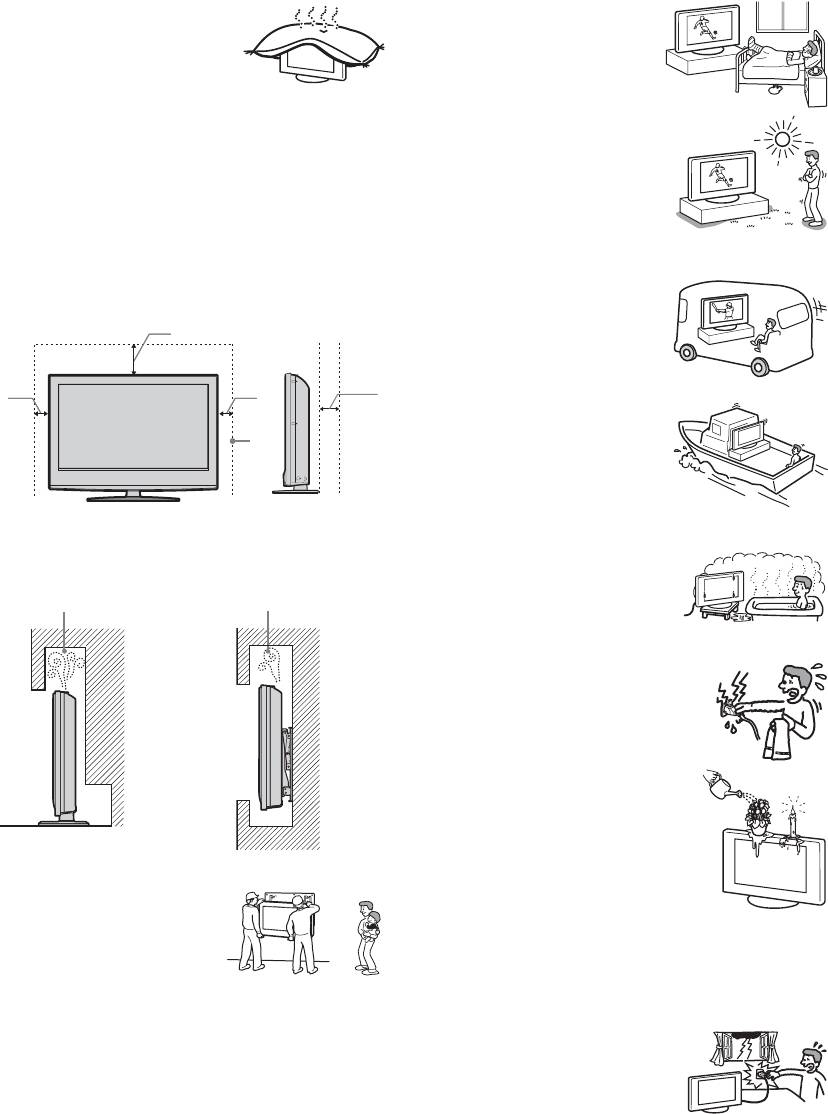
Ventilation
Medical institutions
• Never cover the ventilation
Do not place this TV set in a place
holes or insert anything in the
where medical equipment is in
cabinet. It may cause
use. It may cause a malfunction of
overheating and result in a fire.
medical instruments.
• Unless proper ventilation is
provided, the TV set may gather dust and get dirty. For
Outdoor use
proper ventilation, observe the following:
• Do not install this TV set
– Do not install the TV set turned backwards or sideways.
outdoors. If the TV set is
– Do not install the TV set turned over or upside down.
exposed to rain, it may result in a
– Do not install the TV set on a shelf or in a closet.
fire or an electrical shock.
– Do not place the TV set on a rug or bed.
• If this TV set is exposed to direct
– Do not cover the TV set with cloth, such as curtains, or
sunlight, the TV set may heat up
items such as newspapers, etc.
and it may damage the TV set.
• Leave some space around the TV set as shown below.
Otherwise, air-circulation may be inadequate and cause
Vehicle, Ships and other
overheating, which may cause a fire or damage to the TV set.
vessels
• Do not install this TV set in a
30 cm
vehicle. The motion of the
vehicle may cause the TV set
10 cm 10 cm 15 cm
to fall down and cause injury.
• Do not install this TV set on a
ship or other vessel. If the TV
set is exposed to seawater, it
may cause a fire or damage
the TV set.
Leave at least this much space.
Water and moisture
• Never install the TV set as follows:
• Do not use this TV set near water
Air circulation is
Air circulation is
– for example, near a bathtub or
blocked.
blocked.
shower room. Also do not expose
to rain, moisture or smoke. This
may result in a fire or an electric
shock.
• Do not touch the mains lead and the
TV set with wet hands. Doing so
Wall Wall
may cause an electric shock or
damage to the TV set.
Moisture and flammable objects
• Do not place any objects on the TV
set. The TV set shall not be exposed to
dripping or splashing and that no
objects filled with liquid, such as
Optional accessories
vases, shall be placed on the TV set.
Observe the following when
• To prevent fire, keep flammable
installing the TV set using a stand
objects or naked lights (e.g. candles)
or wall-mount bracket. If you do
away from the TV set.
not do so, the TV set may fall and
• If any liquid or solid object does fall through openings in
cause serious injury.
the cabinet, do not operate the TV set. It may result in an
• If the TV set is to be installed on
electric shock or damage to the TV set. Have it checked
a wall, have the installation carried out by qualified
immediately by qualified service personnel.
service personnel. Improper installation may render the
Lightning storms
TV set unsafe.
For your own safety, do not touch any
• Secure the TV set properly, following the instructions
part of the TV set, mains lead, or
supplied with your stand when installing the TV set.
aerial lead during lightning storms.
• Be sure to attach the brackets supplied with your stand.
Wiring
• When wiring cables, be sure to unplug the mains lead for
your safety.
• Take care not to catch your feet on the cables. It may
damage the TV set.
8
GB
2-685-333-41(0)
KDL-20S2020
