
Sony SU-WTS1: 4 Step 2: Remove Stands from the TV
4 Step 2: Remove Stands from the TV: Sony SU-WTS1
Table of contents
- For Users For dealers or authorized service personnel
- Step 1: Check the Parts
- 4 Step 2: Remove Stands from the TV
- Step 3: Attach the Mounting Arms to the TV
- 6 Step 4: Fasten Lower Mount Wall Brackets (Example for securing to a wood wall)
- Step 5: Secure Upper Mount Wall Brackets
- 8 Step 6: Mount the TV to the Mount Wall Brackets Step 7: Adjust Tension
- Proper Ventilation
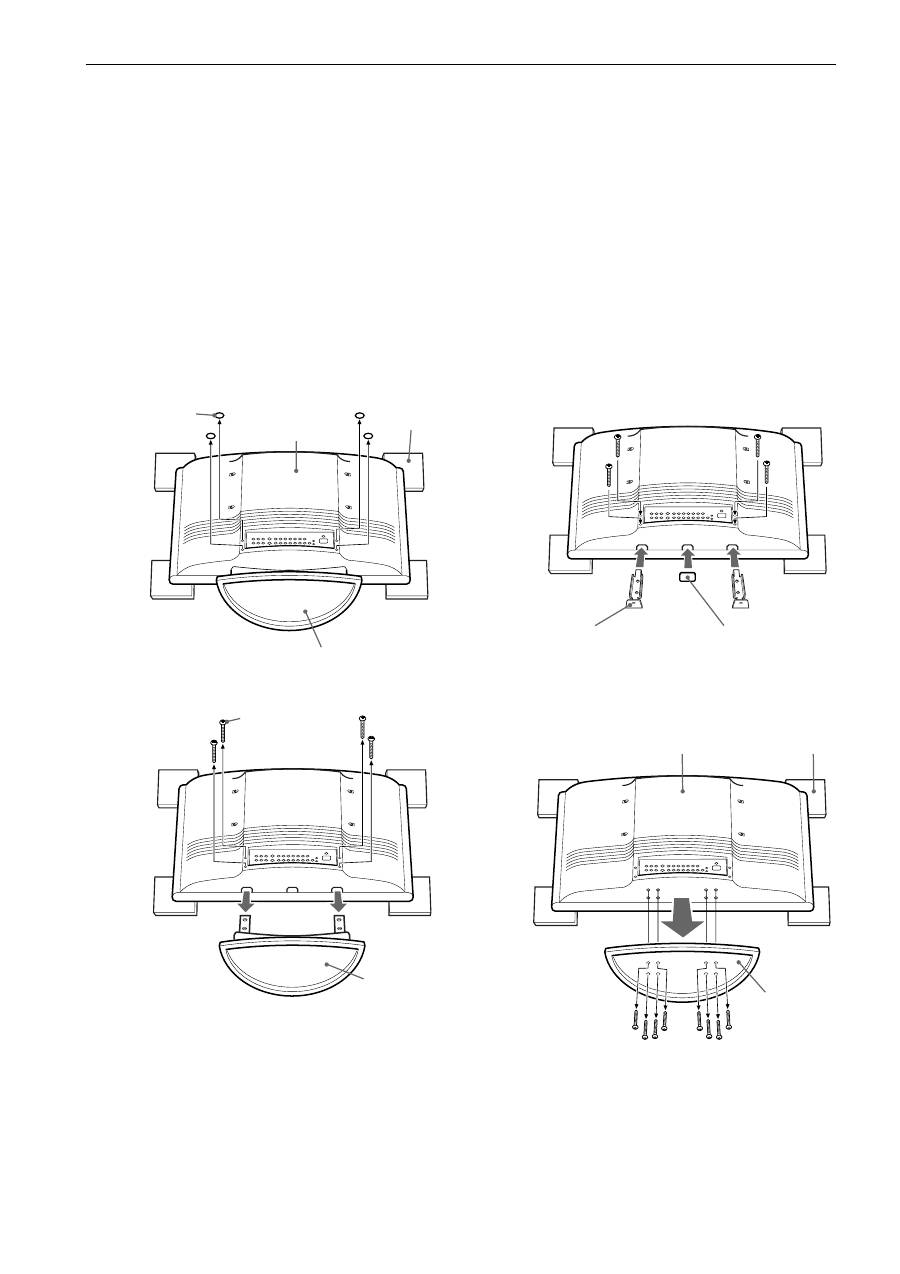
4 Step 2: Remove Stands from the TV
1
Place the 32” model (KZ-32TS1E) or 42” model (KZ-42TS1E) on 4 cushioned supports (not supplied).
The TV screen should face down, parallel to the floor and the base/stand should not touch the floor.
2
Pull the base/stand out from the TV.
For KZ-32TS1E
At the bottom of the rear panel of the TV, cut out the 4 rear panel caps (if there are any) with clippers and scrape the plastic clean with
reamers, so each opening is round and smooth enough to allow a screw to be removed.
For KZ-42TS1E
At the bottom of the stand of the TV, you will see the screws securing the stand. With a (Philips) magnetic screwdriver, remove all the
screws that secure the base to the TV.
3
For KZ-32TS1E only
Attach the covers (
F
,
H
) on the bottom of the TV.
KZ-32TS1E
How to remove the stand and assemble the
covers
KZ-42TS1E
How to remove the stand
1
Rear of TV
Remove the four
(4) caps from
the chassis (if
there are caps).
Stand
Cushioned
support
Remove the four (4)
screws.
Remove
stand and
store away.
2
Secure the two covers (
H
)
with M6 that was previously
removed from the TV stand.
Close rectangle
hole by cover
sheet (
F
).
3
Rear of TV
Remove
the eight
(8) screws.
Remove stand
and store away.
Cushioned
support
2
1
