
Sony SU-B461S: Step 4: Connecting the TV and Player
Step 4: Connecting the TV and Player: Sony SU-B461S
Table of contents
- NOTICE FOR CUSTOMERS IN THE UNITED KINGDOM CAUTION On Safety WARNING
- AC power cord (mains lead) NOTE ON AC adapter (mains adaptor)
- CAUTION PRECAUTIONS
- Step 1: Checking the parts
- Step 2: 2 Installing the TV 1 3
- 4 6 7 5
- 8 Step 3: Safety measures to prevent toppling over
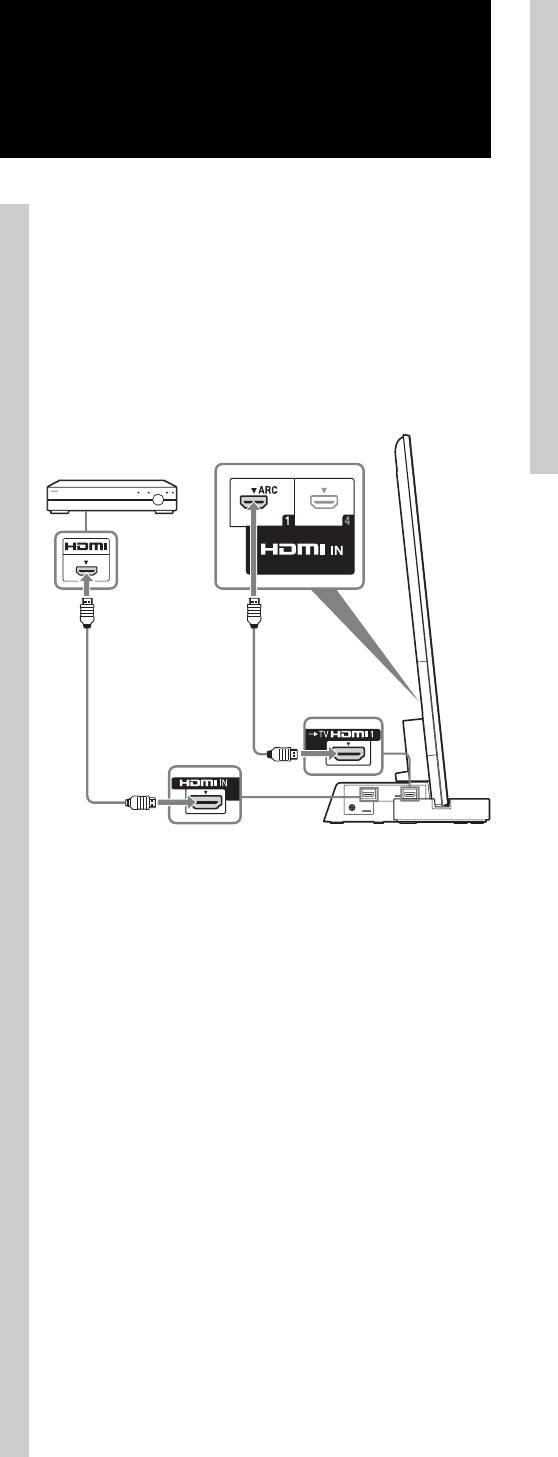
- Step 4: Connecting the TV and Player
- Step 5: Step 6: Connecting the AC Performing the TV power cord (mains lead) settings
- Troubleshooting Specifications Indicator
- HDMI section General
• Check the setup of the connected component if an image is
Step 4:
poor or the sound does not come out of a component
connected via the HDMI cable.
Connecting the TV and
• Audio signals (sampling frequency, bit length, etc.)
transmitted from an HDMI jack (socket) may be
Player
suppressed by the connected component.
• Sound may be interrupted when the sampling frequency or
the number of channels of audio output signals from the
playback component is switched.
• When the connected component is not compatible with
Connect the TV with an HDMI IN 1
copyright protection technology (HDCP), the image and/or
to the TV Stand using an HDMI
the sound from the HDMI TV OUT socket may be
cable.
distorted or may not be output.
In this case, check the specification of the connected
By connecting Sony “BRAVIA” Sync-compatible
component.
components using HDMI cables, operation can be
• We do not recommend using an HDMI-DVI conversion
simplified when you set the Control for HDMI function
cable.
for the TV.
• This system supports Deep Colour, “x.v.Colour,” and 3D
transmission.
Blu-ray Disc
Player, etc.
HDMI cable
(supplied)
HDMI cable
(not supplied)
~
• Please do not connect PC with HDMI.
• The TV Stand is compatible with the Audio Return
Channel (ARC) function. If you connect the TV Stand to
the ARC compatible TV’s HDMI IN 1 via an HDMI cable,
you do not need to connect the TV to the TV Stand with the
digital optical cord.
• You can see the letters “ARC” beside the TV’s HDMI jack
(socket) if it is compatible with the ARC function. Even if
you connect an HDMI cable to the socket, if the HDMI
input jack (socket) is not compatible with the ARC
function, you cannot use the ARC function.
• The ARC function is available only when Control for
HDMI is set to on.
z
• Even if the TV Stand is turned off (active standby mode),
the HDMI signal will be sent from the connected
component to the TV via the HDMI connection. You can
enjoy image and sound from the component on the TV.
Notes on HDMI connections
• Use a High Speed HDMI cable. If you use a Standard
HDMI cable, 1080p, Deep Colour, or 3D images may not
be displayed properly.
• We recommend that you use an HDMI-authorized cable.
10 (GB)
