
Sony SU-B461S: AC power cord (mains lead) NOTE ON AC adapter (mains adaptor)
AC power cord (mains lead) NOTE ON AC adapter (mains adaptor): Sony SU-B461S
Table of contents
- NOTICE FOR CUSTOMERS IN THE UNITED KINGDOM CAUTION On Safety WARNING
- AC power cord (mains lead) NOTE ON AC adapter (mains adaptor)
- CAUTION PRECAUTIONS
- Step 1: Checking the parts
- Step 2: 2 Installing the TV 1 3
- 4 6 7 5
- 8 Step 3: Safety measures to prevent toppling over
- Step 4: Connecting the TV and Player
- Step 5: Step 6: Connecting the AC Performing the TV power cord (mains lead) settings
- Troubleshooting Specifications Indicator
- HDMI section General
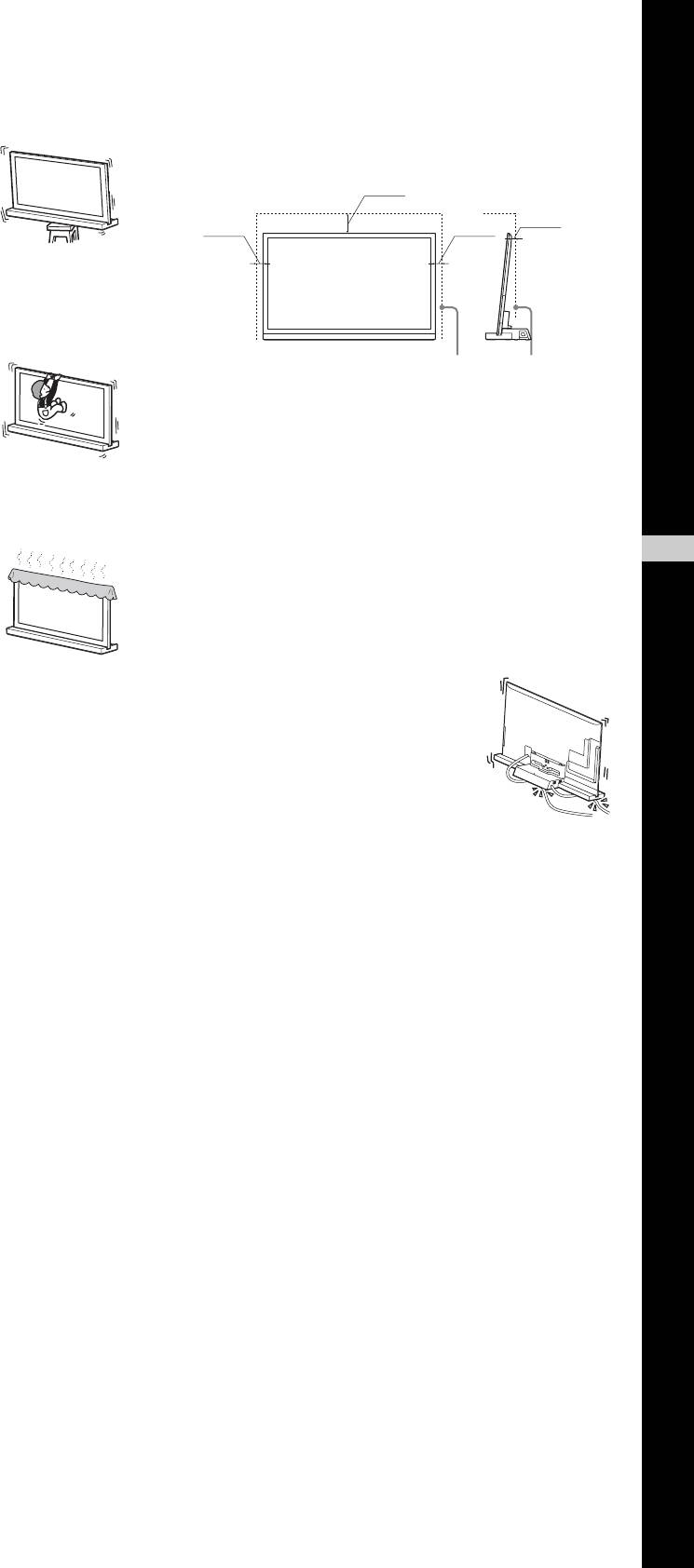
Be sure to install the TV Stand on a
Allow adequate space around the TV
stable surface.
set to ensure proper air circulation.
If you install the TV Stand on an unstable
Allow enough space around the TV as shown below.
surface, it may lose its balance and topple
30 cm
over or fall off. This may cause injury or
property damage.
6 cm
10 cm
10 cm
Do not lean on or hang from the TV
with the TV installed on the TV
Stand.
The TV Stand may topple over, or the TV
Leave at least this much space around the set.
may fall and cause serious injury or death.
AC power cord (mains lead)
• Connect the TV set using a three-wire grounding type
mains plug to a mains socket with a protective earthing
Do not cover the ventilation holes of
connection.
the TV.
• Use only Sony supplied AC power cords (mains lead), not
The ventilation openings in the TV are
those of other brands.
GB
• Do not allow the AC power cord (mains lead) or the
English
necessary to ensure reliable operation of the
TV and to protect it from overheating.
connecting cable to be pinched when you install the TV on
• Do not block or cover the ventilation
the TV Stand. If the AC power cord (mains lead) or the
openings with cloth or other materials.
connecting cable is damaged, this may result in fire or
• Never allow liquid or solid objects to fall
electric shock.
into the ventilation openings.
• Do not step on the AC power cord
(mains lead) or the connecting cable
when you carry the TV Stand. The AC
Do not place liquid filled objects
power cord (mains lead) or the
such as a vase or potted plant on the
connecting cable may be damaged, and
this may result in fire or electric shock.
TV.
• If you stumble over the AC power cord
(mains lead) or the connecting cable, the TV Stand may
Do not use a power line operated TV
topple over and cause injury.
• Unplugging the AC power cord (mains lead) from the wall
set near water; for example, near a
outlet (mains) will completely remove power from the TV
bathtub, washbowl, kitchen sink,
Stand.
laundry tub, wet basement or near a
swimming pool, etc.
NOTE ON AC adapter (mains
adaptor)
Do not install the TV in places
Warning
subject to extreme temperature,
To reduce the risk of fire or electric shock, do not expose this
apparatus to rain or moisture.
such as in direct sunlight, near a
To prevent fire or shock hazard, do not place objects filled
radiator or a heating vent.
with liquids, such as vases, on the apparatus.
The TV may overheat in such conditions which can cause
Do not install this equipment in a confined space, such as a
deformation of the enclosure and/or TV malfunction.
bookshelf or similar unit.
• Please ensure that the AC power outlet (mains socket) is
installed near the equipment and shall be easily accessible.
Do not install the TV in a place
• Be sure to use the supplied AC adapter (mains adaptor)
exposed to direct air conditioning.
and AC power cords (mains lead).
Moisture may condense inside and may cause TV
• Do not use any other AC adapter (mains adaptor). It may
malfunction.
cause a malfunction.
• Connect the AC adapter (mains adaptor) to an easily
accessible AC power outlet (mains socket).
(Continued)
3 (GB)
