
Sony CDX-M770 RU: CD/MD Playing a disc
CD/MD Playing a disc: Sony CDX-M770 RU
Table of contents
- Welcome !
- Table of Contents
- Location of controls Card remote commander RM-X111
- Main display panel Operation side
- Precautions
- Notes on CDs
- Notes on MDs
- Detaching the main display Getting Started window Resetting the unit
- Setting the clock
- CD/MD Playing a disc
- Display items Playing tracks repeatedly Playing tracks in random order
- Labelling a CD
- Locating a disc by name Selecting specific tracks for playback
- Radio Storing stations automatically
- Receiving the stored stations Storing only the desired stations
- Tuning in a station through a RDS list Overview of RDS
- Automatic retuning for best reception results
- Receiving traffic Presetting RDS stations with announcements AF and TA setting
- Tuning in stations by programme type
- Setting the clock DAB (optional) automatically Overview of DAB
- Basic operations of DAB
- Presetting DAB services Presetting DAB services automatically manually
- Tuning in DAB programme through a list
- Locating a DAB service by programme type (PTY) Switching multi-channel audio and DRC
- Tuning up for your best sound Setting the equalizer (EQ7)
- Setting the soundstage menu
- Adjusting the sound characteristics Listening to each programme source in its registered DSO
- Selecting the listening Adjusting the balance position (CDX-M770 only) Adjusting the bass (CDX- M670, MDX-M690 only)
- Adjusting the treble (CDX- Adjusting the front and rear M670, MDX-M690 only) volume (CDX-M770 only) Adjusting the balance (FAD) (CDX-M670, MDX-M690 only)
- Adjusting the volume of the subwoofer(s) Other adjustable items (CDX- M670, MDX-M690 only)
- Other Functions Using the rotary commander
- Quickly attenuating the sound Selecting the spectrum analyzer
- Changing the sound and display settings
- Labelling a Motion Display Connecting auxiliary audio equipment (CDX-M770 only)
- Additional Information Maintenance
- Removing the unit
- Specifications
- Troubleshooting CD/MD playback General Radio reception
- DSP functions (CDX-M770 only) RDS
- Error displays/Messages
To Press
CD/MD
Stop playback (OFF)
Eject the disc (OPEN/CLOSE), or
CDX-M770/M670:
(OPEN) then Z
In addition to playing a CD with this unit, you
Skip tracks
</, (SEEK) (
./>)
can also control external CD/MD units.
– Automatic
[once for each track]
Music Sensor
MDX-M690:
In addition to playing an MD with this unit, you
Fast-forward/
</, (SEEK) (
m/M)
can also control external CD/MD units.
reverse
[hold to desired point]
– Manual Search
Note
If you connect an optional CD unit with the CD TEXT
function, the CD TEXT information will appear in the
Notes
display when you play a CD TEXT disc.
• When the last track on the disc is over, playback
restarts from the first track of the disc.
• With optional unit connected, playback of the same
source will continue on to the optional CD/MD unit.
Playing a disc
(With optional unit)
(With this unit)
1 Press (SOURCE) repeatedly to select
“CD” or “MD.”
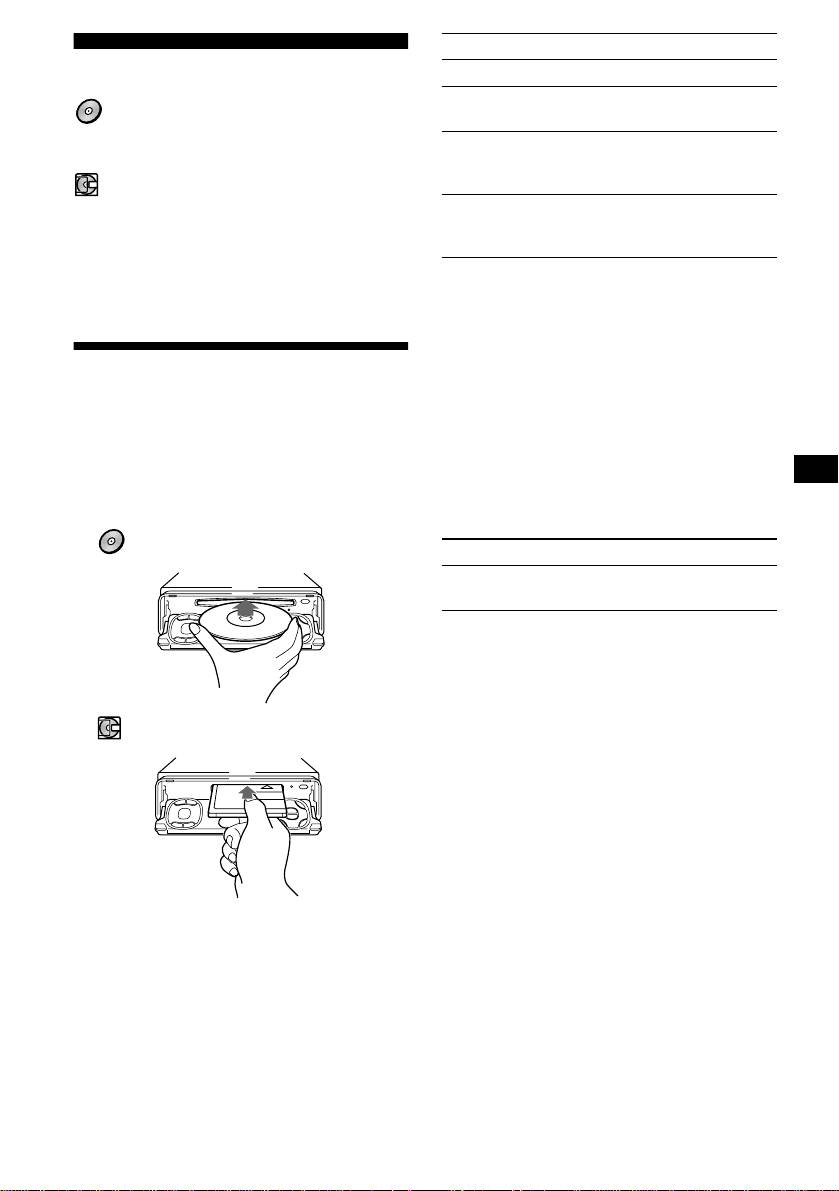
1 Press (OPEN/CLOSE) or (OPEN) on the
unit and insert the disc (labelled side
2 Press (MODE) repeatedly until the
up).
desired unit appears.
Playback starts automatically.
Playback starts.
CDX-M770/M670:
To Press
Skip discs
M/m (DISC) (+/–)
– Disc selection
MDX-M690:
2 Press (OPEN/CLOSE) or (CLOSE) on
the unit to close the front panel.
If a disc is already inserted, press (SOURCE)
repeatedly until “CD” or “MD” appears to start
playback.
11
