
Sony CDX-M600R: If the front panel does not open because of a blown fuse
If the front panel does not open because of a blown fuse: Sony CDX-M600R
Table of contents
- Welcome ! Precautions
- Notes on CDs
- Table of Contents
- Location of controls
- Location of controls
- The corresponding buttons of the unit control the same functions as those on the card remote commander.
- Turning the unit on/off Getting Started Resetting the unit Security release settings
- How to use the menu Setting the clock
- CD Player CD/MD Unit (optional) Listening to a CD
- Locating a specific track Locating a specific point in a track Automatically scrolling a disc name Locating a disc
- Playing tracks repeatedly Playing tracks in random — Repeat Play order — Shuffle Play
- Labelling a CD — Disc Memo
- Locating a disc by name
- Selecting specific tracks for playback
- Memorising only the Radio desired stations Memorising stations automatically
- Receiving the memorised stations
- RDS Overview of the RDS Retuning the same function programme automatically Displaying the station name
- Listening to a regional programme Local link function
- Listening to traffic announcements
- Presetting the RDS stations with the AF and TA data
- Locating a station by programme type
- Setting the clock DAB automatically Overview of DAB
- Basic operations of DAB
- Presetting DAB services Presetting DAB services automatically — BTM manually
- Listening to a DAB programme
- Settings on the audio Locating a DAB service by reception programme type (PTY)
- DSP (CDX-M700R only) Setting the equalizer
- Selecting the listening Selecting a soundstage position menu
- Adjusting the balance Adjusting the front and rear fader
- Adjusting the volume of the subwoofer(s) Listening to each programme source in its registered DSO
- Using the rotary Other Functions commander Labelling the rotary commander
- By rotating the control Other operations (the SEEK/AMS control) By pushing in and rotating the control (the PRESET/DISC control)
- Changing the operative direction Adjusting the sound characteristics (CDX-M600R only) Attenuating the sound
- Changing the sound and display settings
- Boosting the bass sound Selecting the spectrum analyser
- Additional Adjusting the sound and Information frequency of the equalizer preamplifier Maintenance
- Dismounting the unit
- If the front panel does not open because of a blown fuse
- Specifications
- Troubleshooting guide General CD/MD playback
- Radio reception RDS
- Error displays (when an optional CD/MD unit is connected)
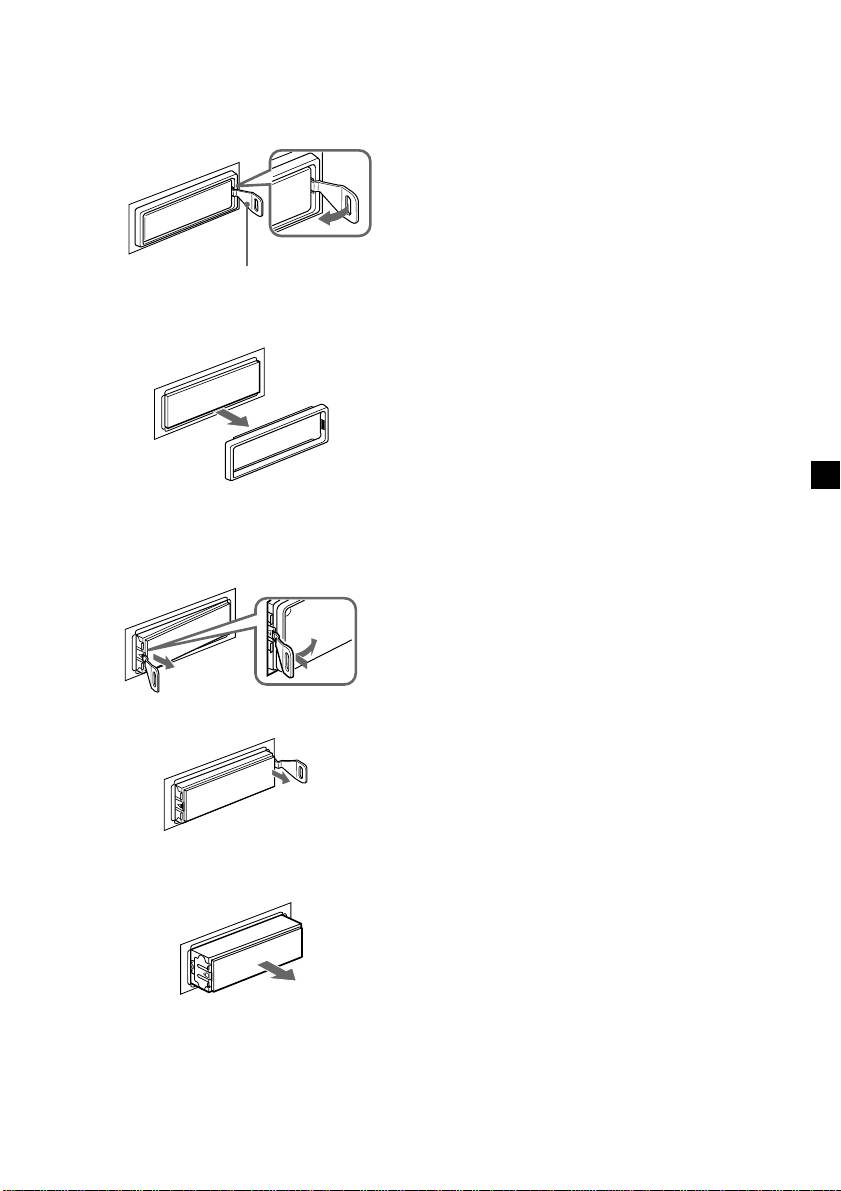
If the front panel does not open
because of a blown fuse
1 Press the clip inside the front cover with
a release key (supplied), and pry the
front cover free.
Release key (supplied)
2 Repeat step 1 on the left side.
The front cover is removed.
3 Use a release key to push in the clip on
the left side of the unit, then pull out the
left side of the unit until the catch clears
the mounting.
4 Repeat step 3 on the right side.
5 Slide the unit out of the mounting.
39
Top 10 manuals
100.00
NZXT HALE90 1000W99.99
Samsung SM-R38099.97
AEG BSB 18C99.97
Dell 2700W99.97
Smeg KSEC70X99.96
Beurer HDE 4099.96
Pyramida KH 50 v.299.96
MSI CSM-H81M-P3299.96
AEG HR 562799.95
Melissa 640-048
