
Sony CDX-M600R: Changing the operative direction Adjusting the sound characteristics (CDX-M600R only) Attenuating the sound
Changing the operative direction Adjusting the sound characteristics (CDX-M600R only) Attenuating the sound: Sony CDX-M600R
Table of contents
- Welcome ! Precautions
- Notes on CDs
- Table of Contents
- Location of controls
- Location of controls
- The corresponding buttons of the unit control the same functions as those on the card remote commander.
- Turning the unit on/off Getting Started Resetting the unit Security release settings
- How to use the menu Setting the clock
- CD Player CD/MD Unit (optional) Listening to a CD
- Locating a specific track Locating a specific point in a track Automatically scrolling a disc name Locating a disc
- Playing tracks repeatedly Playing tracks in random — Repeat Play order — Shuffle Play
- Labelling a CD — Disc Memo
- Locating a disc by name
- Selecting specific tracks for playback
- Memorising only the Radio desired stations Memorising stations automatically
- Receiving the memorised stations
- RDS Overview of the RDS Retuning the same function programme automatically Displaying the station name
- Listening to a regional programme Local link function
- Listening to traffic announcements
- Presetting the RDS stations with the AF and TA data
- Locating a station by programme type
- Setting the clock DAB automatically Overview of DAB
- Basic operations of DAB
- Presetting DAB services Presetting DAB services automatically — BTM manually
- Listening to a DAB programme
- Settings on the audio Locating a DAB service by reception programme type (PTY)
- DSP (CDX-M700R only) Setting the equalizer
- Selecting the listening Selecting a soundstage position menu
- Adjusting the balance Adjusting the front and rear fader
- Adjusting the volume of the subwoofer(s) Listening to each programme source in its registered DSO
- Using the rotary Other Functions commander Labelling the rotary commander
- By rotating the control Other operations (the SEEK/AMS control) By pushing in and rotating the control (the PRESET/DISC control)
- Changing the operative direction Adjusting the sound characteristics (CDX-M600R only) Attenuating the sound
- Changing the sound and display settings
- Boosting the bass sound Selecting the spectrum analyser
- Additional Adjusting the sound and Information frequency of the equalizer preamplifier Maintenance
- Dismounting the unit
- If the front panel does not open because of a blown fuse
- Specifications
- Troubleshooting guide General CD/MD playback
- Radio reception RDS
- Error displays (when an optional CD/MD unit is connected)
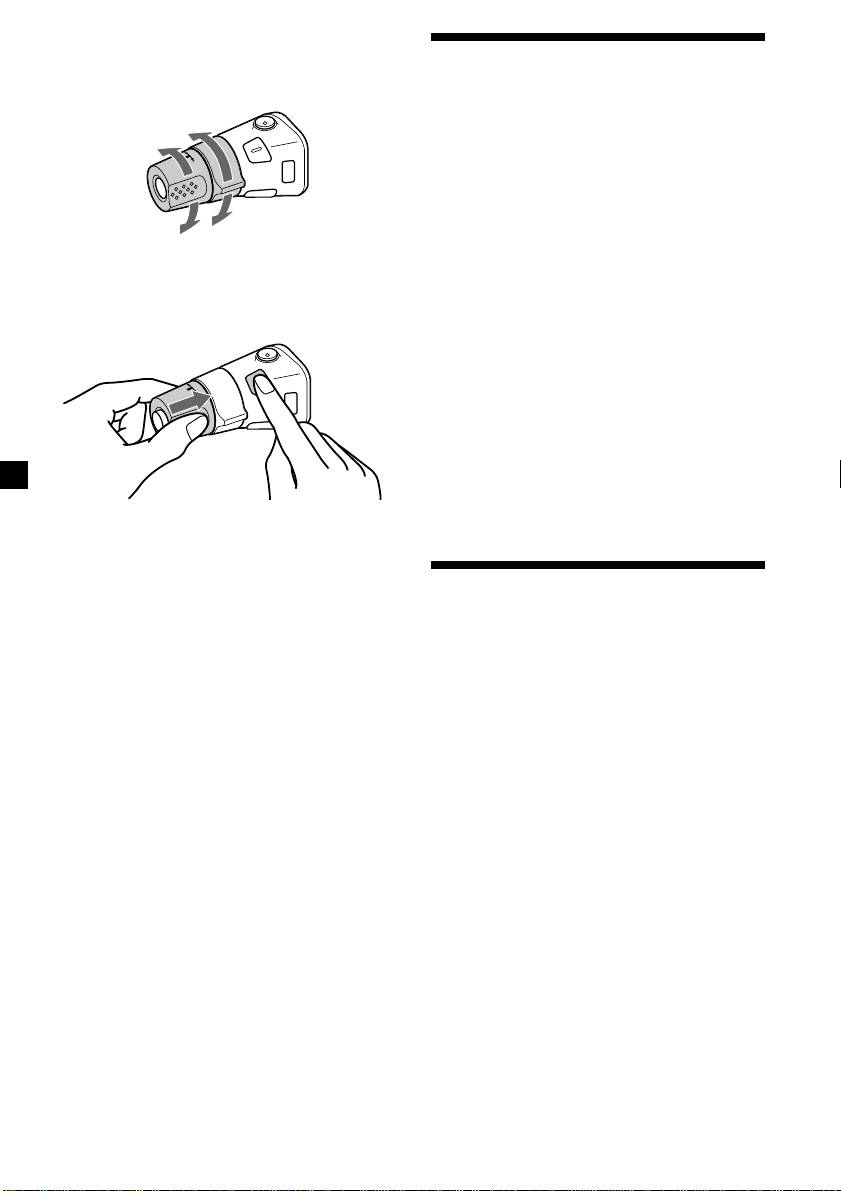
Changing the operative direction
The operative direction of controls is factory-
Adjusting the sound
set as shown below.
characteristics (CDX-M600R only)
To increase
You can adjust the bass, treble, balance, and
fader.
You can store the bass and treble levels
independently for each source.
1 Select the item you want to adjust by
To decrease
pressing (SOUND) repeatedly.
Each time you press (SOUND), the item
If you need to mount the rotary commander
changes as follows:
on the right hand side of the steering column,
BAS (bass) t TRE (treble) t BAL (left-right)
you can reverse the operative direction.
t FAD (front-rear)
2 Adjust the selected item by pressing <
or ,.
When adjusting with the rotary
commander, press (SOUND) and rotate the
VOL control.
Note
Adjust within three seconds after selecting the
item.
Press (SOUND) for two seconds while
pushing the VOL control.
Tip
Attenuating the sound
You can also change the operative direction of
these controls with the unit (see “Changing the
sound and display settings” on page 35).
Press (ATT) on card remote commander
or the rotary commander.
“ATT on” appears momentarily.
To restore the previous volume level, press
(ATT) again.
Tip
When the interface cable of a car telephone is
connected to the ATT lead, the unit decreases the
volume automatically when a telephone call comes
in (Telephone ATT function).
34

