
Sony SDM-X95FB – page 20
Manual for Sony SDM-X95FB
Table of contents
20
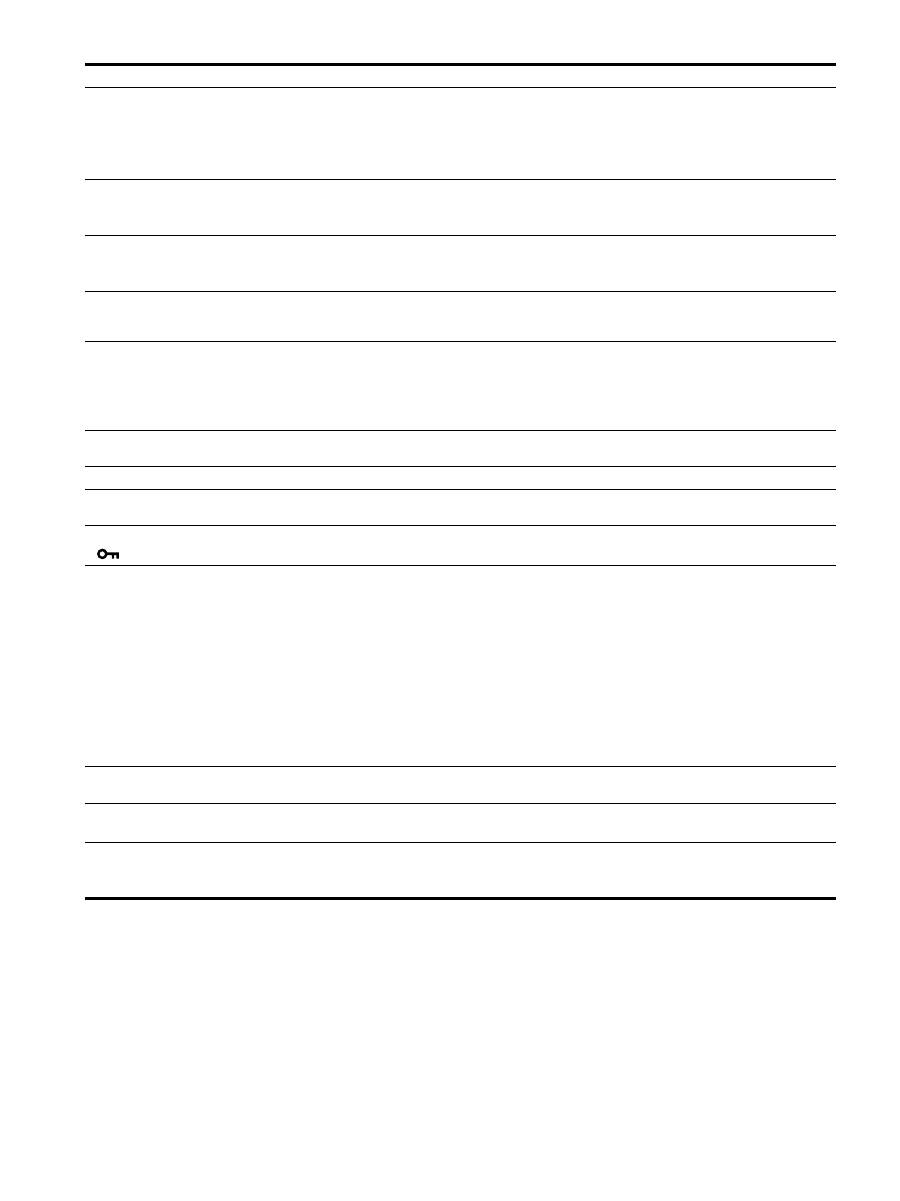
Görüntü bulanık
• Parlaklık ve kontrastı ayarlayın (sayfa 14).
• Aralığı (pitch) ve fazı (phase) ayarlayın (sadece analog RGB sinyal) (sayfa 15).
x
Monitör nedeniyle değil, bir bilgisayar veya bağlanan farklı bir cihaz
nedeniyle oluşan problemler
• Bilgisayarınızda çözünürlüğü 1280
×
1024 olarak ayarlayın.
Hayalet görüntü
• Video kablosunun ya da video yönlendiricinin uzatma kablosunu iptal edin.
• Tüm parçaların (donanımların) ilgili soketlerde doğru bir şekilde takılı olduğundan
emin olun.
Resim ortalanmamış veya
boyutları düzgün değil (sadece
analog RGB sinyalleri)
• Aralık ve fazı ayarlayın (sayfa 15).
• Görüntü konumunu ayarlayın (sayfa 15). Bazı video modlarının ekranı tam olarak
doldurmadığını unutmayın.
Görüntü çok ufak
x
Monitör nedeniyle değil, bir bilgisayar veya bağlanan farklı bir cihaz
nedeniyle oluşan problemler
• Bilgisayarınızda çözünürlüğü 1280
×
1024 olarak ayarlayın.
Görüntü çok karanlık
• Arka ışığı ayarlayın (sayfa 14).
• Aydınlatmayı ayarlayın (sayfa 14).
• GAMMA menüsünü kullanarak gamma ayarlayın (sayfa 14).
• Monitör açıldıktan sonra parlaklığın gelmesi birkaç dakika sürebilir.
• Ekran koyulaşabilir, bu seçtiğiniz ECO moduna bağlıdır.
Dalgalı veya oval (moire) bir
görüntü var
• Aralığı (pitch) ve fazı (phase) ayarlayın (sadece analog RGB sinyal) (sayfa 15).
Renk düzenli değil
• Aralığı (pitch) ve fazı (phase) ayarlayın (sadece analog RGB sinyal) (sayfa 15).
Beyaz renk tam olarak beyaz
görüntülenmiyor
• Renk ısısını ayarlayın (sayfa 14).
Monitör düğmeleri çalışmıyor
(
ekranda görüntülenir)
• Eğer MENU LOCK ON olarak ayarlandıysa, OFF olarak ayarlayın (sayfa 15).
USB kablosu ile bağlanan cihaz
çalışmıyor.
• USB kablosunun (sağlanmıştır) düzgün takılıp takılmadığını kontrol edin (sayfa 8).
• MAIN POWER anahtarına ve
1
(güç) göstergesine basarak ekranı açın.
x
Bağlı bilgisayar veya cihazdan kaynaklanan sorunlar
• Cihazın açık olup olmadığını kontrol edin.
• Güncellenmiş USB sürücüsünü yükleyin. Daha fazla bilgi için ürünün üreticisi ile
temasa geçin.
• Eğer bilgisayarınızı ekrana takılı klavye veya mouse ile kullanamazsanız, klavye veya
fareyi bilgisayarınıza doğrudan bağlayın. Bilgisayarınızı yeniden başlattıktan sonra,
USB bağlantısını sıfırlayın. Bu işlemi tamamladıktan sonra, klavye veya fareyi ekrana
tekrar bağlayın. Ekran bir bilgisayara, klavyeye veya fareye USB port üzerinden
bağlandığında, bilgisayarı yeniden başlatığınızda bilgisayarı bunlarla kontrol
edemeyebilirsiniz.
Bir süre sonra ekran kapanıyor
x
Bağlı bilgisayar veya cihazdan kaynaklanan sorunlar
• Bilgisayar’ın güç tasarruf modunu kapalı olarak ayarlayın.
Menü ekranında görüntülenen
çözünürlük yanlış.
• Ekran kartı ayarına bağlı olarak, menü ekranında görüntülenen çözünürlük,
bilgisayarda ayarlı olanla aynı olmayabilir.
Ana gücü kapattıktan sonra,
1
(güç) göstergesi bir süre daha
yanıyor
• Ana güç açıkken ama
1
(güç) anahtarı basılı değilken veya ekran güç tasarrufu
modundayken eğer MAIN POWER anahtarını kapalı duruma getirirseniz
1
(güç)
göstergesi hemen sönmeyebilir. Bu bir arıza değildir.
Belirti
Bu öğeleri kontrol edin
21
TR
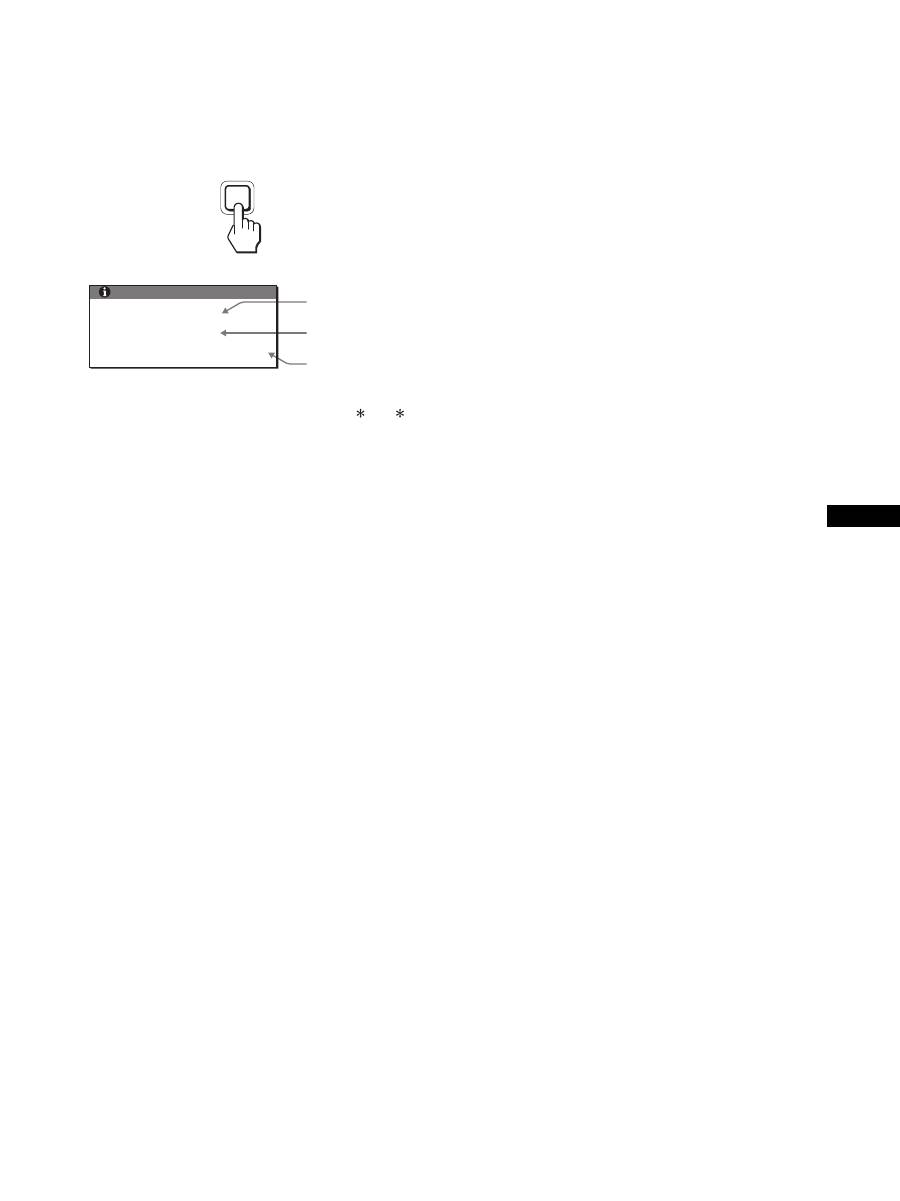
Bu ekran’ın bilgileri görüntüleniyor
Monitör bir giriş sinyali algılarken, MENU düğmesini,
bilgi kutusu belirene kadar, 5 saniyeden fazla basılı
tutunuz.
Bilgi kutusunu kaldırmak için MENU düğmesine tekrar basın.
Bu ekranın güvenlik standartı tescilli adı SDMX75 /X95
olmasına rağmen, satışta SDMX75F/X95F/X75K/X95K
adları da kullanılmaktadır.
Eğer sorun devam ederse yetkili Sony satıcısına başvurun ve
aşağıdaki bilgileri verin:
• Model ismi
• Seri numarası
• Problemin detaylı açıklaması
• Satın alma tarihi
• Bilgisayarınızın ve ekran kartınızın ismi ve özellikleri
• Giriş sinyali tipi (analog RGB/dijital RGB)
MENU
Örnek
Model ismi
Seri numarası
Üretim yılı ve
haftası
INFORMATION
MODEL : SDM-X75F
SER. NO : 1234567
MANUFACTURED : 2005-52
22
Özellikler
1)
Tavsiye edilen yatay ve dikey zamanlama koulu
•Yatay sync genilii toplam yatay zamann %4,8 sinden veya 0,8 µs,
den fazla olmaldr, hangisi daha büyük ise.
•Yatay boluk genilii 2,5 µsan den fazla olmaldr.
•Dikey boluk genilii 450 µsan den fazla olmaldr.
Tasarm ve özellikler haber verilmeksizin deitirilebilir.
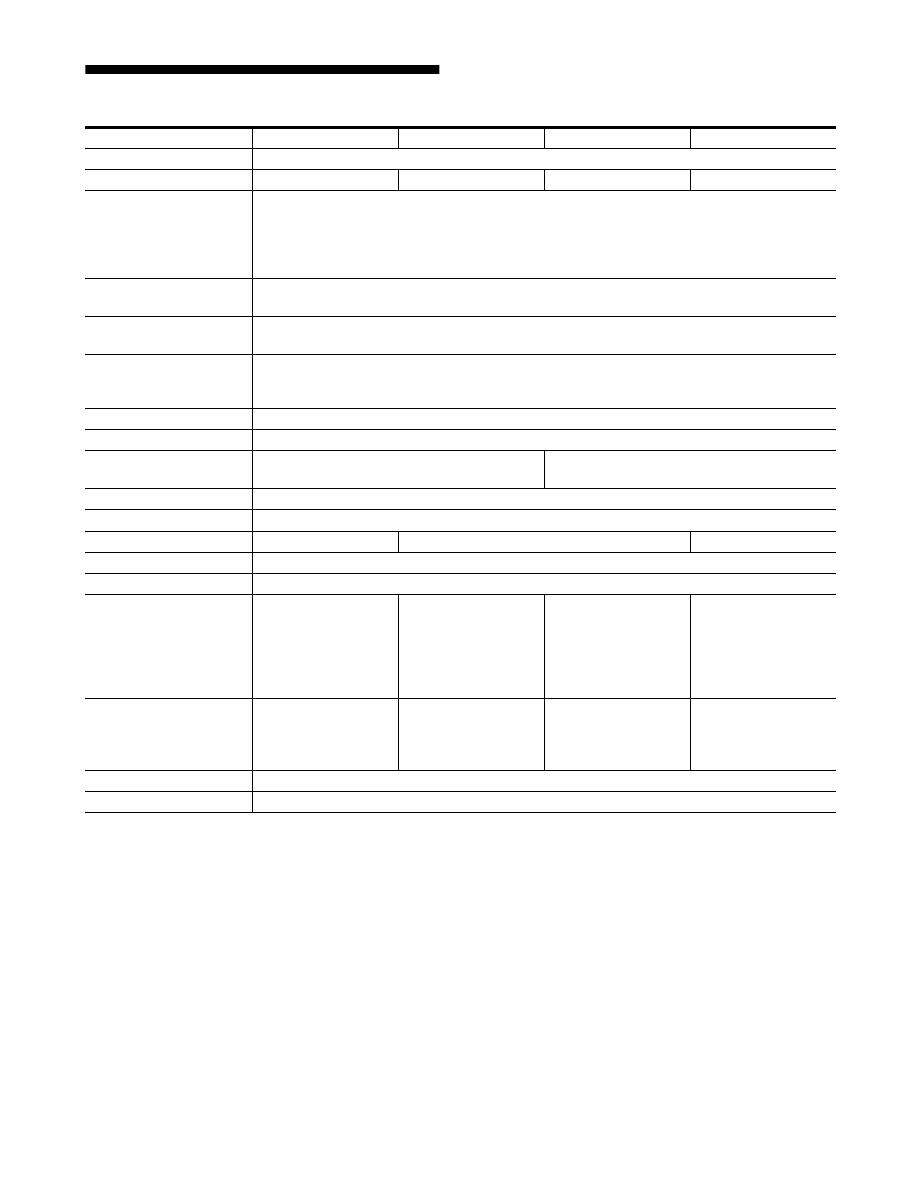
Model ismi
SDMX75F
SDMX95F
SDMX75K
SDMX95K
LCD panel
Panel tipi: aSi TFT Aktif Matris
Resim boyutu: inç
17,0
19,0
17,0
19,0
Giri sinyali format
RGB çalma frekans
1)
Yatay: 28 – 80 kHz (analog RGB)
28 – 64 kHz (dijital RGB)
Dikey: 48 – 75 Hz (analog RGB)
60 Hz (dijital RGB)
Çözünürlük
Yatay: Maks.1280 nokta
Dikey: Maks.1024 satr
Giri sinyal tipleri (Dijital/
Analog)
Dijital
×
1/Analog
×
1
Giri sinyal seviyeleri
Analog RGB video sinyali 0,7 Vpp, 75
Ω
, pozitif
SYNC sinyal TTL seviyesi, 2,2 k
Ω
, pozitif veya negatif
Dijital RGB (DVI) sinyal TMDS (tek link)
Ses girii
Stereo minijack, 0.5Vrms, 47 k
Ω
Hoparlör çk
1 W
×
2
USB port
–
USB Tam Hz (Maks12 Mbps)
A Port
×
2, B Port
× 2
Kulaklk fii
×
1
Güç gereksinimleri
100 – 240 V, 50 – 60 Hz, Maks. 1,0 A
Enerji tüketimi
Maks. 45 W
Maks. 50 W
Maks. 55 W
Çalma scakl
5 – 35 °C
Destek tipi
Yükseklik ayarl
Boyutlar (genilik/
yükseklik/derinlik)
Yaklak 369
×
393,5 –
503,5
×
253 mm
(destekle)
Yaklak 369
×
337
×
66 mm
(destek olmadan)
Yaklak 414
×
409,5 –
519,5
×
277,5 mm
(destekle)
Yaklak 414
×
370
×
69 mm
(destek olmadan)
Yaklak 369
×
393,5 –
503,5
×
253 mm
(destekle)
Yaklak 369
×
337
×
66 mm
(destek olmadan)
Yaklak 414
×
409,5 –
519,5
×
277,5 mm
(destekle)
Yaklak 414
×
370
×
69 mm
(destek olmadan)
Kütle
Yaklak 7,6 kg
(destekle)
Yaklak 4,4 kg
(destek olmadan)
Yaklak 8,9 kg
(destekle)
Yaklak 5,4 kg
(destek olmadan)
Yaklak 7,6 kg
(destekle)
Yaklak 4,4 kg
(destek olmadan)
Yaklak 8,9 kg
(destekle)
Yaklak 5,4 kg
(destek olmadan)
Tak ve Çaltr
DDC2B
Aksesuarlar
Bkz sayfa 6.

i
TCO’99 Eco-document (for the black
model)
x
Congratulations!
You have just purchased a TCO’99 approved and labelled product! Your
choice has provided you with a product developed for professional use.
Your purchase has also contributed to reducing the burden on the
environment and also to the further development of environmentally
adapted electronics products.
x
Why do we have environmentally labelled com-
puters?
In many countries, environmental labelling has become an established
method for encouraging the adaptation of goods and services to the
environment. The main problem, as far as computers and other electronics
equipment are concerned, is that environmentally harmful substances are
used both in the products and during their manufacture. Since it is not so
far possible to satisfactorily recycle the majority of electronics equipment,
most of these potentially damaging substances sooner or later enter nature.
There are also other characteristics of a computer, such as energy
consumption levels, that are important from the viewpoints of both the
work (internal) and natural (external) environments. Since all methods of
electricity generation have a negative effect on the environment (e.g.
acidic and climate-influencing emissions, radioactive waste), it is vital to
save energy. Electronics equipment in offices is often left running
continuously and thereby consumes a lot of energy.
x
What does labelling involve?
This product meets the requirements for the TCO’99 scheme which
provides for international and environmental labelling of personal
computers. The labelling scheme was developed as a joint effort by the
TCO (The Swedish Confederation of Professional Employees), Svenska
Naturskyddsforeningen (The Swedish Society for Nature Conservation)
and Statens Energimyndighet (The Swedish National Energy
Administration).
Approval requirements cover a wide range of issues: environment,
ergonomics, usability, emission of electric and magnetic fields, energy
consumption and electrical and fire safety.
The environmental demands impose restrictions on the presence and use
of heavy metals, brominated and chlorinated flame retardants, CFCs
(freons) and chlorinated solvents, among other things. The product must
be prepared for recycling and the manufacturer is obliged to have an
environmental policy which must be adhered to in each country where the
company implements its operational policy.
The energy requirements include a demand that the computer and/or
display, after a certain period of inactivity, shall reduce its power
consumption to a lower level in one or more stages. The length of time to
reactivate the computer shall be reasonable for the user.
Labelled products must meet strict environmental demands, for example,
in respect of the reduction of electric and magnetic fields, physical and
visual ergonomics and good usability.
Below you will find a brief summary of the environmental requirements
met by this product. The complete environmental criteria document may
be ordered from:
TCO Development
SE-114 94 Stockholm, Sweden
Fax: +46 8 782 92 07
Email (Internet): development@tco.se
Current information regarding TCO’99 approved and labelled
products may also be obtained via the Internet, using the address:
http://www.tco-info.com/
x
Environmental requirements
Flame retardants
Flame retardants are present in printed circuit boards, cables, wires,
casings and housings. Their purpose is to prevent, or at least to delay the
spread of fire. Up to 30% of the plastic in a computer casing can consist
of flame retardant substances. Most flame retardants contain bromine or
chloride, and those flame retardants are chemically related to another
group of environmental toxins, PCBs. Both the flame retardants
containing bromine or chloride and the PCBs are suspected of giving rise
to severe health effects, including reproductive damage in fish-eating
birds and mammals, due to the bio-accumulative
*
processes. Flame
retardants have been found in human blood and researchers fear that
disturbances in foetus development may occur.
The relevant TCO’99 demand requires that plastic components weighing
more than 25 grams must not contain flame retardants with organically
bound bromine or chlorine. Flame retardants are allowed in the printed
circuit boards since no substitutes are available.
Cadmium
**
Cadmium is present in rechargeable batteries and in the colour-generating
layers of certain computer displays. Cadmium damages the nervous
system and is toxic in high doses. The relevant TCO’99 requirement states
that batteries, the colour-generating layers of display screens and the
electrical or electronics components must not contain any cadmium.
Mercury
**
Mercury is sometimes found in batteries, relays and switches. It damages
the nervous system and is toxic in high doses. The relevant TCO’99
requirement states that batteries may not contain any mercury. It also
demands that mercury is not present in any of the electrical or electronics
components associated with the labelled unit.
CFCs (freons)
The relevant TCO’99 requirement states that neither CFCs nor HCFCs
may be used during the manufacture and assembly of the product. CFCs
(freons) are sometimes used for washing printed circuit boards. CFCs
break down ozone and thereby damage the ozone layer in the stratosphere,
causing increased reception on earth of ultraviolet light with e.g. increased
risks of skin cancer (malignant melanoma) as a consequence.
Lead
**
Lead can be found in picture tubes, display screens, solders and
capacitors. Lead damages the nervous system and in higher doses, causes
lead poisoning. The relevant TCO’99 requirement permits the inclusion of
lead since no replacement has yet been developed.
*
Bio-accumulative is defined as substances which accumulate within
living organisms.
** Lead, Cadmium and Mercury are heavy metals which are Bio-
accumulative.

ii
TCO’03 Eco-document (for the silver
model)
x
Congratulations!
The display you have just purchased carries the TCO’03
Displays label. This means that your display is designed,
manufactured and tested according to some of the strictest
quality and environmental requirements in the world. This
makes for a high performance product, designed with the
user in focus that also minimizes the impact on our natural
environment.
x
Ergonomics
• Good visual ergonomics and image quality in order to
improve the working environment for the user and to
reduce sight and strain problems. Important parameters
are luminance, contrast, resolution, reflectance, colour
rendition and image stability.
x
Energy
• Energy-saving mode after a certain time – beneficial
both for the user and the environment
• Electrical safety
x
Emissions
• Electromagnetic fields
• Noise emissions
x
Ecology
• The product must be prepared for recycling and the
manufacturer must have a certified environmental
management system such as EMAS or ISO 14 001
• Restrictions on
- chlorinated and brominated flame retardants and
polymers
- heavy metals such as cadmium, mercury and lead.
The requirements included in this label have been
developed by TCO Development in co-operation with
scientists, experts, users as well as manufacturers all over
the world. Since the end of the 1980s TCO has been
involved in influencing the development of IT equipment
in a more user-friendly direction. Our labelling system
started with displays in 1992 and is now requested by users
and IT-manufacturers all over the world.
For more information, please visit
www.tcodevelopment.com
Recycling Information
x
Customer in Europe
The collection and recycling of this product has been planned
according to your country’s relevant legislation. To ensure that
this product will be collected and recycled in way that minimizes
the impact on the environment, please do the following:
1. If you purchased this product for private use, contact your
municipality or the waste collection system and bring the
product to this collection point / have the product be picked up
by the waste collection system. Alternatively, your retailer
might take back this if you purchase new equivalent equipment;
please check with your retailer whether he will take back this
product before bringing it. For information on your country’s
recycling arrangements, please contact the Sony representation
in your country (contact details at: www.sony-europe.com).
Further details on specific recycling systems can be found at the
following addresses:
- Belgium: www.recupel.be
- Netherlands: www.nvmp.nl (consumer electronics)
www.ictmilieu.nl (IT equipment)
- Norway: www.elretur.no
- Sweden: www.el-kretsen.se
- Switzerland: www.swico.ch
2. If you use this product professionally, check the product’s
delivery contract for take back / recycling arrangements and
follow the procedures described therein. Alternatively, follow
the procedures described under point 1.
x
Customer in USA
We Sony as a member of EIA recommends to visit URL below
http://www.eiae.org/
x
Customer in Asia
http://www.sony.co.jp/SonyInfo/Environment/recycle/3R.html
