
Sony CDP-XE320: Unpacking Hooking Up the System
Unpacking Hooking Up the System: Sony CDP-XE320
Table of contents
- WARNING Precautions
- TABLE OF CONTENTS Welcome! About This Manual
- Unpacking Hooking Up the System
- Where do I go next?
- Playing a CD
- Using the Display
- Checking the information of CD TEXT discs
- Locating a Specific Track or a Particular Point in a Track
- Playing Tracks Repeatedly
- Playing in Random Order
- Creating Your Own Programme
- Creating a programme using the remote
- Recording Your Own Programme Recording a CD by Specifying Tape Length (Time Edit) (CDP-XE520 only)
- Fading In or Out
- Recording From CDs Changing the fading time (CDP-XE520 only) Fading out at the specified time
- Recording From CDs Additional Information Adjusting the Recording Level Notes on CDs (Peak Search)
- Troubleshooting Specifications
- Index
Getting Started
Unpacking
Hooking Up the System
Check that you received the following items:
• Audio connecting cord (1)
Overview
• Remote commander (remote) (CDP-XE520 and
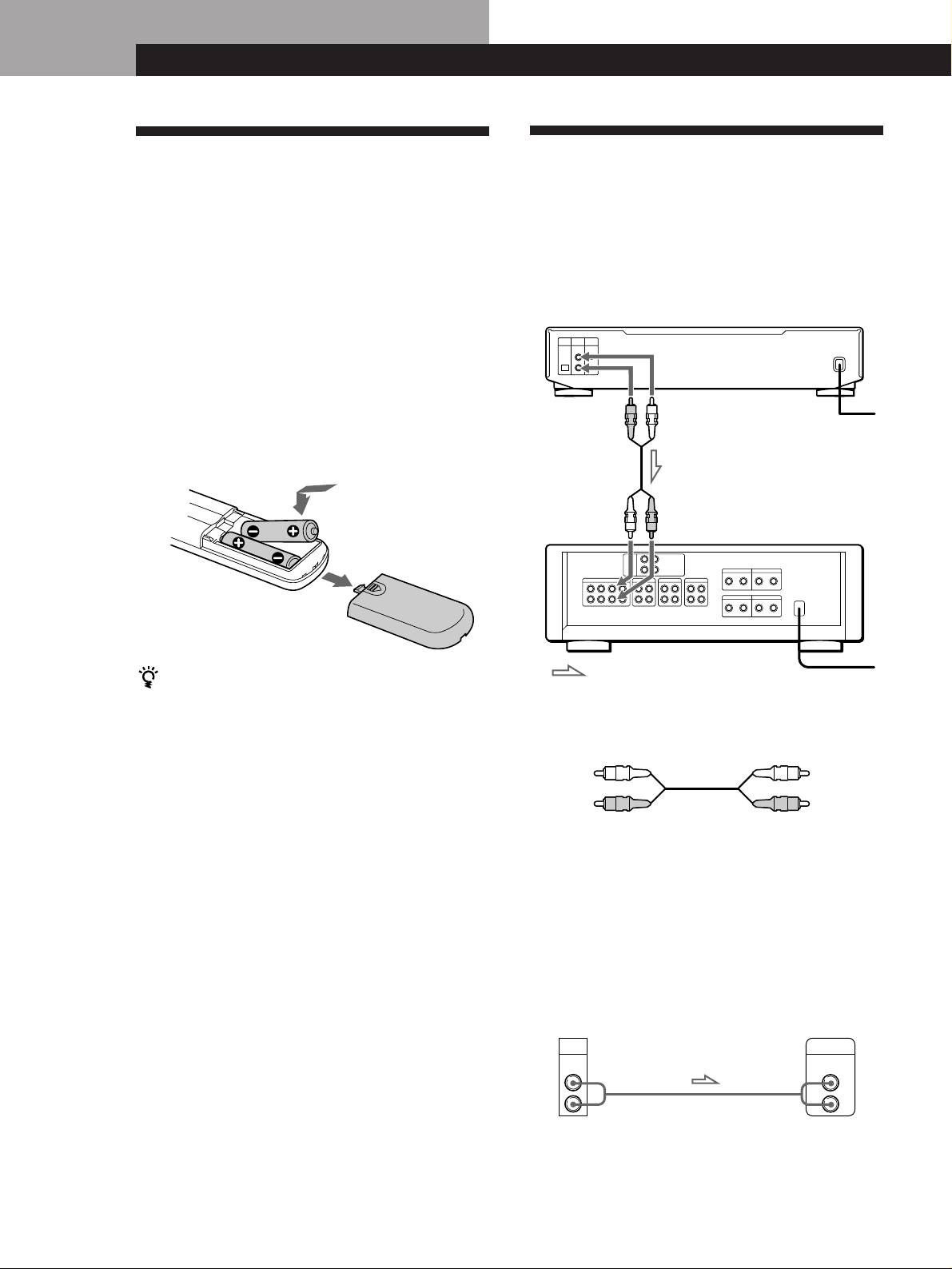
This section describes how to hook up the CD player to
CDP-XE320 only) (1)
an amplifier. Be sure to turn off the power of each
• Sony SUM-3 (NS) batteries (CDP-XE520 and
component before making the connections.
CDP-XE320 only) (2)
CD player
Inserting batteries into the remote
(CDP-XE520 and CDP-XE320 only)
You can control the player using the supplied remote.
Insert two size AA (R6) batteries by matching the +
LINE OUT
LINE OUT
(R)
(L)
To mains
and – on the batteries. When using the remote, point it
at the remote sensor g on the player.
Audio input
Audio input
(L)
(R)
Amplifier
: Signal flow
When to replace batteries
To mains
With normal use, the batteries should last for about six
months. When the remote no longer operates the player,
What cords will I need?
replace all the batteries with new ones.
Audio cord (supplied) (1)
White
Notes
White
(L)
• Do not leave the remote near an extremely hot or humid
(L)
Red
place.
Red
(R)
(R)
• Do not drop any foreign object into the remote casing,
particularly when replacing the batteries.
• Do not expose the remote sensor to direct sunlight or
lighting apparatuses. Doing so may cause a malfunction.
Hookups
• If you don’t use the remote for an extended period of time,
When connecting an audio cord, be sure to match the
remove the batteries to avoid possible damage from battery
leakage and corrosion.
colour-coded cord to the appropriate jacks on the
components: Red (right) to Red and White (left) to
White. Be sure to make connections firmly to avoid
hum and noise.
AmplifierCD player
LINE
OUT
INPUT
CD
L
L
R
R
GB
4
