
Sony CDP-XE320: Creating Your Own Programme
Creating Your Own Programme: Sony CDP-XE320
Table of contents
- WARNING Precautions
- TABLE OF CONTENTS Welcome! About This Manual
- Unpacking Hooking Up the System
- Where do I go next?
- Playing a CD
- Using the Display
- Checking the information of CD TEXT discs
- Locating a Specific Track or a Particular Point in a Track
- Playing Tracks Repeatedly
- Playing in Random Order
- Creating Your Own Programme
- Creating a programme using the remote
- Recording Your Own Programme Recording a CD by Specifying Tape Length (Time Edit) (CDP-XE520 only)
- Fading In or Out
- Recording From CDs Changing the fading time (CDP-XE520 only) Fading out at the specified time
- Recording From CDs Additional Information Adjusting the Recording Level Notes on CDs (Peak Search)
- Troubleshooting Specifications
- Index
Playing CDs
3 Push ≠ AMS ± to select the track.
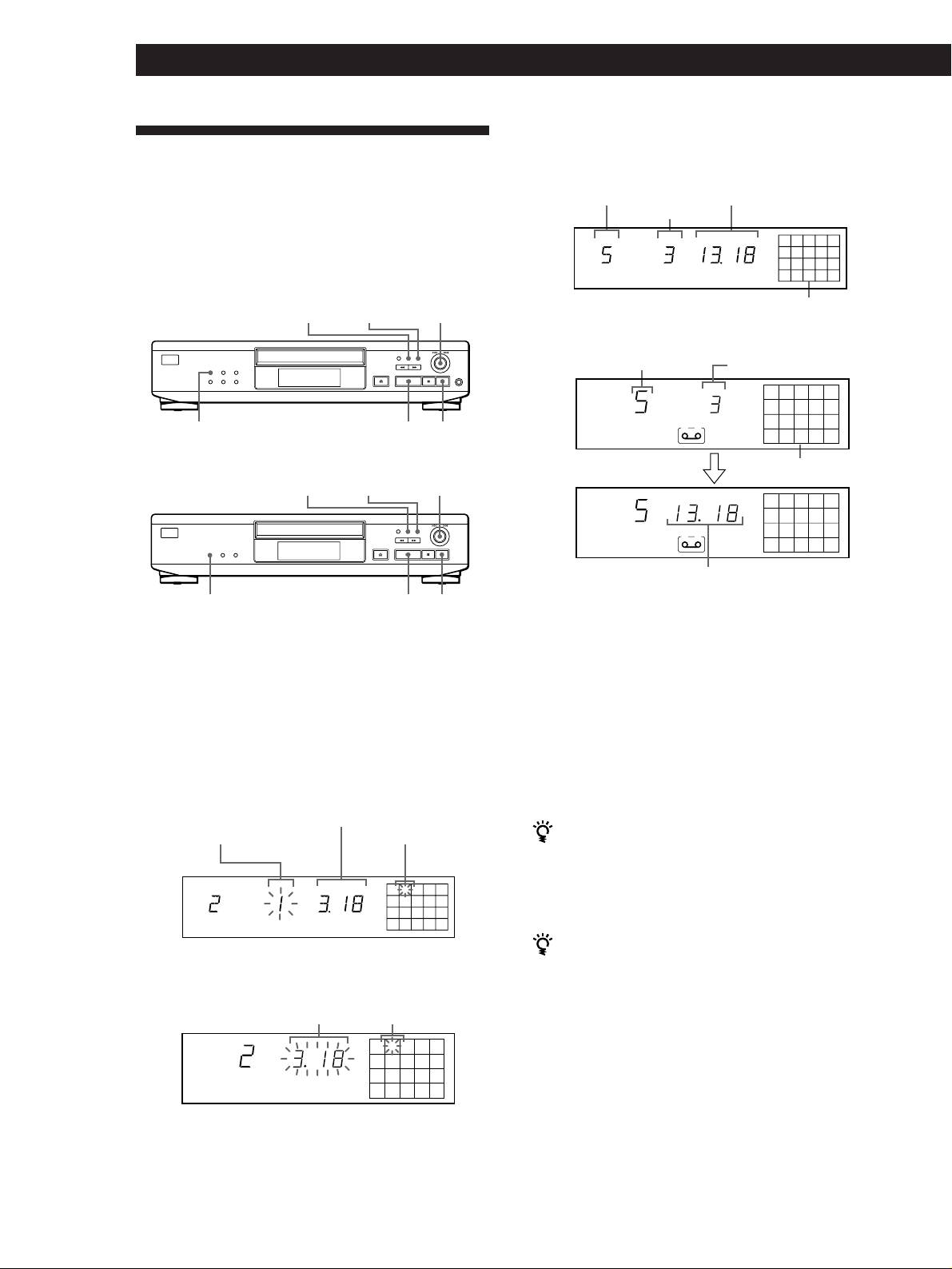
Creating Your Own Programme
• CDP-XE520
(Programme Play)
Last programmed track
Total playing time
Playing order
You can arrange the order of the tracks on a disc and
TRACK STEP
MIN SEC
create your own programme. The programme can
25
8
contain up to 24 tracks.
PROGRAM
TAPE A
• CDP-XE520
Programmed tracks
CHECK
CLEAR
≠ AMS ±
• CDP-XE320 and CDP-XE220
Last programmed track
Playing order
STEP
25
8
PLAY MODE
·
p
A
PROGRAM
• CDP-XE320 and CDP-XE220
After one second
Programmed tracks
CHECK
CLEAR
≠ AMS ±
MIN SEC
25
8
A
PROGRAM
Total playing time
PLAY MODE
·
p
If you’ve made a mistake
Press CLEAR, then repeat Steps 2 and 3.
Creating a programme on the player
4 Repeat Steps 2 and 3 to programme the tracks in
1 Press PLAY MODE repeatedly until “PROGRAM”
the order you want.
appears in the display before you start playing.
5 Press · to start Programme Play.
2 Turn ≠ AMS ± until the track number you
want appears in the display.
To cancel Programme Play
Press PLAY MODE.
• CDP-XE520
Total playing time
Track number being
Playing order
programmed
When tracks, which aren’t numerically consecutive on
the disc, are programmed consecutively (i.e. 1, 3, 5
etc.)
TRACK STEP
MIN SEC
A one-second access time blank is added between the
2
tracks.
PROGRAM
The programme remains until erased (see page 13) or
until you press §OPEN/CLOSE
• CDP-XE320 and CDP-XE220
The programme you have created remains even after the
Track number being
Programme Play mode ends or you select another play
Total playing time
programmed
mode.
MIN SEC
2
Notes
• The total playing time doesn’t appear in the display when it
PROGRAM
exceeds 100 minutes.
• If you programme a track numbered over 24 (or 68 for the
CDP-XE320 and CDP-XE220), “–␣ –␣ .␣ –␣ –” appears instead of
the total playing time.
• “PROGRAM FULL” (or “FULL” for the CDP-XE320 and
CDP-XE220) appears in the display when you try to add a
track to a programme which already contains 24 tracks.
GB
12
