
Sony CDP-XE320: Checking the information of CD TEXT discs
Checking the information of CD TEXT discs: Sony CDP-XE320
Table of contents
- WARNING Precautions
- TABLE OF CONTENTS Welcome! About This Manual
- Unpacking Hooking Up the System
- Where do I go next?
- Playing a CD
- Using the Display
- Checking the information of CD TEXT discs
- Locating a Specific Track or a Particular Point in a Track
- Playing Tracks Repeatedly
- Playing in Random Order
- Creating Your Own Programme
- Creating a programme using the remote
- Recording Your Own Programme Recording a CD by Specifying Tape Length (Time Edit) (CDP-XE520 only)
- Fading In or Out
- Recording From CDs Changing the fading time (CDP-XE520 only) Fading out at the specified time
- Recording From CDs Additional Information Adjusting the Recording Level Notes on CDs (Peak Search)
- Troubleshooting Specifications
- Index
Playing CDs
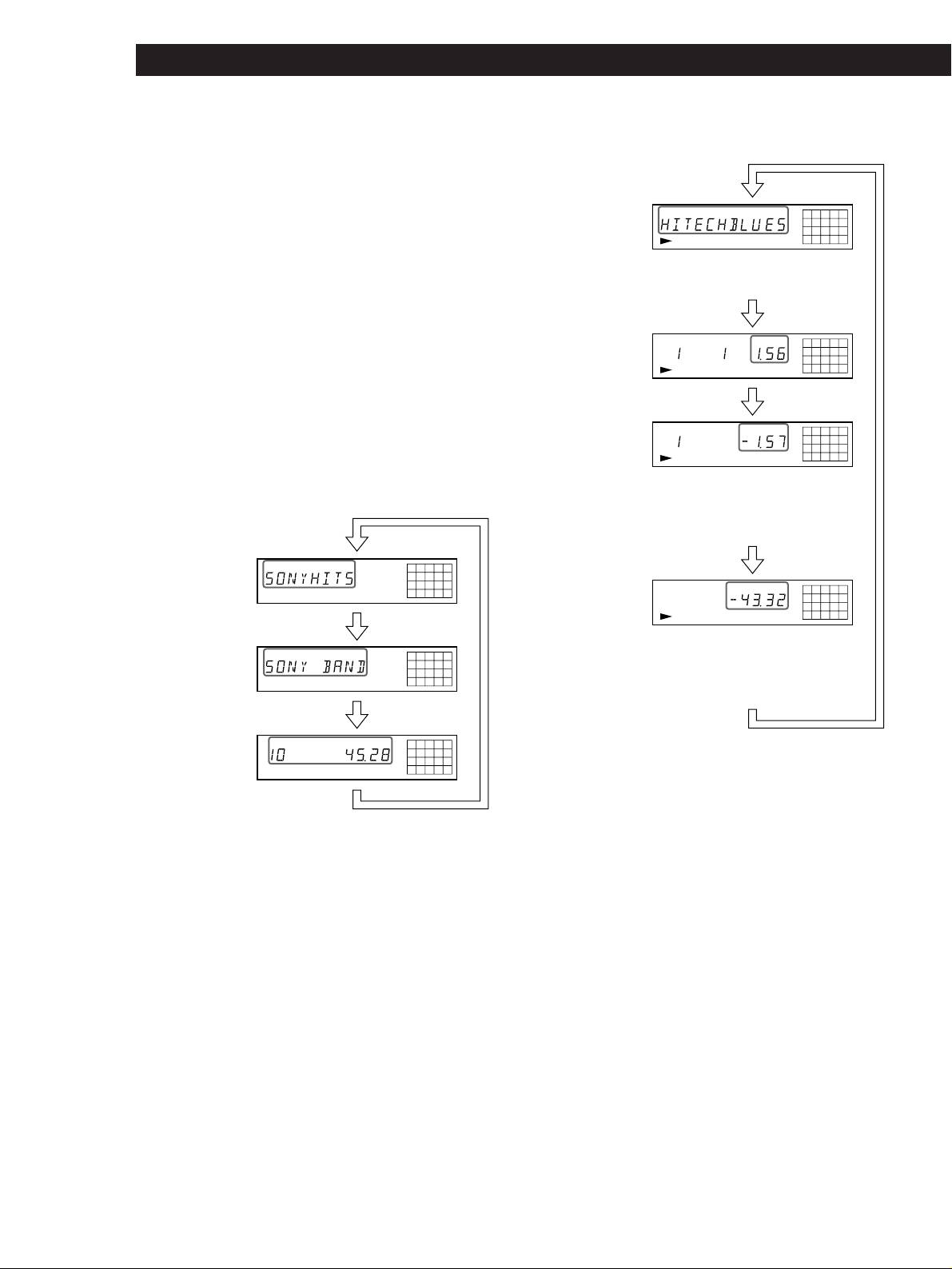
Checking the information of CD TEXT discs
• While playing a disc
(CDP-XE520 only)
CD TEXT discs have information, such as the disc titles
or artist names, memorised in a blank space on the
Track title
TRACK
12345
678910
discs where, on normal discs, there is no information.
TEXTCD
The display shows the CD TEXT information of the
disc so that you can check the current disc title, artist
This information also appears
name and track title. When the player detects CD TEXT
when the player locates the track.
discs, the “CD TEXT” indication appears in the
Press
display. If your CD TEXT disc has multi language
capacity, “CD TEXT” and “MULTI” indications appear
Playing time of the
TRACK INDEX
MIN SEC
12345
678910
in the display. If you want to check the information in
current disc
TEXTCD
another language, refer to “Checking the information
of CD TEXT discs in other languages” on page 8.
Press
Each time you press TIME/TEXT (or TIME on the
Remaining time on
TRACK INDEX
MIN SEC
12345
remote), the display changes as shown in the chart
678910
the current track
below.
TEXTCD
• Before you start playing
If the track number exceeds 24,
“–␣ –␣ .␣ –␣ –” appears instead of the
remaining time.
DISC
Press
Disc title
12345
678910
TEXTCD
Remaining time on
MIN SEC
12345
678910
the disc
TEXTCD
Press
If the remaining time exceeds 100 minutes in
Artist name
ART.
12345
678910
Programme Play mode or when the disc has more
TEXTCD
than 24 tracks, “–␣ –␣ .␣ –␣ –” appears instead of the
remaining time.
Press
Press
Total number of
TRACK INDEX
MIN SEC
12345
678910
tracks and total
If a title or name has more than 12 characters, the first
TEXTCD
playing time
12 characters will light up after the title or name scrolls
Press
by in the display.
Notes
• The display may not show all the characters depending on
the disc.
• This player can only display the disc titles, track titles and
artist names from CD TEXT discs. Other information cannot
be displayed.
Checking the information of CD TEXT discs
in other languages (CDP-XE520 only)
You can change the displayed language if your CD
TEXT disc has multi language capacity. When the
player detects such a CD TEXT disc, the display shows
the current operating language after “CD TEXT” and
“MULTI” appear in the display.
If the player cannot read the language memorised in a
CD TEXT disc, the display shows “<OTHER LANG>”
after the player detects the disc.
GB
8
