
Sony MSAC-US30 – page 38
Manual for Sony MSAC-US30
Table of contents
- English
- Notice
- Pay attention to the following points when using this unit. zHint
- Table of contents
- On “Memory Stick” What is “Memory Stick”? “Memory Stick” types that can be used with this unit
- What is “MagicGate”? Using MagicGate compatible “Memory Stick”
- System requirements
- When using Windows 2000/Windows XP
- On System Restore and Windows XP/Windows Me
- Checking the supplied accessories
- Supplied applications
- Using the operating instructions and online help
- How to use the online Help (When Using Windows)
- Installing the software on your computer Installing the device driver on your computer 1 Turn on your computer.
- 2 Insert the supplied CD-ROM (MSAC-US30) into the CD-ROM 3 Carefully read the License Agreement, and then click the [Agree] button. 4 Click the [Next] button as prompted on the screen.
- 5 When you click [Finish], the driver installation is completed. 6 Following this, installation of the “Memory Stick Formatter” starts. 7 When you click [Finish], installation of “Memory Stick Formatter” is completed.
- 8 Following this, installation of the operating instructions (PDF file) is performed automatically.
- Installing the “SonicStage” software (including “OpenMG”) on your computer 1 Do as follows to install “SonicStage”. 2 Carefully read the License Agreement, and then click the
- 3 Click the [Next] button as prompted on the screen. 4 Select the folder in which you want to install “SonicStage”. 5 Select the folder for storing the “OpenMG” contents.
- 6 Click the [Finish] button. 7 Click the [Restart] button to restart your computer.
- Connecting this unit to your computer On the special USB cable
- Recommended ways for connecting this unit
- Confirming that connections are completed
- When the removable disk (Memory Stick icon) is not indicated 1 Double-click the “System” icon on the “Control Panel”. 2 Check if the device driver has already been installed.
- 2 (Continued) 3 Delete the driver if installed.
- – When using Windows 98SE/Windows Me –
- Copying image data recorded on “Memory Stick” to your computer
- Disconnecting the unit from your computer 1 Click the “Unplug or Eject Hardware” icon in the task tray in the lower right corner of the screen. 2 Click “Safely remove Sony Memory Stick USB Reader/Writer (MSAC-US30)-Drive (F:)”.
- 3 [“Sony Memory Stick USB Reader/Writer (MSAC-US30) can be safely removed.”] is displayed.
- How to Use (When using Macintosh) You can use this unit without installing the driver by connecting this unit to your computer. Removing this unit from your computer or removing “Memory Stick” from this unit.
- About “SonicStage”
- Categorizing imported music as desired (Play List)
- Music files compatible with “SonicStage”
- WMT (Windows Media Technologies) compatible music files
- Check-in/check-out
- Before using “SonicStage” (Be sure to read)
- Cautions when using “OpenMG Jukebox” Writing to a CD-RW/CD-R disc
- Launching “SonicStage”
- Formatting (initialization) of “Memory Stick”
- Write-protecting data Data read/write speed
- Precautions for use of “Memory Stick”
- Uninstalling (Deleting) the software – In the case of Windows 2000/Windows XP – 1 Using Windows 2000: Select [Settings] from the [Start] menu and then click [Control Panel].
- 2 Using Windows 2000: Double-click the “Add/Remove Programs” icon. 3 Click “Change/Remove”. 4 Select the software to be removed (“SonicStage”, Memory Stick Formatter) from the list of “Currently installed
- Troubleshooting Symptom Cause/Solution
- Restrictions imposed by the copyright protection
- Specifications
- LIMITED WARRANTY

주요 제원
Memory Stick USB 리더/라이터
인터페이스: USB 인터페이스
전송율: 최대 480 Mbps
일반제원
작동 전압 DV 5V(USB 케이블을 통한 공급)
소비 전력 최대 500 mA(작동시)
최대 0.5 mA(PC 중지시)
외형 치수 약 38 mm
× 14 mm × 74.5 mm(폭 × 높이 × 길이)
중량 약 30g(“Memory Stick”은 제외)
작동 조건 온도 0°C ~ 40°C(결로 없음)
습도 20% ~ 80%(결로 없음)
디자인 및 주요 제원은 예고 없이 변경할 수 있습니다.
본 제품에 대하여 질문/의견이 있으시면 다음의 당사 고객 지원 웹사이트를 참조
하여 주십시오.
http://www.sony.net/Products/mssupport/
“OpenMG”에 대하여 질문/의견이 있으시면 다음의 웹사이트를 참조하여 주십시
오.
http://www.openmg.com/
47-KR

Sony Corporation
3-086-505-01 (1) AR
Memory Stick USB
Reader/Writer
MSAC-US30

,
,
USB
-AR

©2000-2003 Sony Corporation
©2003 Sony Corporation
•"Memory Stick" "OpenMG" "SonicStage" "MagicGate Memory Stick" "Memory Stick
PRO" "Memory Stick Duo" "MagicGate Memory Stick Duo" "Memory Stick PRO Duo"
Sony Corporation
•Microsoft Windows Microsoft Corporation
•MMX Pentium Intel Corporation
•Adobe Acrobat Acrobat Reader Adobe
Systems, Inc.
•Macintosh Mac OS Apple Computer, Inc.
•
"™" "®"
• ,
•
"Memory Stick"
• "Memory Stick" ,
"Memory Stick" "LOCK"
z
CD-ROM PDF
P
• "Memory Stick"
"Memory Stick" USB
"Memory Stick"
• USB , ,
-AR

"Memory Stick"
"SonicStage" "OpenMG"
"Memory Stick"
Macintosh
"SonicStage"
"SonicStage"
Check-in/check-out
"SonicStage"
"SonicStage"
"Memory Stick"
"Memory Stick"
-AR

"Memory Stick"
"Memory Stick"?
"Memory Stick"
"Memory
,
Stick"
"Memory Stick
"Memory Stick"
Memory Stick
"Memory Stick Duo"
Duo"
"Memory Stick"
Duo Adaptor
"Memory Stick"
"Memory Stick"
* "Memory Stick"
"Memory Stick PRO"
"Memory Stick"
"Memory Stick PRO" ,("MagicGate")
"Memory Stick
,
PRO"
"Memory Stick"
"Memory Stick"
("MagicGate")
"Memory Stick Duo" MagicGate
"Memory Stick Duo" "Memory Stick"
"MagicGate" ,
"Memory Stick" "Memory
"Memory Stick"
Stick PRO"
-AR
"Memory Stick"
"Memory Stick"
"Memory Stick"
,
"MagicGate Memory Stick"
("MagicGate")
"Memory Stick"
"MagicGate"?
"MagicGate"
"Memory Stick"
"MagicGate" "Memory Stick"
"MagicGate"
MagicGate "Memory Stick" "MagicGate" ,
"Memory Stick"
MagicGate
,
"Memory Stick"
MagicGate "Memory Stick"
P
• "SonicStage" MagicGate "Memory Stick"
"Hifi folder"
"Hifi folder" "SonicStage" ,
Explorer
• MagicGate "Memory Stick" ,
•
•
"Memory Stick"
• "SonicStage" Ver. 1.5 "Memory Stick PRO"
-AR

Windows
•OS : Microsoft Windows Windows 98 Second Edition
Windows Millennium Edition (Windows Me) Windows 2000
(Windows 98SE)
Windows XP Home Edition/XP Professional Edition
Professional (Windows 2000)
(Windows XP)
*
*
•CPU : MMX Pentium II
Pentium III
•RAM :
:
•
Windows
CD-ROM
•
"SonicStage"
•
• USB
Hi-Speed USB USB 2.0
, ×
• : High Color
×
Macintosh
•OS : Mac OS 9.0 9.2.2 10.1
10.2.6 X
*
*
•RAM :
• :
• USB
Hi-Speed USB USB 2.0
P
•
• "SonicStage" Macintosh
Macintosh ,
-AR

P
,
Windows 2000/Windows XP
"SonicStage" Windows 2000/Windows XP
• Administrator
Administrator ,
• ,
Power User
• CD-ROM "SonicStage"
• Professional Windows 2000
• NTFS
Service Pack 3 Windows 2000
Service Pack 3 Windows 2000:
.1 Windows
USB
.2 USB
Windows
T
USB
Windows
Windows ,USB
-AR

System Restore Windows XP/Windows Me
Windows XP Windows Me "System Restore"
System Tools
"SonicStage"
"SonicStage"
,
"System Restore"
"System Restore" ,
"SonicStage"
Help
,
"SonicStage"
P
"System Restore",
-AR
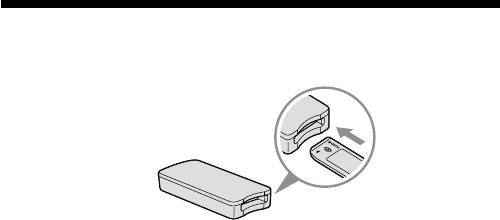
• Memory Stick USB
“Memory Stick”
P
Duo
"Memory Stick"
"Memory Stick Duo" "Memory Stick"
"Memory Stick Duo" ,
Memory Stick Duo Adaptor
"Memory Stick"
"Memory Stick"
• USB
• CD-ROM Windows (MSAC-US30)
P
CD-ROM ,"SonicStage"
* CD-ROM
•
• "SonicStage" Ver. 1.5
Memory Stick Formatter Ver. 2.1
•
PDF
•
PDF
MSAC-US30Manual_ARA.pdf
•
-AR

CD-ROM Windows
Windows
Windows
,
"SonicStage" Ver. 1.5 Windows
"SonicStage" "SonicStage" ,
CD ,
MagicGate "Memory Stick"
P
• "SonicStage" Macintosh
• CD-RW/CD-R
• "SonicStage" Ver. 1.5 "Memory Stick PRO"
Memory Stick Formatter Ver.2.1
Windows
"Memory Stick"
"Memory Stick"
"Memory Stick",
"Memory Stick"
P
"Memory Stick"
-AR
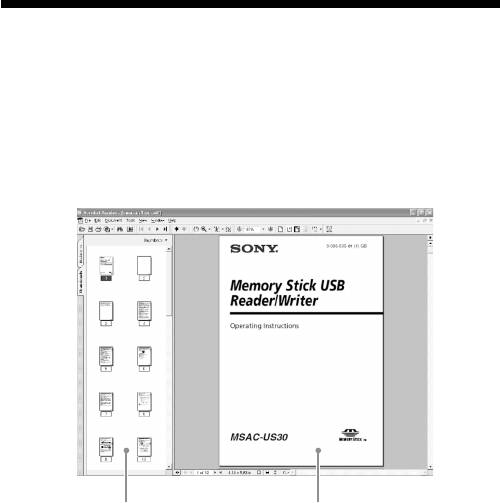
CD-ROM
CD-ROM PDF
,
Acrobat Reader Adobe Systems Incorporated PDF
Acrobat Reader
Screen view
•
,
•
Acrobat Reader ,Help
Adobe Acrobat Reader
-AR
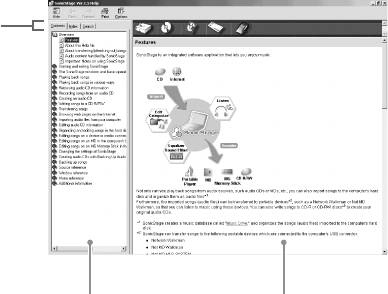
Help
Windows
Help
• "SonicStage"
Memory Stick Formatter
•
, Help
Help
Screen view
•
Contents Keywords
•
-AR

P
,
Windows XP
OS
P
"Memory Stick Formatter" PDF
1
,
Windows 2000 Windows XP ,
Administrator
-AR
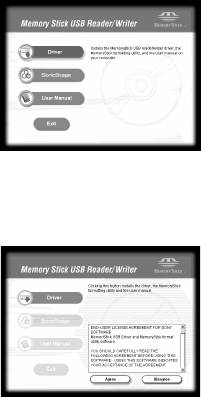
2 CD-ROM (MSAC-US30) CD-ROM
[Driver]
,
3 , [Agree]
[Agree] ,
4 [Next]
-AR
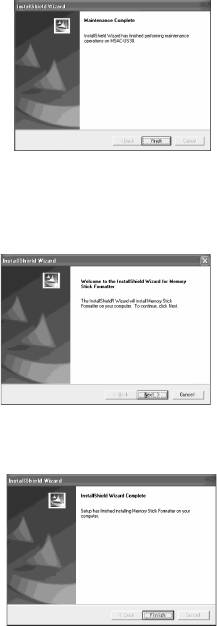
5 [Finish] ,
6 , "Memory Stick
Formatter"
[Next]
7 [Finish] ,"Memory Stick Formatter"
"Memory Stick Formatter" ,[Start] – [Programs] –
[Memory Stick Utility] – [Memory Stick Formatter]
-AR
8 , PDF
,
[Exit]
,
"SonicStage"
,
[Start] – [Programs] – [Sony Memory Stick
,
Reader Writer] – [MSAC-US30 Instructions]
P
PDF Acrobat Reader Adobe Systems
Incorporated
-AR
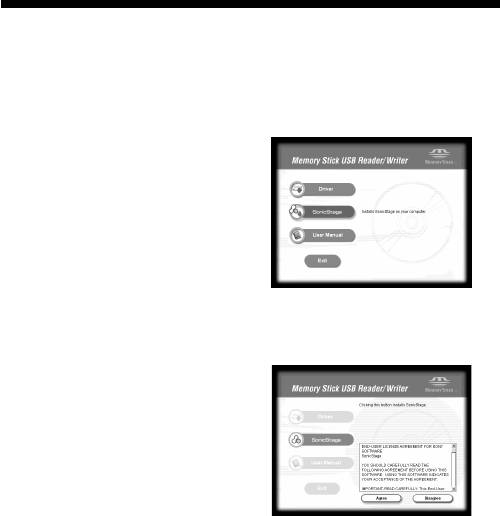
"SonicStage"
"OpenMG"
1 "SonicStage"
[SonicStage]
2 , [Agree]
[Agree] ,"SonicStage"
-AR
