
Sony KDL-40R453B: Installing the TV on the wall
Installing the TV on the wall: Sony KDL-40R453B
Table of contents
- Installation Information for Using Sony Wall-Mount Bracket (SU-WL450)
- On Safety To Customers WARNING To Customers CAUTION To Sony dealers Precautions
- Installing the TV onto the Checking the parts wall Preparing for installation
- Deciding on the installation location 1 Decide on the installation location.
- 2 Select Wall mounting style. It is selectable as shown below. WARNING 3 Fit Base Adaptor by using Screw (PSW 4x10) to Base (20) when selecting 2-a.
- Installing the Base on the wall 4 Decide the positions of the screws for installing the Base (20) .
- Preparing for the installation of the TV
- Installing the TV on the wall
- Confirming the completion of the installation Other information
- Specifications
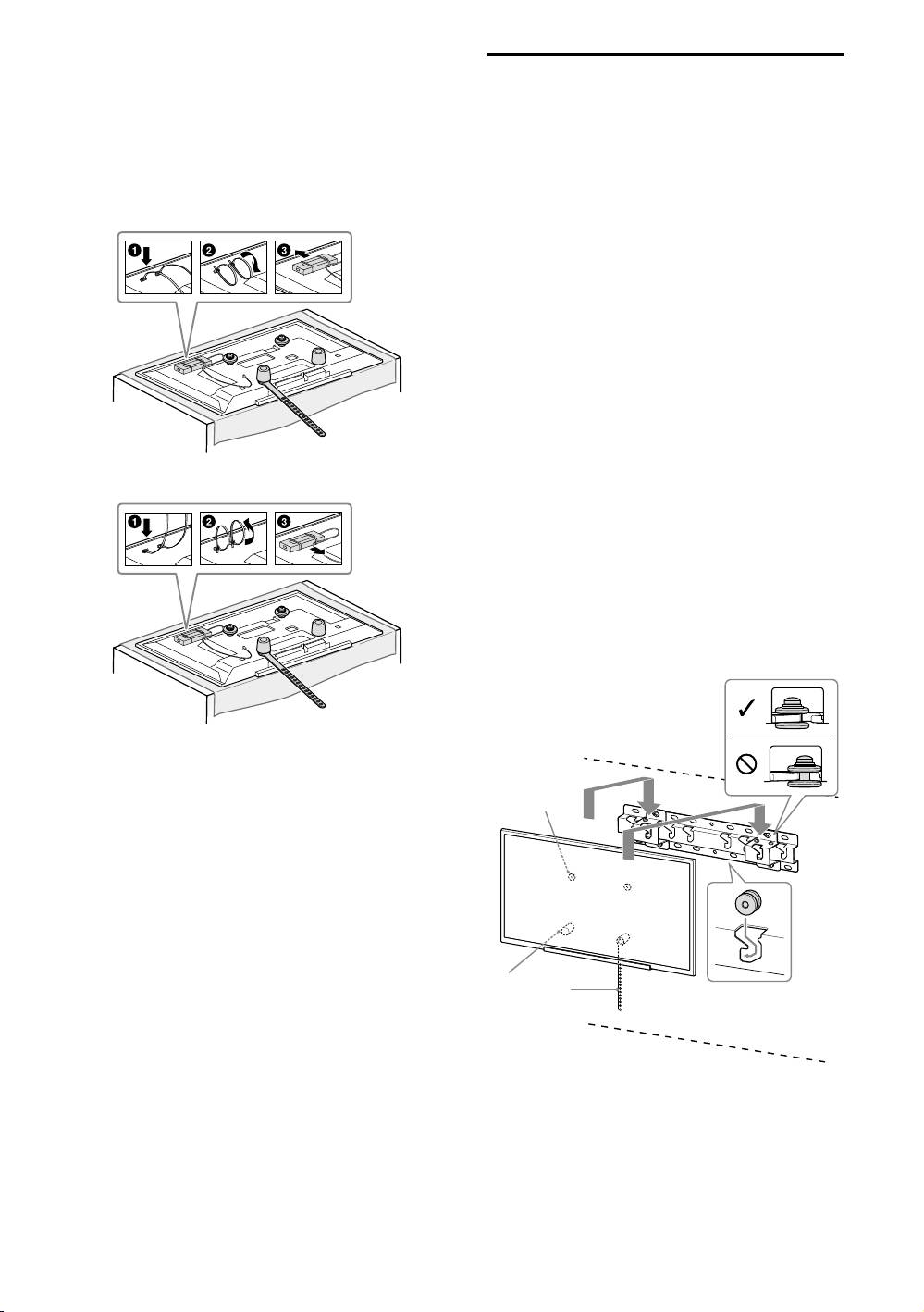
3 Bundle the AC Adapter using
Installing the TV on the wall
the cable holders (supplied
with the TV). Make sure that the
1 Connect the necessary cable(s)
label is facing outwards when
to the TV.
Make sure to connect the cables before
bundling AC adapter.
installing the TV on the wall. You will be
For KDL-48W60B/48W58B/48R48B/
unable to connect the cables when the TV
40W60B/40R48B/40R45B
is installed.
Refer to the Reference Guide supplied with
your TV.
Note
Subcontract the cable routing in the wall to a licensed
contractor.
Bundle the connecting cables to prevent stepping on
them before wall mounting.
2 Install the TV onto the Base.
For the location of the Pulleys to the
hang on the Base, refer to the table of
step 3 in “Deciding on the installation
For KDL-32R43B/32R41B
location” on page 8.
Hold the TV securely with both hands
and gently hang the Pulleys attached
to the rear of the TV to the Base, making
sure to confirm the shape of the holes.
After installing the TV on the wall,
confirm the Pulleys are firmly latched
into the Base.
2-a
− 10 (GB) −


