
Sony CDX-CA650V: Selecting specific tracks for playback
Selecting specific tracks for playback: Sony CDX-CA650V
Table of contents
- Welcome!
- Location of controls
- Card remote commander RM-X114
- Precautions Notes on discs
- Getting Started Resetting the unit
- Detaching the front panel
- Setting the clock CD Player CD/MD Unit (optional) Playing a disc
- Display items
- Playing tracks repeatedly Labelling a CD Playing tracks in random order
- Locating a disc by name
- Selecting specific tracks for playback
- Receiving the stored stations Radio Storing stations automatically
- Storing only the desired Tuning in a station through a stations list
- Automatic retuning for best RDS Overview of RDS
- Receiving traffic announcements
- Presetting RDS stations with Tuning in stations by AF and TA setting programme type
- Setting the clock automatically
- Other Functions Using the rotary commander
- Adjusting the sound characteristics Quickly attenuating the sound
- Changing the sound and display settings
- Selecting the sound position Setting the equalizer
- Additional Information Maintenance Fuse replacement
- Removing the unit
- Specifications
- CD/MD playback Troubleshooting General Radio reception
- Error displays/Messages Error displays RDS Messages
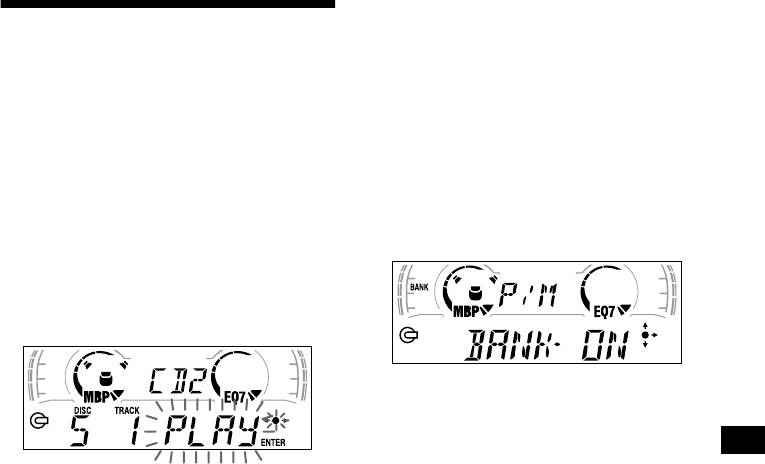
Playing specific tracks only
Selecting specific tracks for
You can select:
•“BANK-ON” — to play the tracks with the
playback
“PLAY” setting.
•“BANK-INV” (Inverse) — to play the tracks
— Bank (For a CD unit with the CUSTOM FILE
with the “SKIP” setting.
function)
If you label the disc, you can set the unit to skip
1 During playback, press (MENU), then
or play the tracks of your choice.
press either side of (DISC/PRESET)
repeatedly until “BANK-ON,” “BANK-
INV,” or “BANK-OFF” appears.
1 Start playing the disc you want to
2 Press the (+) side of (SEEK) repeatedly
label.
until the desired setting appears.
2 Press (MENU), then press either side
of (DISC/PRESET) repeatedly until
“BANK SEL” appears.
3 Press (ENTER).
3 Press (ENTER).
Playback starts from the track following the
current one.
To return to normal play mode, select “BANK-
4 Label the tracks.
OFF” in step 2.
1 Press either side of (SEEK)
repeatedly to select the track you
want to label.
2 Press (ENTER) repeatedly to select
“PLAY” or “SKIP.”
5 Repeat step 4 to set “PLAY” or “SKIP”
for all the tracks.
6 Press (MENU) twice.
The unit returns to normal CD play mode.
Notes
• You can set “PLAY” and “SKIP” for up to 24 tracks.
• You cannot set “SKIP” for all the tracks on a CD.
13
