
Sony CDX-CA650V: Detaching the front panel
Detaching the front panel: Sony CDX-CA650V
Table of contents
- Welcome!
- Location of controls
- Card remote commander RM-X114
- Precautions Notes on discs
- Getting Started Resetting the unit
- Detaching the front panel
- Setting the clock CD Player CD/MD Unit (optional) Playing a disc
- Display items
- Playing tracks repeatedly Labelling a CD Playing tracks in random order
- Locating a disc by name
- Selecting specific tracks for playback
- Receiving the stored stations Radio Storing stations automatically
- Storing only the desired Tuning in a station through a stations list
- Automatic retuning for best RDS Overview of RDS
- Receiving traffic announcements
- Presetting RDS stations with Tuning in stations by AF and TA setting programme type
- Setting the clock automatically
- Other Functions Using the rotary commander
- Adjusting the sound characteristics Quickly attenuating the sound
- Changing the sound and display settings
- Selecting the sound position Setting the equalizer
- Additional Information Maintenance Fuse replacement
- Removing the unit
- Specifications
- CD/MD playback Troubleshooting General Radio reception
- Error displays/Messages Error displays RDS Messages
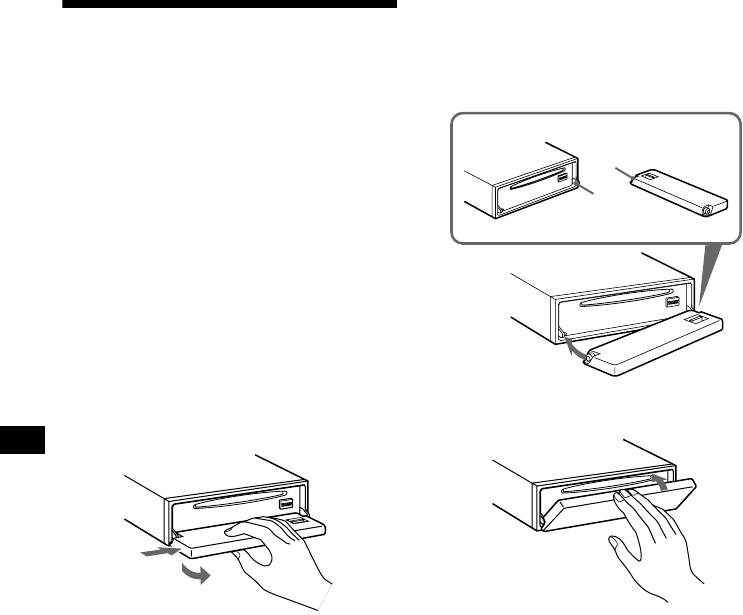
Attaching the front panel
Detaching the front panel
Place hole A of the front panel onto the spindle
B on the unit, then lightly push the left side in.
Press (SOURCE) (or insert a CD) to operate the
You can detach the front panel of this unit to
unit.
protect the unit from being stolen.
Caution alarm
If you turn the ignition switch to the OFF
A
position without removing the front panel, the
caution alarm will beep for a few seconds.
B
If you connect an optional amplifier and do not
use the built-in amplifier, the beep sound will be
deactivated.
1 Press (OFF)*.
CD/MD playback or radio reception stops
(the key illumination and display remain on).
* If your car has no ACC position on the ignition
switch, be sure to turn the unit off by pressing
(OFF) for 2 seconds to avoid car battery drain.
2 Press (OPEN), then slide the front
panel to the right, and gently pull out
x
the left end of the front panel.
1
2
Note
Notes
Do not put anything on the inner surface of the front
• If you detach the panel while the unit is still turned
panel.
on, the power will turn off automatically to prevent
the speakers from being damaged.
• Do not drop or put excessive pressure on the front
panel and its display window.
• Do not subject the front panel to heat/high
temperature or moisture. Avoid leaving it in parked
cars or on dashboards/rear trays.
Tip
When carrying the front panel with you, use the
supplied front panel case.
8
