
Sony CDX-CA650V: Card remote commander RM-X114
Card remote commander RM-X114: Sony CDX-CA650V
Table of contents
- Welcome!
- Location of controls
- Card remote commander RM-X114
- Precautions Notes on discs
- Getting Started Resetting the unit
- Detaching the front panel
- Setting the clock CD Player CD/MD Unit (optional) Playing a disc
- Display items
- Playing tracks repeatedly Labelling a CD Playing tracks in random order
- Locating a disc by name
- Selecting specific tracks for playback
- Receiving the stored stations Radio Storing stations automatically
- Storing only the desired Tuning in a station through a stations list
- Automatic retuning for best RDS Overview of RDS
- Receiving traffic announcements
- Presetting RDS stations with Tuning in stations by AF and TA setting programme type
- Setting the clock automatically
- Other Functions Using the rotary commander
- Adjusting the sound characteristics Quickly attenuating the sound
- Changing the sound and display settings
- Selecting the sound position Setting the equalizer
- Additional Information Maintenance Fuse replacement
- Removing the unit
- Specifications
- CD/MD playback Troubleshooting General Radio reception
- Error displays/Messages Error displays RDS Messages
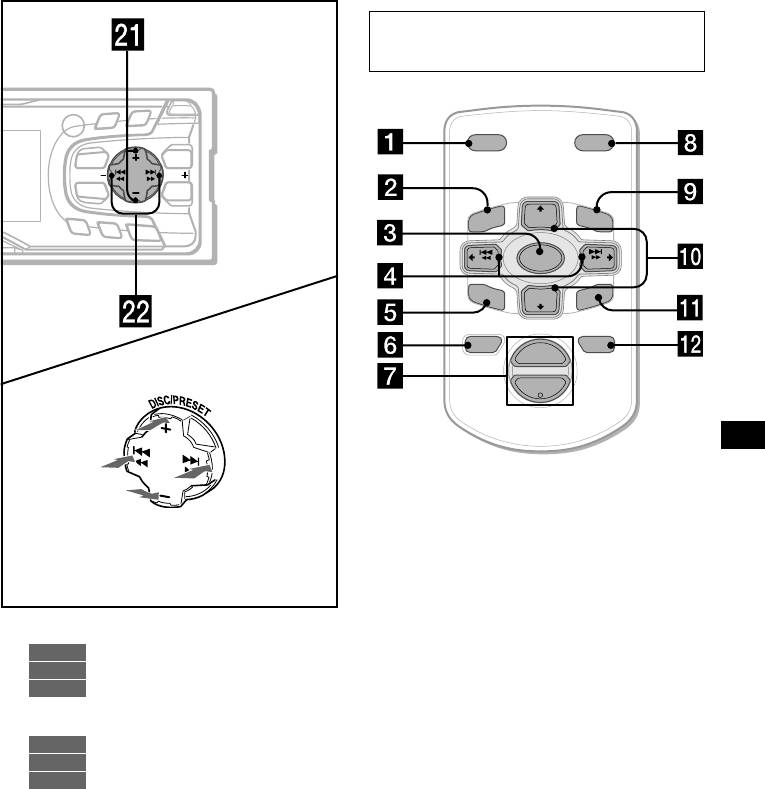
Card remote commander RM-X114
(optional)
PTY
D
S
SC
R
O
LL
O
P
E
N
DISPLAY
I
S
C
/
P
R
E
S
D
E
T
DSPL MODE
MENU
LIST
SEEKSEEK
SOUND
ENTER
PRESET
+
DISC
+
LIST
AF
MENU
TA
O
FF
SOURCE
SEEK
–
SEEK
+
SOUND
DISC
–
E
N
TE
R
PRESET –
ATTOFF
+
VOL
(DISC/PRESET)
(+): to select upwards
–
(SEEK)
(SEEK)
(–): to select
(+): to select
leftwards/
rightwards/
.
>
The corresponding buttons of the card
remote commander control the same
(DISC/PRESET)
functions as those on this unit.
(–): to select downwards
In menu mode, the currently selectable button (s)
a DSPL button
of these four are indicated with a “ M” in the display.
b MENU button
c SOURCE button
d SEEK (</,) buttons
u DISC/PRESET buttons (+/–)
e SOUND button
CD/MD
10, 12
f OFF button
RADIO
14, 15, 19
g VOL (–/+) buttons
MENU
9, 11, 12, 13, 14, 18, 19, 22, 23,
h MODE button
24
i LIST button
v SEEK buttons (–/+)
j DISC/PRESET(M/m) buttons
CD/MD
9
RADIO
14, 15, 16
k ENTER button
MENU
9, 11, 13, 19, 21, 22, 23
l ATT button
Note
If the unit is turned off by pressing (OFF) for 2
seconds, it cannot be operated with the card remote
commander unless (SOURCE) on the unit is pressed,
or a disc is inserted to activate the unit first.
Tip
Refer to “Replacing the lithium battery” for details on
how to replace the batteries (page 25).
5
