
Sony CDX-CA650V: Removing the unit
Removing the unit: Sony CDX-CA650V
Table of contents
- Welcome!
- Location of controls
- Card remote commander RM-X114
- Precautions Notes on discs
- Getting Started Resetting the unit
- Detaching the front panel
- Setting the clock CD Player CD/MD Unit (optional) Playing a disc
- Display items
- Playing tracks repeatedly Labelling a CD Playing tracks in random order
- Locating a disc by name
- Selecting specific tracks for playback
- Receiving the stored stations Radio Storing stations automatically
- Storing only the desired Tuning in a station through a stations list
- Automatic retuning for best RDS Overview of RDS
- Receiving traffic announcements
- Presetting RDS stations with Tuning in stations by AF and TA setting programme type
- Setting the clock automatically
- Other Functions Using the rotary commander
- Adjusting the sound characteristics Quickly attenuating the sound
- Changing the sound and display settings
- Selecting the sound position Setting the equalizer
- Additional Information Maintenance Fuse replacement
- Removing the unit
- Specifications
- CD/MD playback Troubleshooting General Radio reception
- Error displays/Messages Error displays RDS Messages
Notes
• For safety, turn off the ignition before cleaning the
Removing the unit
connectors, and remove the key from the ignition
switch.
• Never touch the connectors directly with your fingers
1 Remove the front cover
or with any metal device.
1 Detach the front panel (page 8).
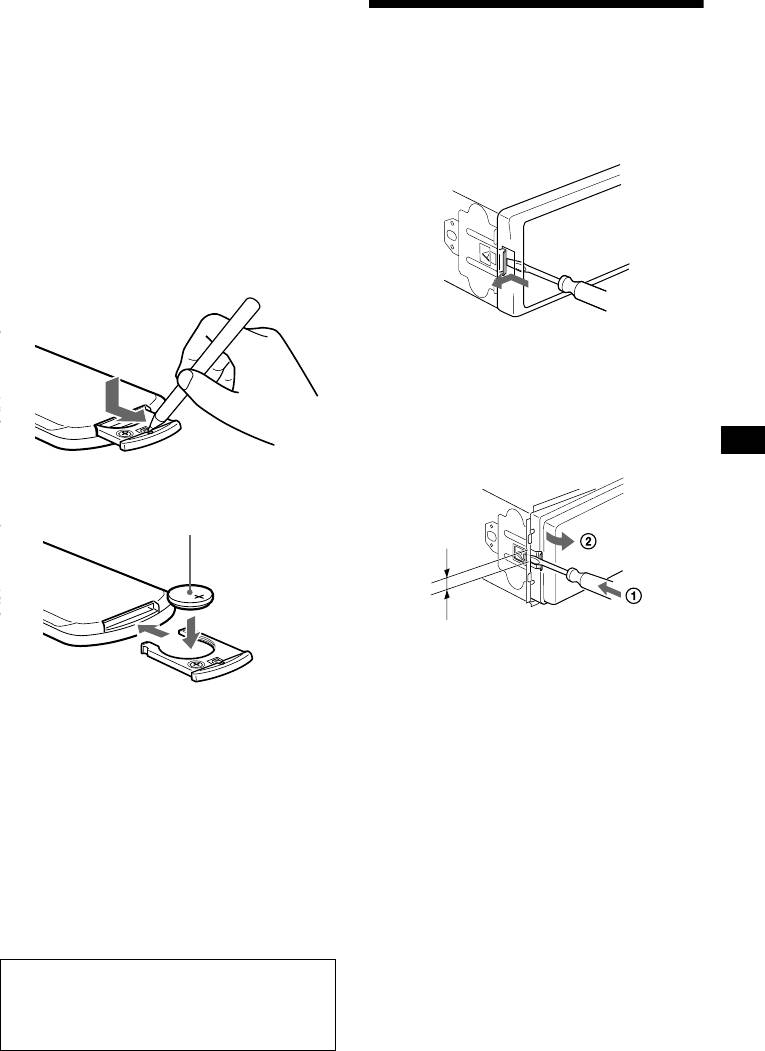
Replacing the lithium battery
2 Press the clip inside the front cover
Under normal conditions, batteries will last
with a thin screwdriver.
approximately 1 year. (The service life may be
shorter, depending on the conditions of use.)
When the battery becomes weak, the range of the
card remote commander becomes shorter.
Replace the battery with a new CR2025 lithium
battery.
3 Repeat step 2
for the other side.
2 Remove the unit
1 Use a thin screwdriver to push in
the clip on the left side of the unit,
then pull out the left side of the unit
until the catch clears the mounting.
x
+ side up
4mm
2 Repeat step 1 for the right side.
3 Slide the unit out of its mounting.
Notes on lithium battery
• Keep the lithium battery out of the reach of
children. Should the battery be swallowed,
immediately consult a doctor.
• Wipe the battery with a dry cloth to assure a
good contact.
• Be sure to observe the correct polarity when
installing the battery.
• Do not hold the battery with metallic tweezers,
otherwise a short-circuit may occur.
WARNING
Battery may explode if mistreated.
Do not recharge, disassemble, or dispose of
in fire.
25
