
Sony CDX-L550: Additional Information Maintenance Removing the unit
Additional Information Maintenance Removing the unit: Sony CDX-L550
Table of contents
- Welcome!
- Table of Contents
- Location of controls
- Precautions
- Notes on discs
- Detaching the front panel Getting Started Resetting the unit
- Setting the clock
- Display items CD Player Playing a disc
- Playing tracks repeatedly Radio Storing stations automatically Playing tracks in random order
- Receiving the stored stations Storing only the desired stations
- RDS Overview of RDS
- Automatic retuning for best reception results
- Receiving traffic Presetting RDS stations with announcements AF and TA setting
- Tuning in stations by programme type
- Setting the clock Other Functions automatically Using the rotary commander
- By rotating the control Changing the operative direction By pushing in and rotating the control
- Adjusting the sound Changing the sound and characteristics display settings Quickly attenuating the sound
- Selecting the sound position
- Setting the equalizer
- Additional Information Maintenance Removing the unit
- Specifications
- Troubleshooting
- Error displays/Messages
Notes
• For safety, turn off the ignition before cleaning the
connectors, and remove the key from the ignition
Additional Information
switch.
• Never touch the connectors directly with your fingers
or with any metal device.
Maintenance
Removing the unit
Fuse replacement
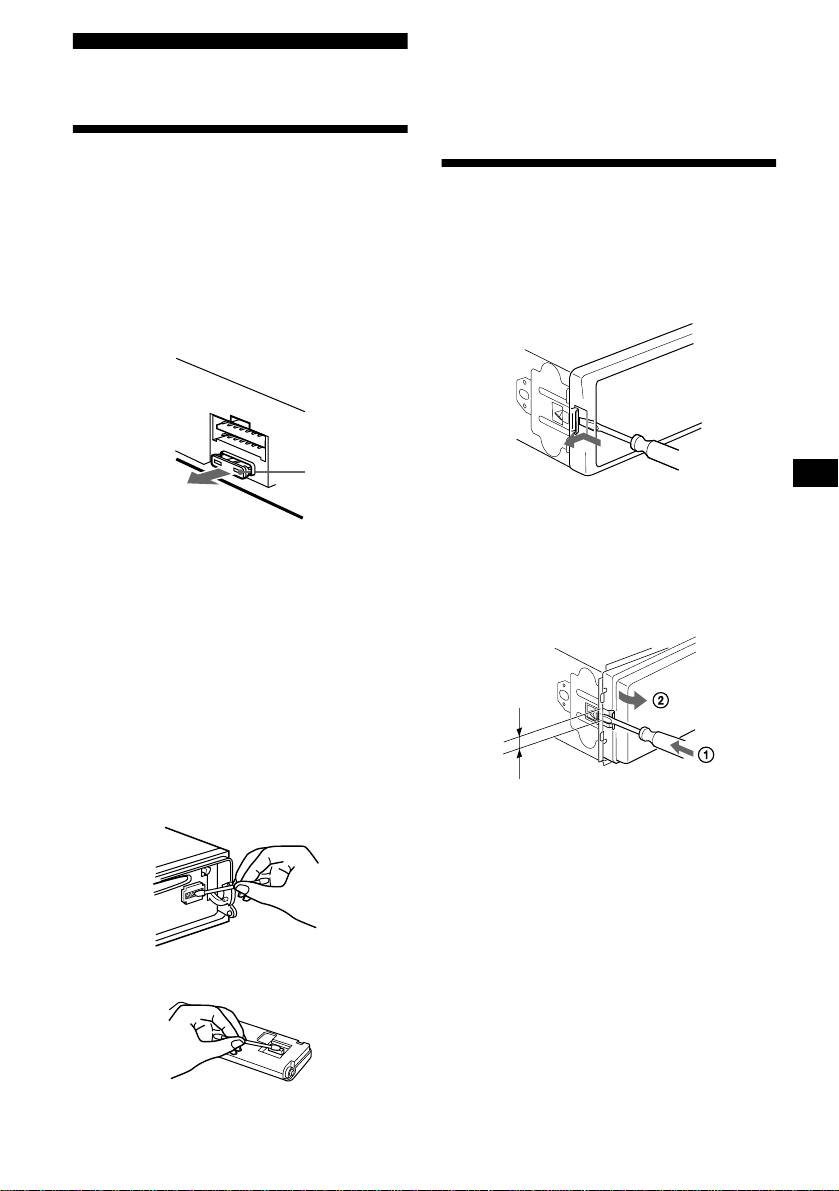
When replacing the fuse, be sure to use one
1 Remove the front cover
matching the amperage rating stated on the
original fuse. If the fuse blows, check the power
1 Detach the front panel (page 7).
connection and replace the fuse. If the fuse blows
2 Press the clip inside the front cover
again after replacement, there may be an internal
with a thin screwdriver.
malfunction. In such a case, consult your nearest
Sony dealer.
Fuse (10 A)
3 Repeat step 2
for the other side.
2 Remove the unit
Warning
Never use a fuse with an amperage rating
1 Use a thin screwdriver to push in
exceeding the one supplied with the unit as this
the clip on the left side of the unit,
could damage the unit.
then pull out the left side of the unit
until the catch clears the mounting.
Cleaning the connectors
The unit may not function properly if the
connectors between the unit and the front panel
are not clean. In order to prevent this, detach the
front panel (page 7) and clean the connectors
with a cotton swab dipped in alcohol. Do not
4mm
apply too much force. Otherwise, the connectors
may be damaged.
2 Repeat step 1 for the right side.
3 Slide the unit out of its mounting.
Main unit
Back of the front panel
21

