
Sony CDX-CA850: Removing the unit
Removing the unit: Sony CDX-CA850
Table of contents
- Welcome !
- Table of Contents
- Location of controls Card remote commander RM-X113
- Main unit
- Precautions Notes on discs
- Getting Started Resetting the unit
- Detaching the front panel
- Setting the clock CD Player CD/MD Unit (optional) Playing a disc
- Playing tracks repeatedly Display items Playing tracks in random order
- Labelling a CD
- Locating a disc by name Selecting specific tracks for playback
- Radio Storing stations automatically
- Receiving the stored stations Storing only the desired stations
- Tuning in a station through a RDS list Overview of RDS
- Automatic retuning for best reception results
- Receiving traffic Presetting RDS stations with announcements AF and TA setting
- Tuning in stations by programme type
- Setting the clock DAB (optional) automatically Overview of DAB
- Basic operations of DAB
- Presetting DAB services Presetting DAB services automatically manually
- Tuning in DAB programme through a list
- Locating a DAB service by programme type (PTY) Switching multi-channel audio and DRC
- By pressing buttons Other Functions Using the rotary commander Inserting the supplied lithium battery
- By rotating the control Changing the operative direction By pushing in and rotating the control
- Adjusting the sound Changing the sound and characteristics display settings Quickly attenuating the sound
- Setting the equalizer Adjusting the equalizer curve
- Selecting the spectrum analyzer Setting the Dynamic Soundstage Organizer (DSO)
- Labelling a Motion Display Additional Information Maintenance
- Removing the unit
- Specifications
- CD/MD playback Troubleshooting General Radio reception
- Error displays/Messages Error displays RDS Messages
Notes
• For safety, turn off the ignition before cleaning the
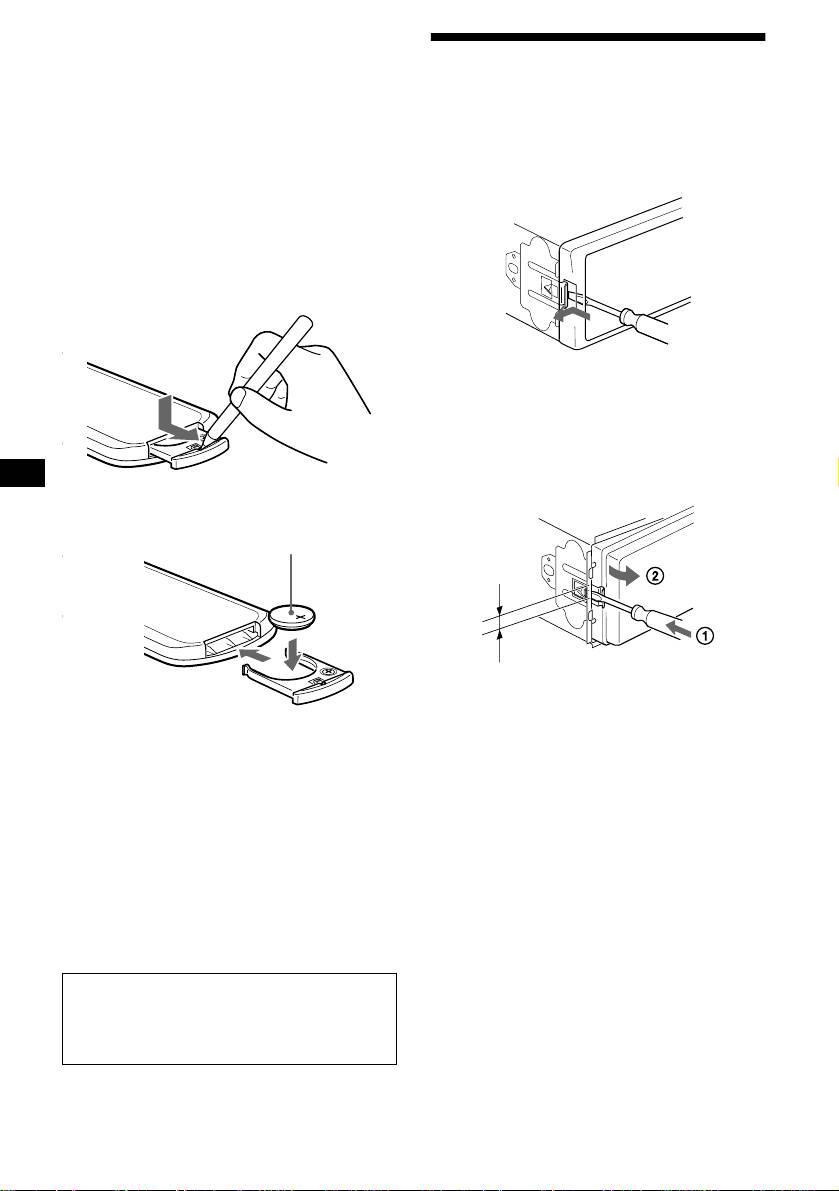
Removing the unit
connectors, and remove the key from the ignition
switch.
• Never touch the connectors directly with your fingers
1 Remove the front cover
or with any metal device.
1Detach the front panel (page 8).
Replacing the lithium battery
2Press the clip inside the front cover
Under normal conditions, batteries will last
with a thin screwdriver.
approximately 1 year. (The service life may be
shorter, depending on the conditions of use.)
When the battery becomes weak, the range of the
card remote commander becomes shorter.
Replace the battery with a new CR2025 lithium
battery.
3Repeat step 2 for the other side.
2 Remove the unit
1Use a thin screwdriver to push in
the clip on the left side of the unit,
then pull out the left side of the unit
until the catch clears the mounting.
x
+ side up
4 mm
2Repeat step 1 for the right side.
3Slide the unit out of its mounting.
Notes on lithium battery
• Keep the lithium battery out of the reach of
children. Should the battery be swallowed,
immediately consult a doctor.
• Wipe the battery with a dry cloth to assure a
good contact.
• Be sure to observe the correct polarity when
installing the battery.
• Do not hold the battery with metallic tweezers,
otherwise a short-circuit may occur.
WARNING
Battery may explode if mistreated.
Do not recharge, disassemble, or dispose of
in fire.
30


